Today, we’re announcing the general availability of GitHub-hosted agents and pay-as-you-go pricing in Azure Pipelines.
GitHub-hosted agents give teams access to more compute options for their pipelines, including native Apple silicon and larger Linux and Windows machines. Instead of purchasing parallel-job capacity in advance, you pay only for the pipeline execution time you use, based on the selected agent SKU.
This release includes:
- General availability of GitHub-hosted agents and pay-as-you-go pricing
- General availability of macOS agent SKUs
- Public preview of Linux and Windows agent SKUs
Choose the right compute for each pipeline
The GitHub-hosted Agents pool complements the existing Microsoft-hosted Azure Pipelines pool. It runs on the same infrastructure as GitHub Actions and provides additional hardware configurations, including larger machines with more CPU, memory, and storage.
Each job runs on a fresh, isolated virtual machine. The virtual machine hosts a single agent and is reimaged after the job finishes.
The available SKU families are:
| Operating system | SKU | Rate per minute | Available image labels | vCPU | RAM | SSD storage | Architecture |
|---|---|---|---|---|---|---|---|
| macOS | Standard | $0.062 | macos-26-arm64xcode-27 |
3 | 7 GB | 14 GB | arm64 (M1) |
| macOS | XLarge | $0.102 | macos-26-arm64-xlxcode-27-xlarge |
5, plus 8 GPU hardware-acceleration cores | 14 GB | 14 GB | arm64 (M2) |
| Linux | 8-core | $0.022 | ubuntu-24.04-8-coreubuntu-26.04-8-core |
8 | 32 GB | 300 GB | x64 |
| Linux | 16-core | $0.042 | ubuntu-24.04-16-coreubuntu-26.04-16-core |
16 | 64 GB | 600 GB | x64 |
| Windows | 8-core | $0.042 | windows-2025-8-corewindows-2025-vs2026-8-core |
8 | 32 GB | 300 GB | x64 |
| Windows | 16-core | $0.082 | windows-2025-16-corewindows-2025-vs2026-16-core |
16 | 64 GB | 600 GB | x64 |
Availability in this table applies to the agent SKU families. For current image labels and the software installed on each image, see the GitHub-hosted agents documentation.
Important The
ubuntu-26.04-8-core,ubuntu-26.04-16-core,windows-2025-8-core, andwindows-2025-16-coreimages are still rolling out and aren’t available to every Azure DevOps organization yet. They will become available to more organizations over the next few weeks. The Ubuntu 24.04 and Windows Server 2025 with Visual Studio 2026 images are available to all organizations that have GitHub-hosted agents enabled.
GitHub-hosted agents run in the same regions as Microsoft-hosted agents.
Pay only for the minutes you use
GitHub-hosted agents use pay-as-you-go billing. You’re charged per minute of pipeline execution time, with the per-minute rate determined by the agent SKU.
This model is separate from the parallel-job billing used by Microsoft-hosted agents in the Azure Pipelines pool:
- You don’t need to purchase parallel-job capacity for jobs that run in the GitHub-hosted Agents pool
- GitHub-hosted agent jobs don’t consume your existing parallel jobs
- There is no free tier or allocation of free minutes for GitHub-hosted agents
- Existing pipelines continue to use their current pool unless you explicitly update them
For current rates, see Azure DevOps pricing.
Enable GitHub-hosted agents
To get started, you need permission to configure your organization’s billing settings.
- In your Azure DevOps organization, go to Organization settings > Billing
- Set Enable GitHub-hosted agents to On
- Select Save
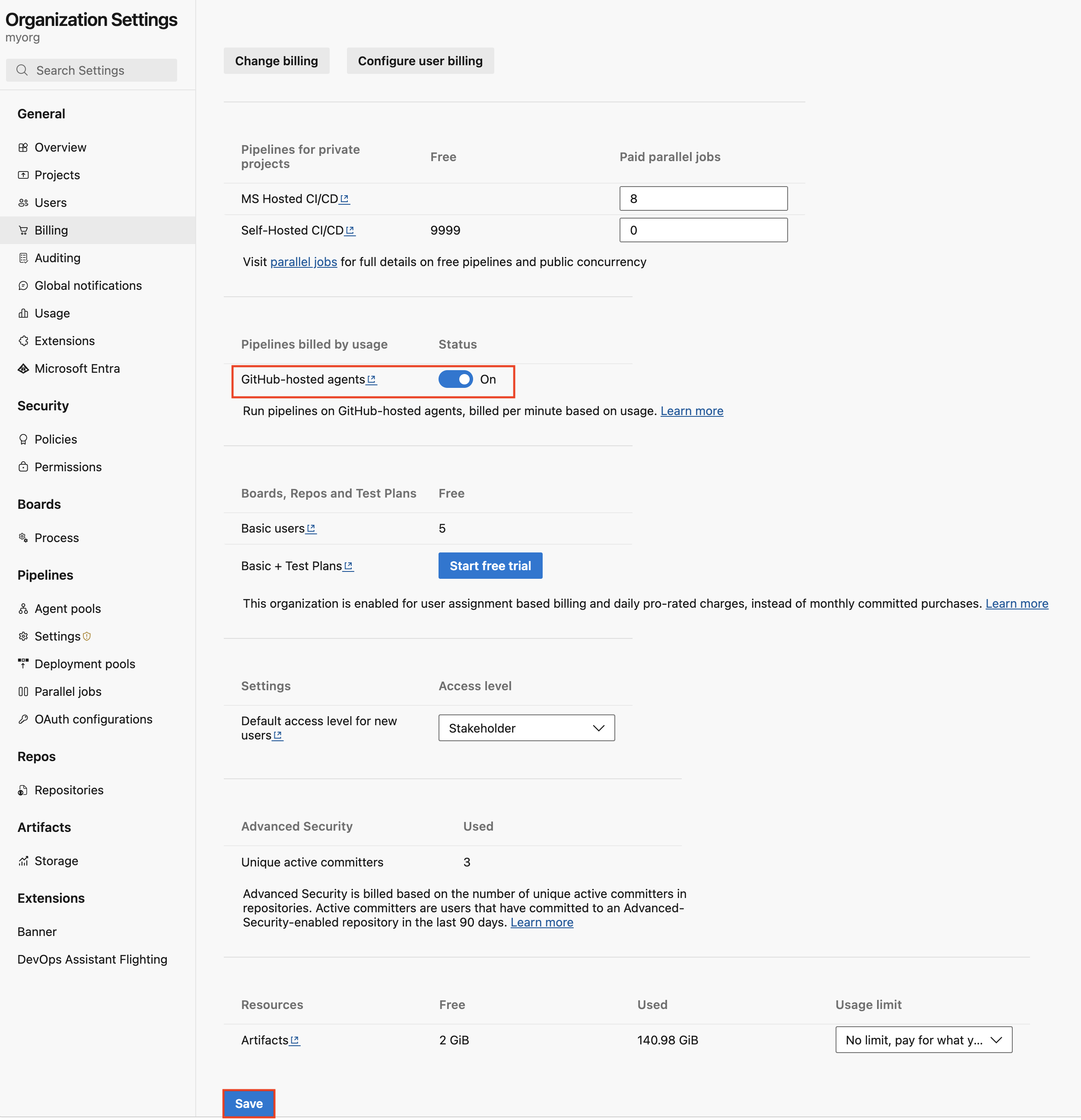
Azure DevOps provisions a new GitHub-hosted Agents pool for your organization. Provisioning can take up to 24 hours.
Enabling the pool doesn’t change existing pipelines or start any jobs. Charges begin only when a pipeline runs on a GitHub-hosted agent.
Use a GitHub-hosted agent in a pipeline
Set the pool name to GitHub-hosted Agents and select the VM image label that matches the operating system and SKU you want.
The following example uses a standard macOS agent:
pool:
  name: 'GitHub-hosted Agents'
  vmImage: 'macos-26-arm64'

steps:
- bash: |
    echo "Hello from Apple silicon"
    uname -a
    sw_vers
The next example uses an 8-core Linux agent:
pool:
  name: 'GitHub-hosted Agents'
  vmImage: 'ubuntu-24.04-8-core'

steps:
- bash: |
    echo "Hello from Linux"
    echo "Logical processors: $(nproc)"
    free -h
And this example uses a 16-core Windows agent:
pool:
  name: 'GitHub-hosted Agents'
  vmImage: 'windows-2025-16-core'

steps:
- pwsh: |
    Write-Host "Hello from Windows"
    Write-Host "Logical processors: $([Environment]::ProcessorCount)"
    Get-ComputerInfo | Select-Object WindowsProductName
For the complete and current list of image labels, see GitHub-hosted agent images.
Monitor usage and costs
You can monitor usage from the Analytics tab of the GitHub-hosted Agents pool. The analytics view shows consumed minutes and lets you filter by agent SKU, project, and pipeline.
Pay-as-you-go usage is also available in Azure Cost Management. You can filter costs by Azure DevOps organization and project, and use Azure Cost Management budgets and alerts to help track spending as more teams adopt the new agents.
Get started
GitHub-hosted agents make it easier to match pipeline compute to your workload. Use native Apple silicon for Apple development, choose larger Linux or Windows machines for compute-intensive builds, and pay only for the execution time you consume.
Enable GitHub-hosted agents in your organization’s billing settings, update a pipeline to use the new pool, and monitor usage as you scale.
To learn more, see:
- GitHub-hosted agents for Azure Pipelines
- Azure DevOps pricing
- Apple silicon and Xcode 27 images available in pay-as-you-go preview
The post GitHub-hosted agents with Pay-as-you-Go pricing are now generally available in Azure Pipelines appeared first on Azure DevOps Blog.