

I had finished renaming a set of back-end deployments in a nonproduction environment. The current Azure DevOps release definitions used the new names, the Kubernetes workloads ran under the new identities and every current deployment pointed at the replacement image repositories.
Then I opened an older Azure DevOps Classic release. It still offered Redeploy.
That release retained the inline deployment task captured when someone created it, including the retired Helm release name and image path. About 45 more releases across five definitions held the same task. Nobody redeployed one, but each remained an executable record of the old delivery path.
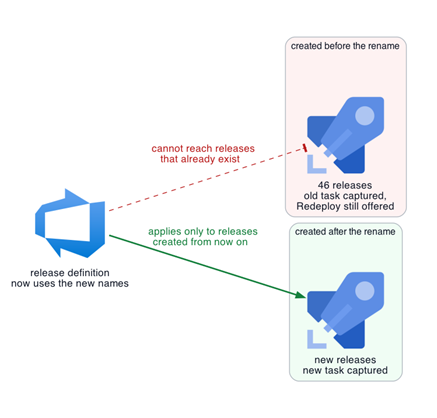
Figure 1: Editing a Classic Release Definition Leaves Already-Existing Releases Untouched
A Classic Release Stores its Task Graph
Microsoft describes a Classic release as a snapshot of the information required to run its stages and tasks. Azure DevOps can deploy the same release to a stage more than once. Editing the definition changes later releases but does not rewrite the task graph stored in releases that already exist.
The cutover changed four coupled values: The image repository path, the packaged chart name, the Helm release name and the Kubernetes resource names. The current definition showed only the replacement values. Existing releases still stored the old combination, which is why checking the definition alone would have missed the executable path.
The old task called Helm with –install. Its release name no longer existed. Helm documents the flag as an instruction to install when it cannot find that name. A redeploy would therefore attempt a second installation under the retired identity rather than upgrade the current release.
The Forward Rename Exposed the Failure Order
I did not run a stale release. The forward rename had already shown how this chart behaved when two releases wanted the same route.
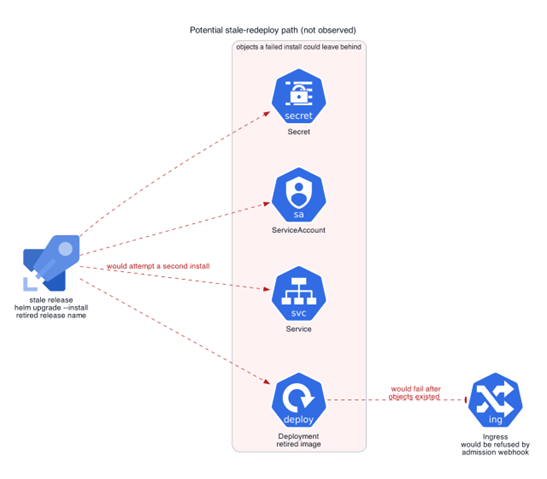
While the old release still held the host and path, the admission webhook refused the new release’s duplicate ingress. The refusal happened after Helm had created the Secret, ServiceAccount, Service and Deployment. The task used neither –atomic nor –cleanup-on-fail, so those objects remained.
A stale redeploy could have attempted the same installation under the old name. Figure 2 describes that conditional path. The observed event was the late ingress refusal during the forward rename.
The old release also replayed the variable values captured at release creation. I later verified that changing a linked variable group did not change an existing Classic release. A newly created release was required to use the new values. Therefore, I treated database access as unproven unless the captured credentials and network path were checked separately.
The refused ingress did not make the remaining objects invisible or prove that they were isolated. Cluster operators could still see the Secret, ServiceAccount, Service and Deployment, and the Service could remain reachable from inside the cluster. Whether a pod could do useful work still depended on the image and its captured values.
Figure 2: The Conditional Stale-Redeploy Path, Based on the Failure Order Observed During the Forward Rename
The Executable Path Removed in Two Stages
My first containment step was to delete the retired image repositories after confirming that no active workload or current pipeline referenced them. A stale deployment could then create objects, but its pod could not pull the old image and would remain in ImagePullBackOff. This reduced the issue to orphan objects and a confusing failed release.
Deleting those repositories also removed image-level rollback through the retired path, so I checked the current releases and workloads first.
I used the Release API to filter each definition by active status and maximum creation time. The cutover timestamp identified candidates, but each stored task determined whether a release was stale. The five definitions contained a total of 46 stale releases — 25, 8, 8, 4 and 1.
Azure DevOps supports changing an active release to abandoned. I tested one target first, then tried to restore it. The API returned VS402966, stating that a release could not move from Abandoned back to Active. The release remained visible for audit history, but its Redeploy action disappeared.
That test made the next 45 changes a deliberate permanent decision. After abandoning them, I queried the definitions again, compared the Helm release set and checked the live endpoints. Every remaining active release postdated the cutover, and the running workloads had not changed.
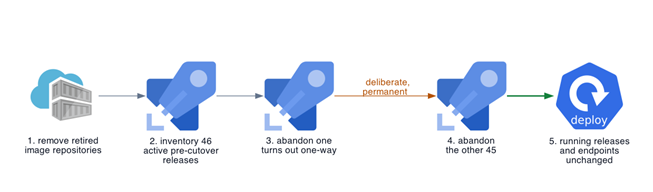
Figure 3: The Cleanup Order, Including the One-Release Test That Exposed the One-Way Transition
Checks to Add to a Classic Release Migration
- Query active releases created before the migration boundary and follow continuation tokens.
- Inspect each release payload instead of relying on the current definition.
- Check stored scripts, Helm release names, image paths and captured variable values.
- Check –install, –atomic and –cleanup-on-fail before predicting Helm’s failure path.
- Verify retired images and captured credentials separately.
- Test abandonment on one genuine target and treat it as one-way unless your platform proves otherwise.
A green deployment proves that the new path works. For a Classic pipeline with inline deployment logic, I now consider the migration complete only when historical releases can no longer execute the retired path.