This is a guest post by Sam Basu. Sam is a technologist, author, speaker, Microsoft MVP and Developer Advocate for Uno Platform.
If you’ve spent any time building software in the last couple of years, you’ve felt the shift. AI is no longer a novelty sitting on the sidelines – it’s right there in the editor, the terminal, the build pipeline. And for .NET developers, this moment is particularly exciting. The ecosystem is deep, the tooling is stellar, and AI just keeps getting better at navigating both.
But raw AI power and grounded, contextual AI are two very different things. An AI agent will happily write you a settings page for a cross-platform .NET app. It will compile. It will pass review if you only read it. And it will still be wrong in ways you cannot see until the app is running in front of you. Closing that gap is the problem we set out to solve at Uno Platform.
The developers who will get the most out of this era aren’t the ones prompting the hardest – they’re the ones giving AI the right context to actually do the job well. The focus is on quality – how can we provide AI all the guardrails to be successful and be able to validate its own work, and tooling that makes .NET developers productive from the start. Let’s unpack.
Why MCP, and why we ended up with two servers
The obvious first move is context stuffing: shovel the docs into the prompt,
add a long instructions file, hope for the best. It fails for a reason that
is clear in hindsight. Documentation is large, the useful slice is small and
query-dependent, and no amount of prompt real estate substitutes for the
agent being able to look something up at the moment it has the question.
Model Context Protocol solves the lookup
problem. It does not solve the verification problem. Knowing what the API
should be does not tell an agent whether the layout it just wrote actually
renders. Those are two different jobs with two different lifetimes, and that
distinction is why we ended up with two servers rather than one.
The split we landed on maps to those two lifetimes.
The docs server: grounding
The docs server is publicly hosted at https://mcp.platform.uno/v1, speaks
HTTP, authenticates with OAuth, and is stateless. It answers what is true
about this framework right now – a question whose answer changes when we
ship, not when your app runs.
uno_platform_docs_search– search official documentation and return the
most relevant resultsuno_platform_docs_fetch– fetch a full documentation page as markdownuno_platform_agent_rules_init– initialize the agent session with rules
for working against a running appuno_platform_usage_rules_init– load common API usage rules
It also ships two prompts: /new to scaffold an app with current best
practices, and /init to prime an existing conversation before adding a
feature to an existing codebase.
The design property that matters is that this server is versioned with our
documentation, not with the developer’s SDK. Correct a doc page and every
agent everywhere gets the correction on its next call. That is a very
different maintenance story from shipping guidance inside a NuGet package,
and it is the main reason we host it rather than distribute it.
The app server: eyes and hands
The app server is the opposite in every dimension. It ships as a .NET tool
launched over stdio, runs on the developer’s machine as a bridge to the Uno
DevServer, is stateful, and belongs to exactly one session. It answers what
is actually happening right now.
It gives an agent four capabilities. It can run the app –
uno_app_start launches in debug mode with Hot Reload enabled, so the agent
controls the whole lifecycle rather than waiting for a human to press F5. It
can see – uno_app_get_screenshot for pixels, and
uno_app_visualtree_snapshot for an XML snapshot of the visual tree. It can
act – uno_app_pointer_click, uno_app_key_press, uno_app_type_text,
and uno_app_element_peer_action to invoke automation peers directly. And
it can check itself – uno_health reports the status of the bridge and
its connection, because an agent that cannot tell “the app is broken” from
“my connection dropped” will confidently debug the wrong thing.
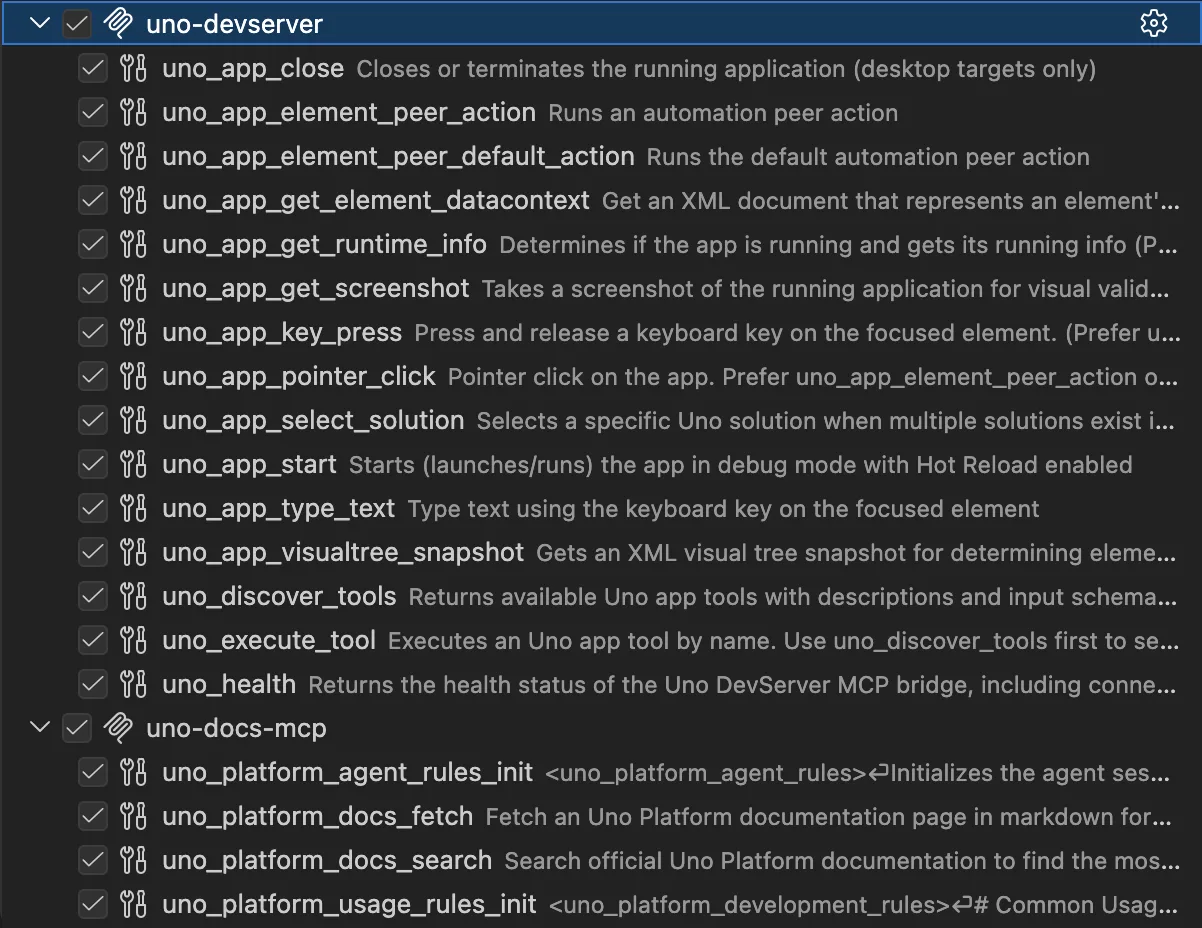
Both servers, side by side, as the agent sees them.
The visual tree tool is the one that earns its keep. Screenshots tell a
model that something looks wrong; the XML tree tells it which element is at
fault and what its properties are. Pixels are for detection, structure is
for diagnosis, and an agent needs both.
There is one detail in that tool list worth calling out: read the
description on uno_app_pointer_click and it says prefer
uno_app_element_peer_action. That preference lives in the tool
description itself rather than in documentation nobody loads, because
coordinate clicking is brittle across window sizes and DPI while automation
peers are stable. More on why that matters below.
Building it: the MCP C# SDK in production
Both servers are written in C# on the
official MCP C# SDK,
which Microsoft maintains in collaboration with the community. Two things
we would tell any .NET team starting the same work.
Pick your transport from your topology. The docs server is HTTP because
it is a hosted multi-tenant service that needs OAuth. The app server is
stdio because it is a child process on one developer’s machine talking to
one running app. The topology decides the transport; there is not much of a
choice to agonize over once you have written the constraints down.
Your tool definitions are a permanent tax on the context window. Every
tool name, description, and input schema is loaded before the model does any
work. Our docs server costs about 6.4k tokens and the app server about 1.5k
– for comparison, the built-in GitHub MCP server in the same session costs
about 5.2k. That is real budget spent before a single question is answered,
and it is why terse, high-signal tool descriptions are not a style
preference.
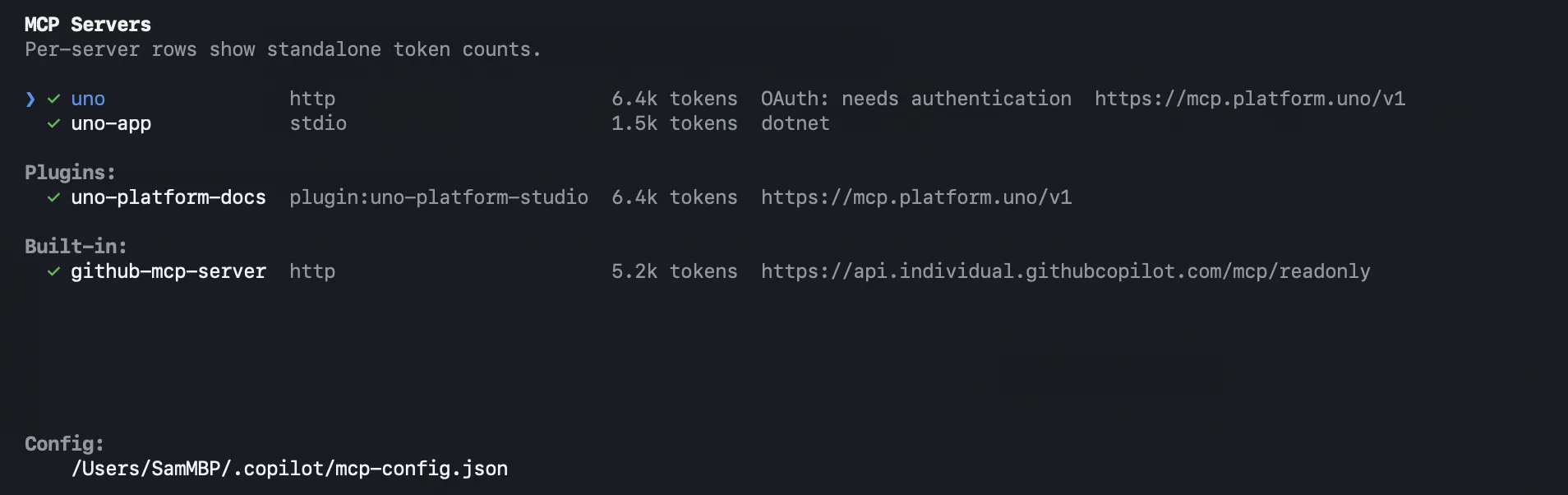
The same servers in GitHub Copilot CLI. Note the token cost per server.
That second point has a corollary: tool descriptions are prompts, not
documentation. A tool the model never selects may as well not exist, and
the only lever you have over selection is the wording. This is why
uno_app_pointer_click explicitly tells the model to prefer the
automation-peer tool instead – that is not documenting a preference, it is
steering a decision at the moment it is made.
Generating code and validating it are different problems
Here is the hot take: AI can write UI code faster than any human team, and
it cannot tell whether what it wrote is correct. As agentic workflows become
normal, that asymmetry is the bottleneck. Generation got cheap. Verification
did not.
Web developers already solved their half of this. Playwright drives a real
browser, so an agent working on a web app can check its own work. There has
been no equivalent for a native cross-platform .NET app running on Windows,
macOS, Linux, iOS, Android, or WebAssembly – the app is a black box the
moment it launches.
The app server is our answer to that:
Playwright-style UI automation for .NET apps.
The agent writes a change, the app hot reloads, the agent takes a
screenshot, reads the visual tree, clicks through the flow, and decides for
itself whether the change did what was asked. When it did not, the agent
fixes it before handing anything back.
Code is cheap. Software is not. This is how you hold both truths at once.
Skills: giving the agent the “how”
MCP tools give an agent the what. They do not say when to reach for which
one, or in what order, or what “done” looks like. That is what Skills are
for.
The cooking analogy holds up well here. MCP tools are ingredients –
atomic, each does one thing. Skills are recipe cards – the reusable
instructions for combining ingredients into something worth eating. The
agent is the cook, choosing a recipe and adapting it to what is actually
in the kitchen.
Our Skills library
is organized by the thing you are actually doing: MVUX state and feeds,
navigation, theming, the Uno Toolkit controls, and testing. The one that
closes the loop is uno-testing-ui, which automates UI testing through the
app server – the Skill knows the order to drive the tools in, so the agent
does not have to work it out from first principles every session.
Grounded documentation, a live app it can inspect, and curated procedure for
the workflows that matter: that combination is what we mean by contextual
AI.
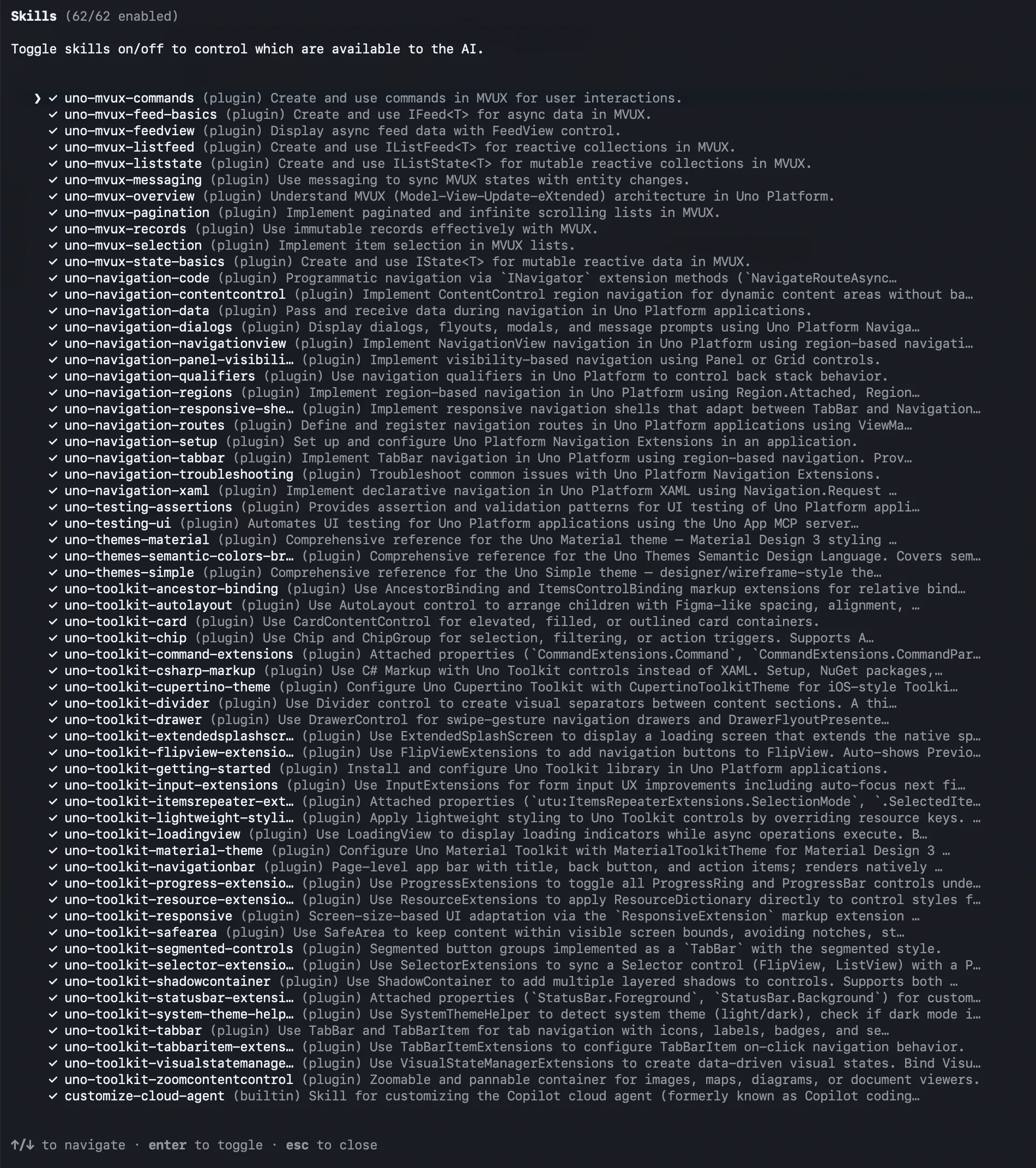
Skills install as plugins, available to any MCP-compatible agent.
What it adds up to
The most interesting thing we built with all of this is not a feature list,
it is a compiler running where a compiler has no business running.
Uno Platform Studio 3.0
generates a full cross-platform .NET app entirely in the browser. Behind the
prompt box, a specialized agent orchestrated by
Microsoft Agent Framework
plans and executes the work across parallel steps and multi-turn
conversations. A full Roslyn workspace
then compiles what the agent writes, loads the generated assemblies,
resolves NuGet changes, and hot reloads the result into the running app –
all in the browser, while you watch. The docs server keeps the agent’s
knowledge current. The app server lets it check its own work. The Skills
keep it on the rails.
That is Roslyn, Microsoft Agent Framework, and the MCP C# SDK doing work
that would have been a research project a few years ago, and the entire
stack is .NET.
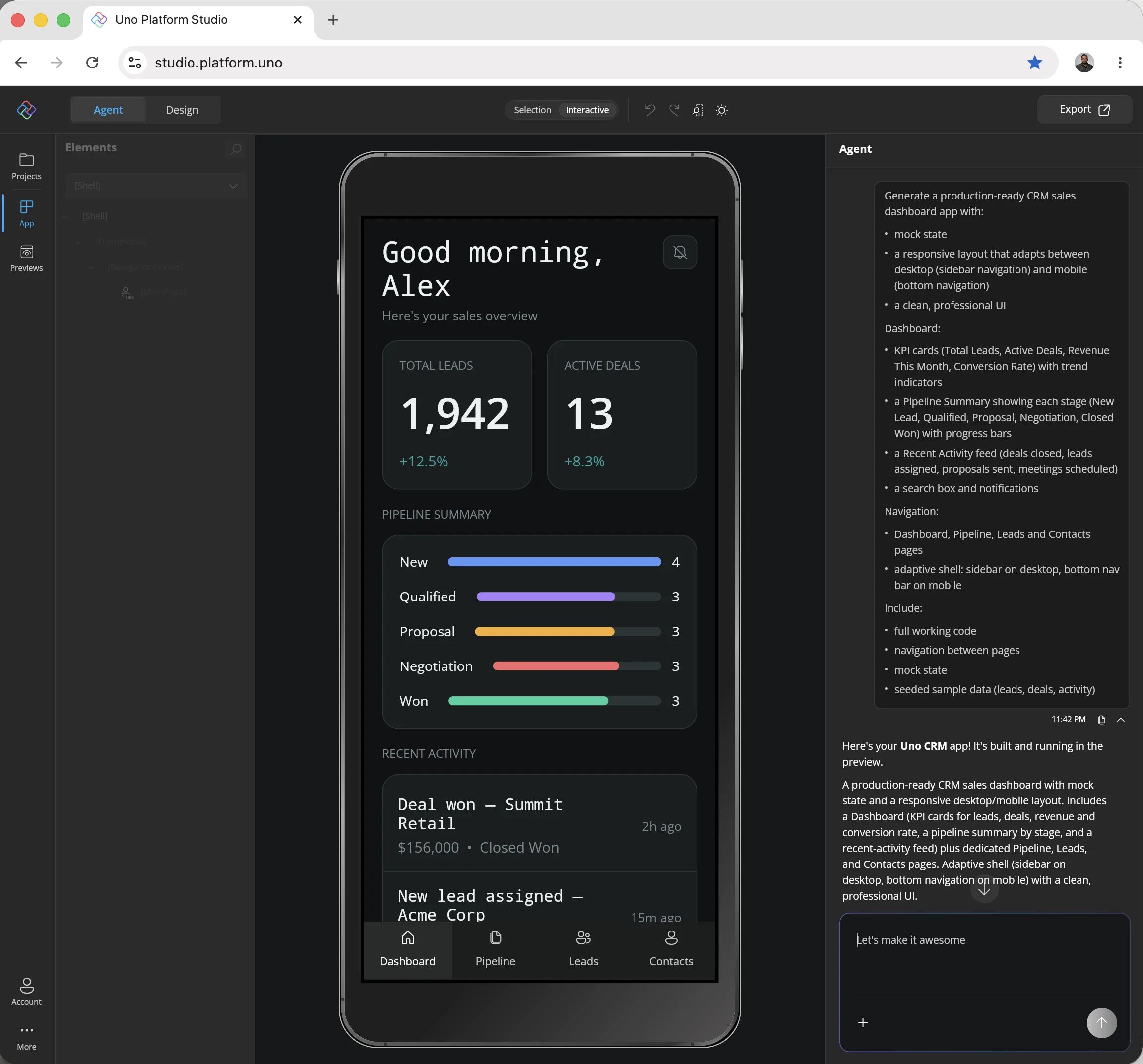
Prompt on the right, compiled and running .NET app on the left. Not a mockup.
The practical consequence for a team is that the agent stops being a fast
typist. It knows your design system, it validates its own output against a
running app, and it follows workflows you chose. That is a different
proposition from writing code faster.
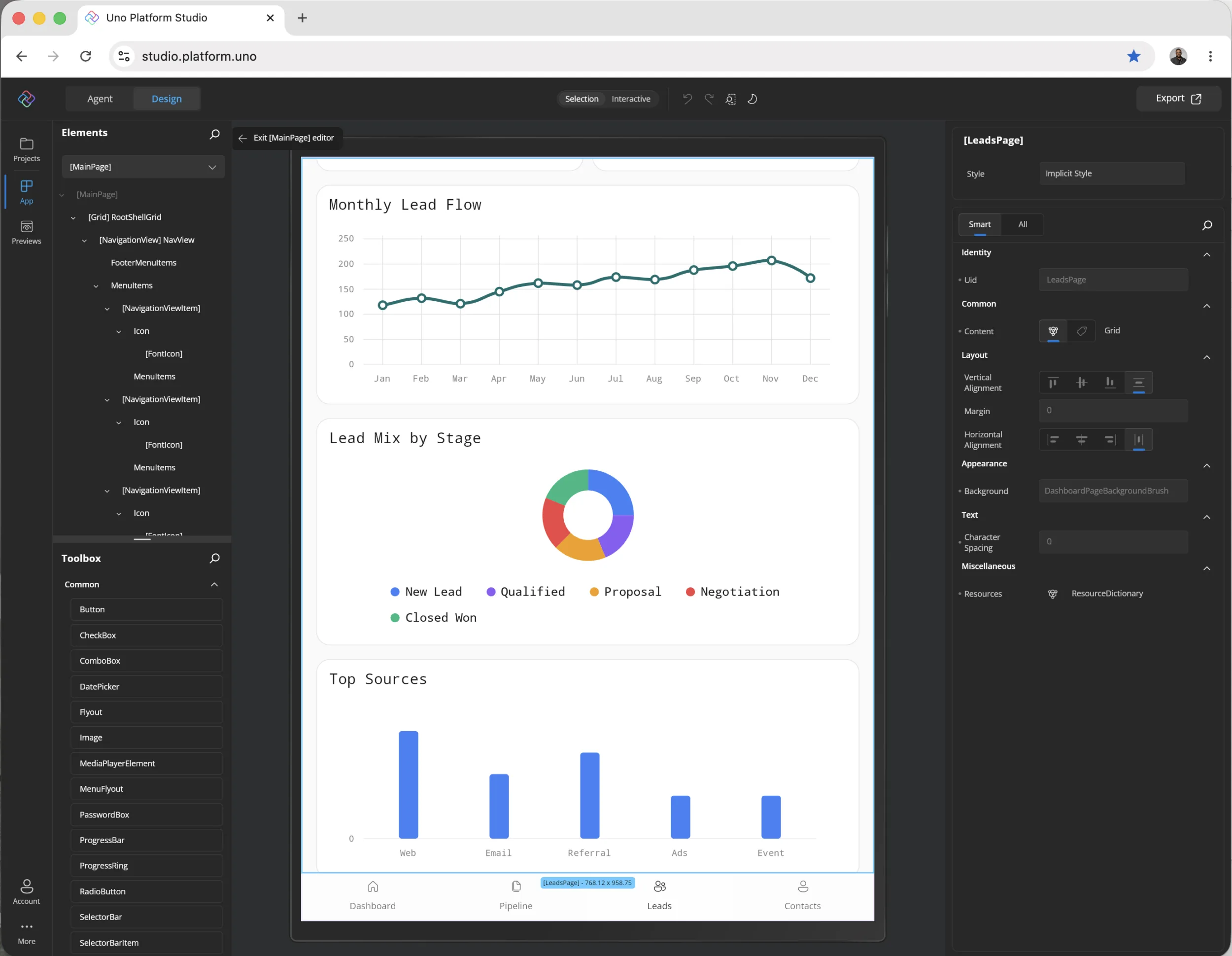
The generated .NET app is fully interactive in the browser, along with page navigation and
Previews to work on app UI in isolation. Developers can iterate on app UI with the
Agent or manually with Hot Design in the browser – the changes are immediately visible
with Hot Reload. There is no barrier to entry – developers can start in the browser,
iterate on app UI with Agent or Hot Design, and drop down to local IDE/CLI with same
tools, when ready.
Why we work upstream
None of this would be buildable on a foundation we could not influence, and
that is the honest reason we invest where we do.
We co-maintain
SkiaSharp alongside Microsoft’s .NET
team. SkiaSharp is the 2D graphics API underneath a large share of .NET
charting, custom controls, and data visualization – it is built on Google’s
Skia, the same engine in Chrome and Android – and it is what Uno Platform
renders with. Becoming a
co-maintainer
formalized years of investment ahead of
SkiaSharp 4.0, the
largest release the project has had in years.
We also work directly on the .NET runtime through a
formal collaboration with the Microsoft .NET team,
contributing to .NET for Android and .NET for iOS bindings and to AOT in
.NET 10.
The pattern is the same one this whole post describes: the further upstream
you fix something, the more people never have to think about it again.
Wrap up
If you are building an MCP server for your own .NET stack, the two things we
would pass along are these. Split your servers by lifetime, not by feature –
knowledge that changes when you ship does not belong in the same process as
state that changes when the app runs. And spend real time on your tool
descriptions, because they are prompts, and a tool the model never selects
may as well not exist.
The rest is ordinary .NET. The MCP C# SDK, Roslyn, Microsoft Agent
Framework, and a graphics stack we help maintain, doing work that is
anything but ordinary.
Try the Uno Platform MCP servers at
aka.platform.uno/mcp.
The post How Uno Platform uses .NET, MCP, and AI to build high quality apps appeared first on .NET Blog.