A couple of weeks ago I was talking with a couple of friends who are building agents with Microsoft Agent Framework. The demos were great, the agents were smart, everyone was happy. And then one of them asked the question:
“OK, the agent is done… now, how do I deploy this thing?”
And the table went quiet  , because the honest answer used to be: a Dockerfile, a web server, authentication, session storage, scaling rules, telemetry wiring and much more. Basically a whole second project just to get your agent out of your machine.
Well, good news: Foundry Hosted Agents give that console app a managed home in Azure. You keep the agent logic you wrote with Agent Framework and deploy it as a containerized application to Microsoft-managed infrastructure. Foundry gives it an endpoint and handles the compute, scaling, identity, session state, observability, and lifecycle around it.
So instead of building and operating that whole second project yourself, today the answer is 1 NuGet package, 3 lines of C#, and 2 commands. Let me show you.
What you will build
You will take an existing Agent Framework console application and:
- Register it with the Foundry Responses protocol.
- Run and invoke it locally with
azd. - Provision its Azure resources.
- Deploy it as a Foundry Hosted Agent.
- Inspect conversations, traces, versions, and evaluations in the Foundry portal.

The starting point: a minimal MAF agent
This is probably where you are right now. A simple agent built with Microsoft Agent Framework, running in a console app:
using Azure.AI.Projects;
using Azure.Identity;
using Microsoft.Agents.AI;

var endpoint = Environment.GetEnvironmentVariable("FOUNDRY_PROJECT_ENDPOINT")
    ?? throw new InvalidOperationException("Set FOUNDRY_PROJECT_ENDPOINT environment variable");
var deployment = Environment.GetEnvironmentVariable("AZURE_OPENAI_DEPLOYMENT_NAME") ?? "gpt-5-mini";

AIAgent agent = new AIProjectClient(new Uri(endpoint), new DefaultAzureCredential())
    .AsAIAgent(
        model: deployment,
        instructions: "You are a friendly assistant. Keep your answers brief.",
        name: "HelloAgent");

Console.WriteLine(await agent.RunAsync("Hello! Tell me a fun fact about .NET."));
That’s it. No server, no protocol, nothing fancy. You run dotnet run, the agent answers, the perfect Hello World for agents. (If you’re not there yet, start with Your First C# Agent, it takes 5 minutes.)
But this agent lives in your terminal, nobody else can talk to it. Which brings us back to my friends’ question.
So… how do I deploy this? Enter Foundry Hosted Agents
Hosted Agents are the managed hosting layer in Microsoft Foundry Agent Service. Here is what the platform takes care of:
- Managed infrastructure: no containers to configure, no web servers, no scaling rules. The platform provisions compute per session and scales to zero when idle.
- Built-in session state:
$HOMEand uploaded files persist across turns and idle periods. Your agent remembers, and you didn’t write a single line of storage code. - Dedicated agent identity: every deployed agent gets its own Microsoft Entra ID, created automatically. Secure access to models, tools, and downstream services, no manual managed identity setup.
- OpenAI-compatible endpoint: your agent gets a
/responsesendpoint, so any OpenAI-compatible SDK (Python, JavaScript, or C#) can talk to it out of the box.
And yes, Hosted Agents is generally available!
Responses or Invocations?
Hosted agents support two protocols. Responses is OpenAI-compatible and lets the platform manage conversation history, streaming, and session lifecycle. Invocations gives you control over the raw HTTP request and is useful for webhooks or custom payloads. If you are unsure, start with Responses; an agent can expose both protocols.
Now let’s make our console agent hosted-ready.
The diff: 1 package + 3 lines
Before you begin
You need the .NET 10 SDK, the Azure Developer CLI, an Azure subscription, and permission to create resources and role assignments. Sign in with azd auth login before continuing.
The existing agent already references Azure.AI.Projects. To make it hosted-ready, add one new package:
dotnet add package Microsoft.Agents.AI.Foundry.Hosting --prereleaseAbout prerelease packages
Foundry Hosted Agents is generally available. At the time of writing, the .NET hosting integration package used by this sample is published as a prerelease package, which is why the command includes --prerelease.
And now, the full hosted-ready version. I marked the new lines: there are three of them.
using Azure.AI.AgentServer.Core;
using Azure.AI.Projects;
using Azure.Identity;
using Microsoft.Agents.AI;
using Microsoft.Agents.AI.Foundry.Hosting;

var projectEndpoint = new Uri(Environment.GetEnvironmentVariable("FOUNDRY_PROJECT_ENDPOINT")
    ?? throw new InvalidOperationException("FOUNDRY_PROJECT_ENDPOINT is not set."));
var deployment = Environment.GetEnvironmentVariable("AZURE_AI_MODEL_DEPLOYMENT_NAME") ?? "gpt-5-mini";

AIAgent agent = new AIProjectClient(projectEndpoint, new DefaultAzureCredential())
    .AsAIAgent(
        model: deployment,
        instructions: "You are a friendly assistant. Keep your answers brief.",
        name: "HelloAgent");

var builder = AgentHost.CreateBuilder(args);                                      // 👈 new line 1
builder.Services.AddFoundryResponses(agent);                                      // 👈 new line 2
builder.RegisterProtocol("responses", endpoints => endpoints.MapFoundryResponses()); // 👈 new line 3

var app = builder.Build();
app.Run();
What each line does:
AgentHost.CreateBuilder(args)creates an application host preconfigured for the Foundry hosting environment. Think of it asWebApplication.CreateBuilder, but it already knows about Foundry: health checks, OpenTelemetry, session context, all wired.AddFoundryResponses(agent)registers your agent with the Responses protocol handler. YourAIAgentdoesn’t change at all, it just gets plugged in.RegisterProtocol(...)maps the/responsesHTTP endpoint.
Now look at what you didn’t write: no Kestrel configuration, no session store, no streaming plumbing, no conversation history management. The same AIAgent you had before, now speaking a production protocol.
Run it locally first
Before shipping anything, let’s test it locally. The Azure Developer CLI (azd) has an AI agent extension that makes this the easy part:
azd ext install azure.ai.agentsScaffold your project to be deployed as a hosted agent, run:
azd ai agent initSet your environment variables:
Using PowerShell?
The commands below use Bash syntax. In PowerShell, set the variables with $env:FOUNDRY_PROJECT_ENDPOINT = "..." and $env:AZURE_AI_MODEL_DEPLOYMENT_NAME = "gpt-5-mini".
export FOUNDRY_PROJECT_ENDPOINT="https://<account>.services.ai.azure.com/api/projects/<project>"
export AZURE_AI_MODEL_DEPLOYMENT_NAME="gpt-5-mini"
And run the agent host:
azd ai agent runYour agent is now live on http://localhost:8088. Let’s talk to it:
Keep the local endpoint local
The local development endpoint is intended for testing. Do not expose port 8088 publicly or treat the local host as a production authentication boundary.
azd ai agent invoke --local "Hello!"Or if you’re a curl person:
curl -X POST http://localhost:8088/responses
  -H "Content-Type: application/json"
  -d '{"input": "Hello!"}'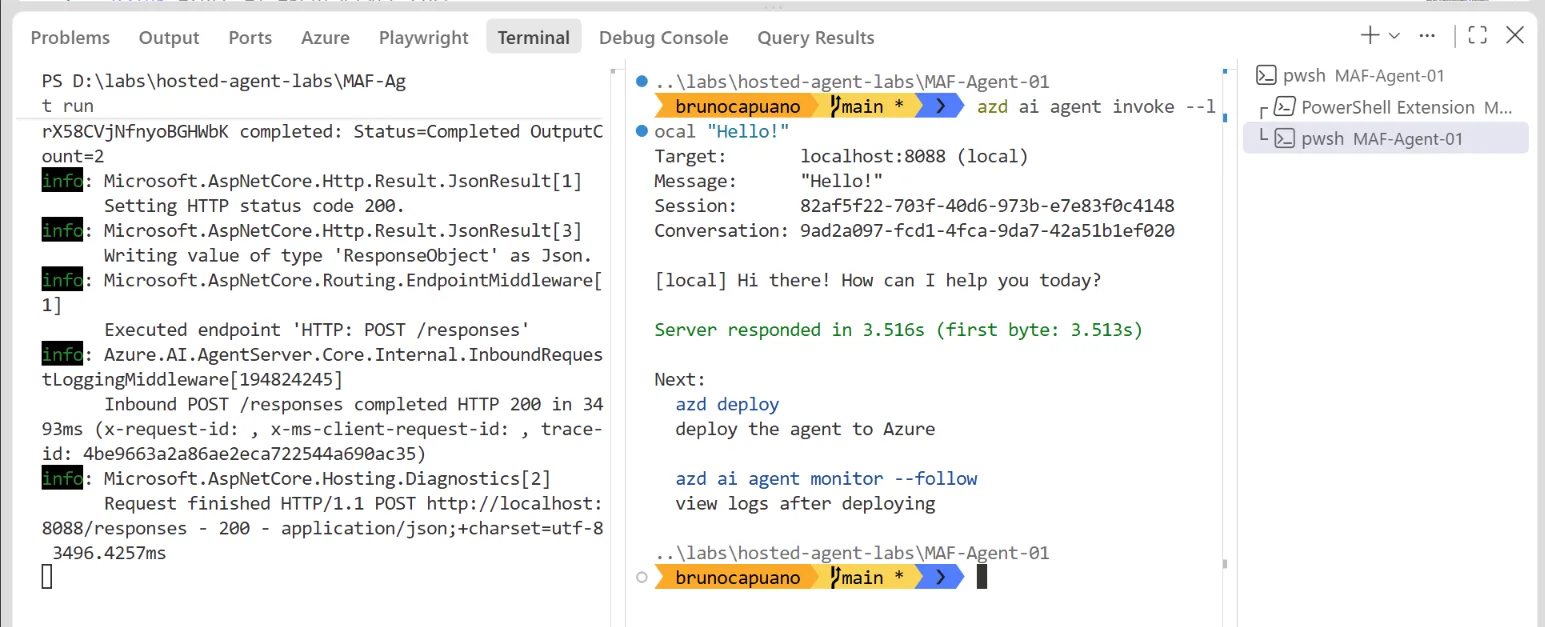
The local host listens on port 8088 while azd ai agent invoke sends a request through the Responses protocol.
Works locally? Great. Time to ship it.
Deploy: two commands
This is the part where I usually spend hours. Here it is, all of it:
azd provision
azd deploy
Those are the only two deployment commands. Let me explain what actually happens  :
:
azd provisioncreates a resource group with a Foundry instance, a project, a model deployment, Application Insights, and an Azure Container Registry (ACR). If you already have a Foundry project, you can skip this one.azd deploypackages your agent as a container image, pushes it to ACR, and deploys it to Microsoft Foundry Agent Service.
Azure resources and costs
This walkthrough provisions billable Azure resources. When you finish experimenting, remove the environment with azd down if you no longer need it. Review the resources before confirming deletion.
When the deployment finishes, your agent automatically gets:
- A dedicated endpoint:
{project_endpoint}/agents/{name}/endpoint/protocols/openai/responses - A dedicated Microsoft Entra agent identity for runtime authentication
You configured none of that. It’s just there.
Your agent, living its best life in the Foundry portal
And here is where the whole “why Foundry” story pays off. Open the Foundry portal and your agent is waiting for you with a full production toolkit around it.
Chat with it in the Playground. Your deployed agent, live, no client code needed.
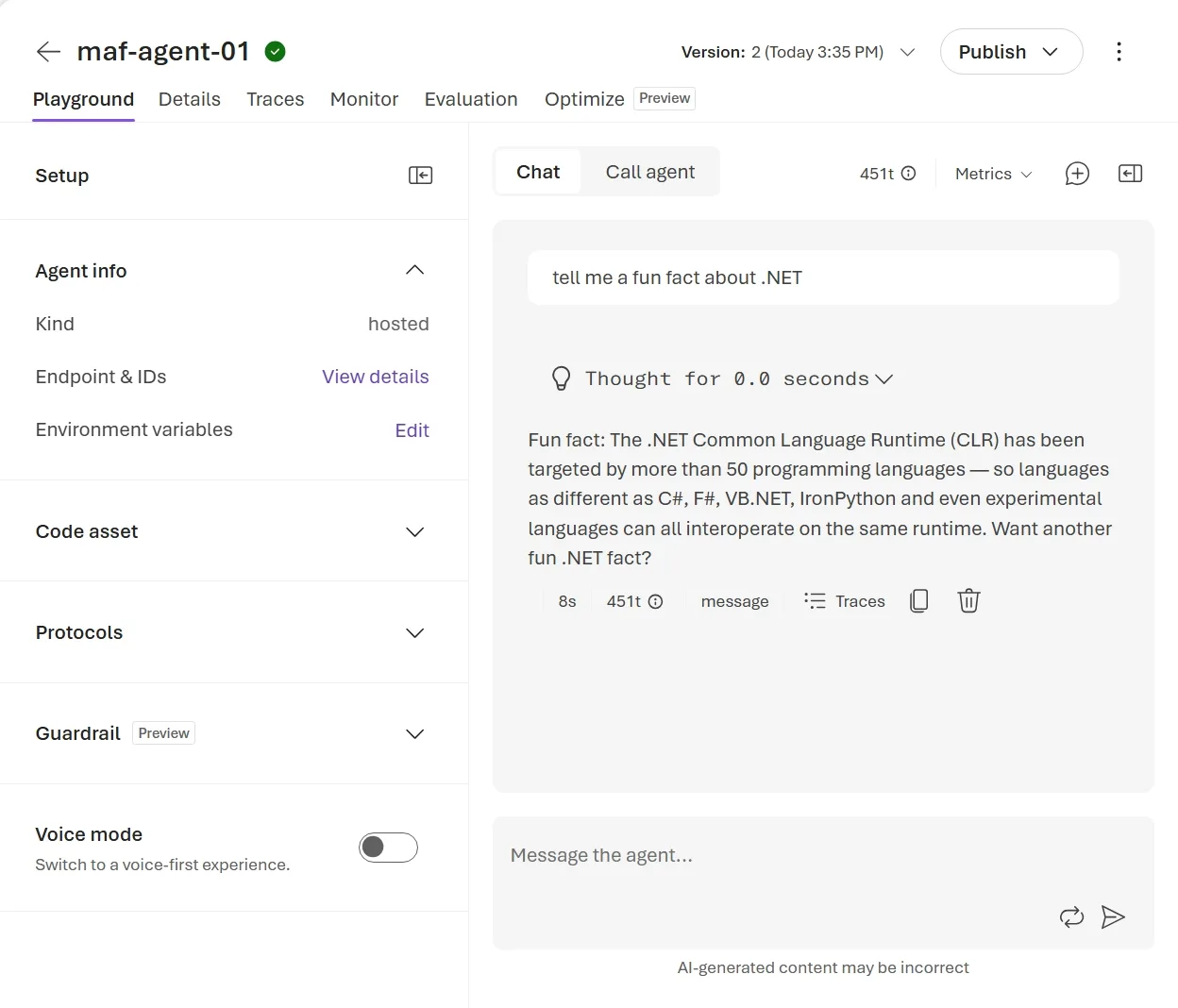
The Foundry playground lets you test the deployed agent without building a separate client application.
Traces, out of the box. The platform injects an Application Insights connection string into your container, and the protocol libraries emit OpenTelemetry traces by default. Every request, every model call, right there under Transaction search. You wrote zero telemetry code.
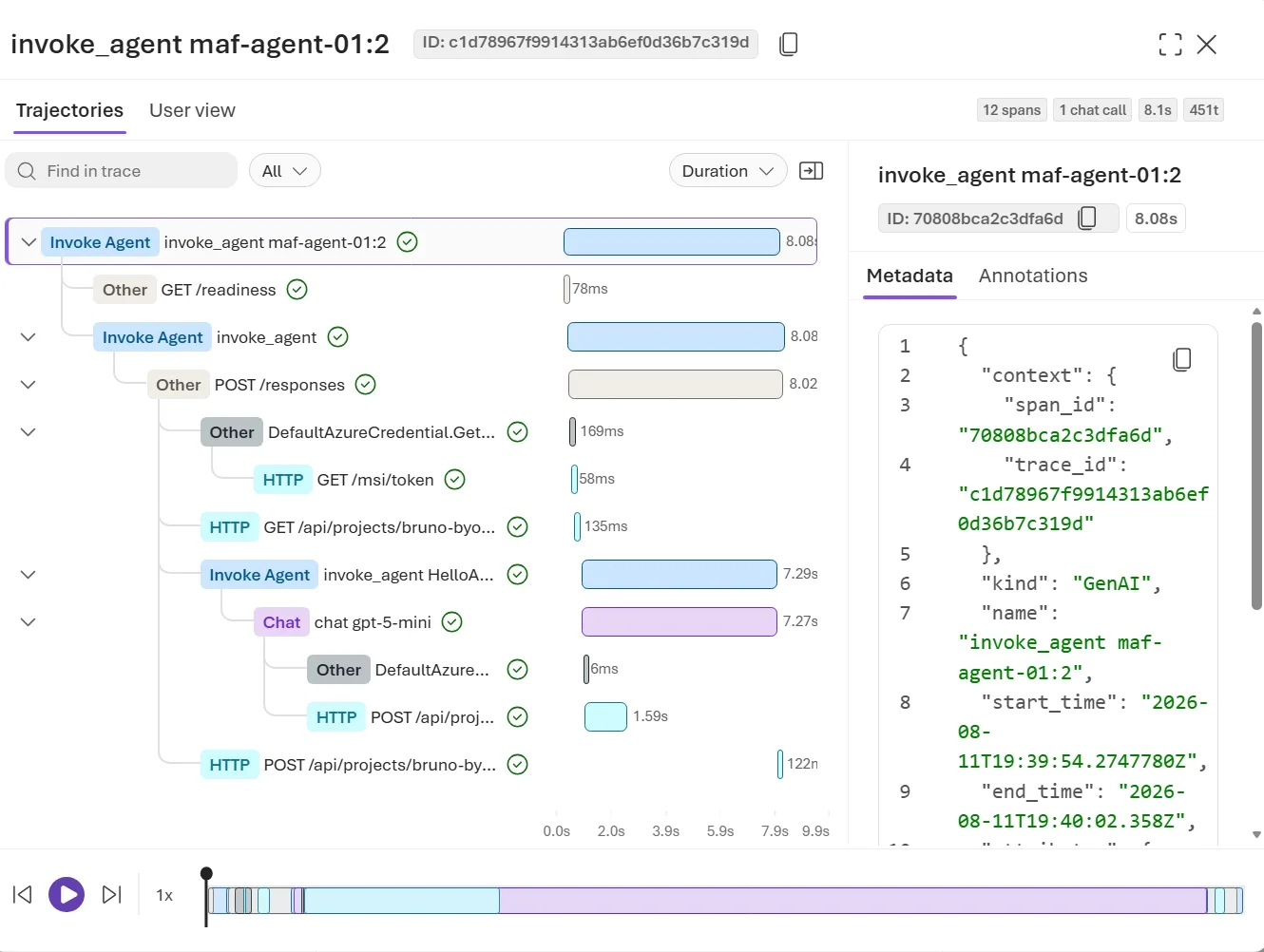
A conversation trace shows the request, model call, and child operations for an agent response.
Evals. Foundry includes agent evaluators so you can measure the quality of your deployed agent’s responses, not just guess.
Versions and sessions. Every deployment creates an immutable agent version, so rollbacks are trivial. Sessions are managed by the platform: 15 minutes idle and the compute is deprovisioned, state persisted, and everything restored automatically when the session resumes.
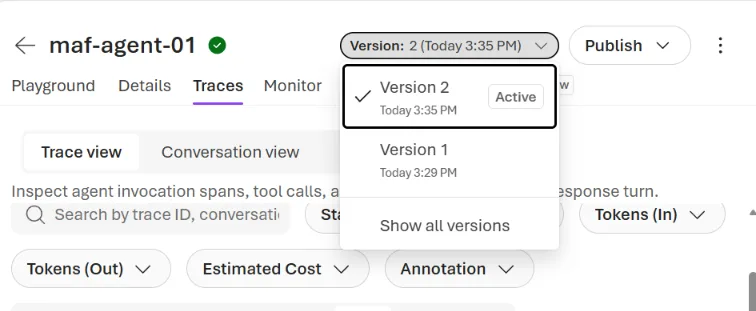
Each deployment creates an immutable agent version that you can inspect and use for rollback.
And tools. Hosted agents have access to the Foundry Toolbox: Code Interpreter, web search, Azure AI Search, MCP, A2A, and more, through a single MCP endpoint with consolidated authentication.
Everything my friends were planning to build by hand. Already there. 
Bonus: the VS Code experience 

If you live in Visual Studio Code (like me), there’s an even faster loop. The Microsoft Foundry Toolkit extension turns the whole flow into three commands from the Command Palette:
Foundry Toolkit: Create new Hosted Agentscaffolds the entire project for you: code,agent.yaml, everything.- Press F5 and your agent starts locally with the debugger attached, and the Agent Inspector opens so you can chat with it interactively. Yes, you can set breakpoints inside your agent code while chatting with it.
Foundry Toolkit: Deploy Hosted Agentopens a wizard that builds the container image in ACR, registers the agent version, and assigns the required RBAC roles automatically.

And if you don’t want to deal with Docker at all: choose the Code ZIP deployment method, upload your .NET code, and the platform builds and hosts it for you. No Dockerfile needed.
Wrap-up
Let’s do the final math. Going from a console agent to a production hosted agent on Microsoft-managed infrastructure:
- 1 NuGet package:
Microsoft.Agents.AI.Foundry.Hosting - 3 lines of C#:
AgentHost.CreateBuilder,AddFoundryResponses,RegisterProtocol - 2 commands:
azd provision,azd deploy
And what you get in return: managed scaling, persistent sessions, a dedicated Microsoft Entra identity, an OpenAI-compatible endpoint, traces, evals, and versioning.
Next time the “how do I deploy this thing?” question comes up, I’m just sending this blog post link  .
.
Want to see all of this built live?

If deploying an agent in 3 lines got your attention, wait until we build the whole thing from scratch using Agent Harness. Join me for “From Model to Agent: The Agent Framework Harness, Live in C#”, a 4-part live coding series on Microsoft Reactor, four consecutive Thursdays in September.
We go from a bare model all the way to observability, governance, and deployment (yes, exactly the territory of this post, but live and with more claws).
Learn more
- What are Hosted Agents?
- Foundry Hosted Agents with Agent Framework (C#)
- Microsoft Agent Framework overview
- C# hosted agent samples
Happy coding!
Bruno
The post From dotnet run to Foundry Hosted Agent in 3 lines of C# appeared first on .NET Blog.