

A developer pushes one file. It contains an AWS access key left in a configuration block. Five minutes later, CI catches it. By then, the secret is in the remote repository, cached by mirrors and potentially forked. The developer rotates the key, scrubs the commit history and spends the rest of the afternoon on incident response. The real question isn’t how to clean up faster — it’s why the secret left the developer’s machine in the first place.
The Five-Minute Gap
Most engineering teams have invested in CI-based secret scanning. Tools such as GitHub Advanced Security, GitGuardian and TruffleHog’s CI integration catch leaked credentials in pull requests and pushed branches. This is good, but it’s also too late.
The GitGuardian 2026 State of Secrets Sprawl report found that 29 million secrets were detected on GitHub in 2025 alone — a 34% year-over-year increase and the largest single-year jump ever recorded. Worse, 64% of secrets leaked back in 2022 remain unrevoked even today. The gap between Git push and CI detection is typically 3 to 10 minutes. In that window, the secret hits the remote, enters reflog and becomes available to anyone with read access. Even if CI blocks the PR, the credential is already exposed in Git history.
Rotation mitigates the immediate risk. However, it doesn’t eliminate the exposure window and it doesn’t address the root cause: The secret should never have been committed.
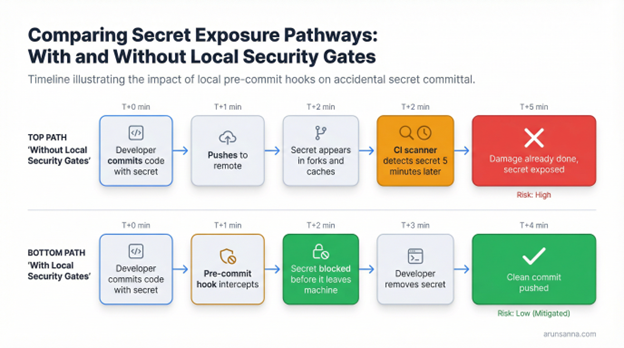
Note: Without local security gates, secrets reach the remote before CI can intervene. With local gates, the commit is blocked before anything leaves the developer’s machine.
Two Gates, Two Purposes
Git provides two natural interception points on the developer’s machine: Pre-commit and pre-push hooks. Each serves a different security function.
The pre-commit gate focuses on secret detection. Before a commit is finalized, the hook scans staged files for API keys, tokens, passwords and other credential patterns. The critical detail: The scan should target the Git index (the staged snapshot), not the working tree. Scanning the working tree picks up unstaged experiments and editor temp files, producing false positives that train developers to ignore findings.
The pre-push gate handles broader security and quality concerns. Before code reaches the remote, the hook runs static analysis on changed files, checks dependency manifests against known vulnerability databases and optionally enforces test coverage thresholds. This gate is heavier, so it runs at push time rather than on every commit.
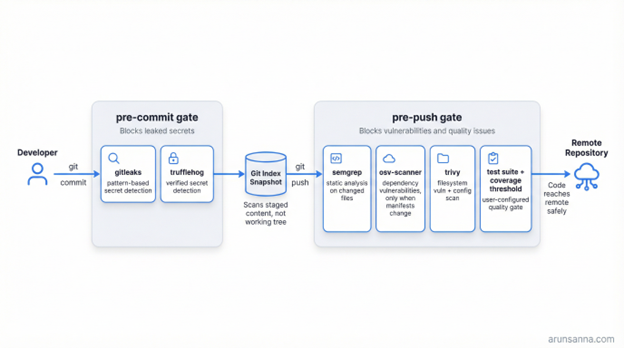
Note: The two-gate model separates fast secret detection (pre-commit) from deeper security and quality scanning (pre-push).
This separation matters. Secret detection needs to be fast and run on every commit — developers will bypass a hook that adds 30 seconds to their commit cycle. Vulnerability scanning and test execution are slower but acceptable at push time, when the developer is already context-switching.
What a Local Security Gate Should Do
A well-designed local security gate follows a few principles:
- Scan the Right Thing: Pre-commit scanning should materialize the Git index into a temporary snapshot and scan it, not the working tree. This ensures you’re checking exactly what will be committed, nothing more.
- Distinguish Verified From Unverified: Not all secret findings are equal. A confirmed live AWS key is a different severity than a string that matches a regex pattern. Tools such as TruffleHog can verify whether a detected credential is actually active. The gate should hard-block verified secrets while making unverified findings configurable — block or warn, the team decides.
- Require Accountability for Suppressions: Every codebase has false positives. The allowlist should require an owner, a reason and an expiration date for each suppression — no anonymous, permanent exceptions. When an allowlist entry expires, the gate should warn the developer and force a re-evaluation.
- Be Honest About Its Limits: Git hooks can be bypassed with –no-verify. Any local security gate is a guardrail, not a fence. It catches mistakes. It doesn’t prevent malice. The correct architecture pairs local gates with CI scanning to provide defense-in-depth.
Practical Implementation With Prehook
I built prehook (https://github.com/arunsanna/prehook) to implement this pattern as a single Go binary with no runtime dependencies beyond the scanner tools themselves. Here’s what the setup looks like:
prehook init # generates .prehook.yaml with secure defaults
prehook install # wires into .git/hooks/pre-commit and pre-push
prehook doctor # validates all scanner binaries are present
The configuration is a single YAML file checked into the repository:
version: 1
pre_commit:
blocking: true
gitleaks:
enabled: true
timeout: 2m
trufflehog:
enabled: true
block_verified: true # hard-block confirmed live secrets
block_unknown: false # warn on unverified findings
pre_push:
semgrep:
enabled: true
osv:
enabled: true # skips if no dependency manifests changed
trivy:
severity: HIGH,CRITICAL
quality:
test_command: go test ./…
coverage:
enabled: true
threshold: 60 # minimum coverage percentage to push
The doctor command validates the local environment, checking that each enabled scanner is installed and optionally enforcing version pins. This is particularly useful for team onboarding — add prehook doctor to your setup documentation, and new developers know exactly what’s missing before they write their first commit.
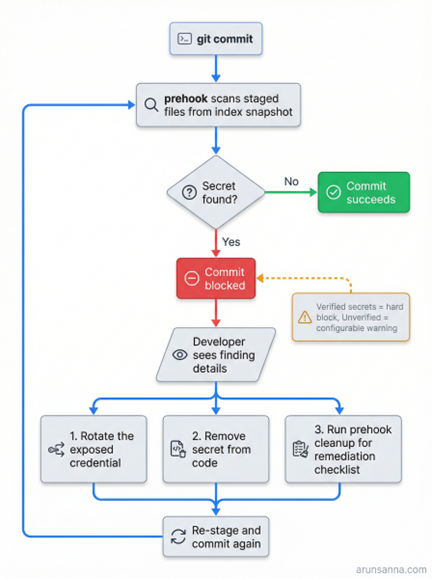
Note: When the prehook catches a secret, the commit is blocked. The developer rotates the credential, removes it from the code and re-commits. Verified secrets are always blocked; unverified findings follow the team’s configured policy.
What This Pattern Doesn’t Solve
Local Git hooks are not a complete secrets management strategy. They are one layer in a defense-in-depth approach. Specifically:
- They can be bypassed. A developer running git commit –no-verify skips all hooks. This is by design in Git. CI scanning is the backstop that catches what local hooks miss, whether through bypass or misconfiguration.
- They don’t replace secrets management. The right answer is to never have secrets in code at all — use environment variables, vault systems or cloud IAM roles. Local hooks catch cases where that discipline breaks down, which happens inevitably.
- They require scanner installation. Unlike a SaaS CI integration, local hooks depend on each developer having the scanner binaries installed. This is a real adoption barrier. Tools such as prehook doctor reduce friction, but the dependency exists.
- The value proposition is not perfection. It’s catching the 90% of accidental leaks that happen because a developer was moving fast, testing locally or copying from a Stack Overflow answer including a placeholder key that wasn’t actually a placeholder.
Getting Started
If you want to implement local Git security gates on your team:
- Start with secret detection only. Wire up Gitleaks or TruffleHog in a pre-commit hook. This is the highest-value, lowest-friction starting point.
- Scan the index, not the working tree. Avoid false positives from unstaged changes.
- Keep pre-commit fast. Under five seconds. Anything slower, and developers bypass it.
- Add vulnerability scanning at push time. Semgrep, OSV-Scanner and Trivy are good options for the pre-push gate.
- Pair with CI. Local hooks catch mistakes. CI enforces policy.
You can build this yourself with shell scripts, use a framework such as pre-commit or use a purpose-built tool such as prehook (https://github.com/arunsanna/prehook) that handles the index snapshot, scanner orchestration and allowlist management in a single binary.
The principle is what matters: Stop secrets before they ship. The tooling is a means to that end.
You can’t un-push a secret. However, you can stop it from being pushed in the first place.