This is a guest blog from Sander ten Brinke, a Microsoft MVP and Senior Software Engineer, with a passion for building scalable and maintainable applications.
A lot has changed for ASP.NET Core when it comes to building APIs over the last couple of years. The introduction of Minimal APIs, alongside controllers, has made it easier than ever to get started with building APIs, with .NET 10’s support for built-in request validation making it an even stronger contender.
Even though building APIs has become easier, one aspect that remains crucial is API versioning. Proper versioning ensures that your API can evolve without breaking existing clients. API versioning has always been supported thanks to libraries like Asp.Versioning. But with the release of Microsoft.AspNetCore.OpenApi, Microsoft’s own OpenAPI library for ASP.NET Core, implementing versioning has changed — especially if you want an officially supported approach.
Microsoft’s package sets up OpenAPI with versioning in mind (due to the URL being /openapi/v1.json by default), but ASP.NET Core doesn’t come with extensive built-in API versioning support. Since the release of Microsoft.AspNetCore.OpenApi in .NET 9, there have been a lot of questions online about how to integrate versioning without having to write a lot of custom code, duplicate OpenAPI and versioning definitions, and more.
In this post, we’ll walk through how to implement API versioning in .NET 10 applications — covering both controllers and Minimal APIs — while keeping your OpenAPI documentation accurate and up to date for each version. We’ll take the officially supported approach, keeping duplicate code and configuration to a minimum.
We’ll start with implementing API versioning without OpenAPI, and then we’ll integrate OpenAPI into our versioned API setup, showing how to generate separate OpenAPI documents for each API version. Finally, we’ll add SwaggerUI support using Swashbuckle.AspNetCore.SwaggerUI and Scalar support with Scalar.AspNetCore to visualize our versioned API documentation and discuss how to maintain it as your API evolves. By presenting API versioning in a step-based approach, it becomes clear what code changes each step requires.
To do this, we’ll use the brand new Asp.Versioning v10 package, also known as ASP.NET API Versioning, which is the first version to officially support both .NET 10 and the new built-in OpenAPI support, making the integration cleaner and simpler than ever before.
The importance of API versioning
But first, let’s make sure we understand the importance of API versioning. If you already understand API versioning, you can skip ahead to the next sections.
API versioning is essential for maintaining backward compatibility as your API evolves. It allows you to introduce new features, fix bugs, and make changes without disrupting existing clients. There are several strategies for versioning APIs, including:
- URL Path Versioning (e.g.,
/api/v1/resource) - Query String Versioning (e.g.,
/api/resource?version=1.0) - Header Versioning (e.g.,
X-API-Version: 1.0) - Media Type Versioning (e.g.,
Accept: application/json; v=1.0)- This is less common in ASP.NET Core applications due to the need for custom media type formatters, but it is still a valid and widely-used approach in the industry. GitHub is a well-known example of an API that uses media type versioning.
The examples above use a v prefix with either a major version number or a major-minor version number. However, there are other versioning formats you can use, such as date-based versioning (e.g., 2026-03-01), status-based versioning (e.g., v1-beta), and more. The versioning format is entirely up to you, and choosing the right versioning strategy depends on your specific use case and client requirements.
While you could implement API versioning yourself, using a library like Asp.Versioning simplifies the process significantly, providing built-in support for various versioning strategies and seamless integration with ASP.NET Core.
Note
This post focuses on Asp.Versioning v10.0.0, the first release to officially support both ASP.NET Core 10 and the new built-in OpenAPI library. The prior stable version, Asp.Versioning v8.x.x, will work with .NET 10 via implicit roll-forward, but v10 is purpose-built for the new OpenAPI integration and brings improvements and bug fixes — so it’s the recommended choice for .NET 10 applications.
We’ll look at how to set this up in both Minimal APIs and controllers in a bit. First, let’s explore why OpenAPI is important in this context.
About the code samples
All complete code samples in this post are formatted as file-based apps, a feature introduced in C# 14 and .NET 10 that lets you run .NET applications from a single .cs file — no project file required! Copy any complete sample to a .cs file and run it with dotnet <filename>.cs. The #:sdk and #:package directives at the top of each sample automatically configure the required SDK and NuGet packages. Make sure you have the .NET 10 SDK installed!
The changes to OpenAPI in .NET 9 and 10
Since .NET 9, Microsoft.AspNetCore.OpenApi has become the default way to generate OpenAPI documentation for ASP.NET Core applications, replacing Swashbuckle.AspNetCore. Setting it up is straightforward, and it seems geared for versioning out of the box, as the URL for accessing the OpenAPI document includes a version segment by default: /openapi/v1.json.
Note about OpenAPI tools
While Swashbuckle and NSwag are still viable and widely-used options for OpenAPI documentation in .NET, this post focuses on the newer built-in OpenAPI support.
If you haven’t set up OpenAPI in your .NET 9/10 application yet, here’s a quick example of how to do it:
#:property PublishAot=false
#:sdk Microsoft.NET.Sdk.Web
#:package Microsoft.AspNetCore.OpenApi@10.0.4

var builder = WebApplication.CreateBuilder(args);

builder.Services.AddOpenApi();

var app = builder.Build();

// This sets up the OpenAPI endpoint at /openapi/v1/openapi.json
// If you'd prefer YAML, you can change the URL to end up with .yaml instead
app.MapOpenApi();

app.MapGet("/users", () =>
{
    var users = new List<UserDto>
    {
        new(1, "Ada Lovelace", "ada@example.com"),
        new(2, "Grace Hopper", "grace@example.com"),
        new(3, "Conner Pilot", "copilot@example.com"),
    };

    return TypedResults.Ok<List<UserDto>>(users);
})
.WithName("GetUsers");

app.Run();

record UserDto(int Id, string Name, string Email);
{
"openapi": "3.1.1",
"info": {
"title": "UsersApi | v1",
"version": "1.0.0"
},
"servers": [
{
"url": "http://localhost:5055/"
}
],
"paths": {
"/users": {
"get": {
"tags": ["UsersApi"],
"operationId": "GetUsers",
"responses": {
"200": {
"description": "OK",
"content": {
"application/json": {
"schema": {
"type": "array",
"items": {
"$ref": "#/components/schemas/UserDto"
}
}
}
}
}
}
}
}
},
"components": {
"schemas": {
"UserDto": {
"required": ["id", "name", "email"],
"type": "object",
"properties": {
"id": {
"pattern": "^-?(?:0|[1-9]\d*)$",
"type": ["integer", "string"],
"format": "int32"
},
"name": {
"type": "string"
},
"email": {
"type": "string"
}
}
}
}
},
"tags": [
{
"name": "UsersApi"
}
]
}You can also customize the OpenAPI document by using transformers and enrich your operations by using TypedResults. To learn about this and other approaches, check out the official documentation for Microsoft.AspNetCore.OpenApi.
An introduction to API versioning with Asp.Versioning
Before we dive into the specifics of how to set up API versioning with OpenAPI in .NET 10, let’s briefly introduce the Asp.Versioning library.
This library provides a comprehensive solution for API versioning in ASP.NET Core applications, supporting various versioning strategies and seamless integration with both Minimal APIs and controllers.
It has been widely adopted in the .NET community, having 800 million downloads with all packages combined!
Asp.Versioning is a collection of several libraries that you can use to add versioning for controllers, Minimal APIs, OData, and more. In this post, we’ll focus only on controllers and Minimal APIs, which require the following packages:
| API Type | Required Packages (.NET 10+) |
|---|---|
| Controllers | Asp.Versioning.MvcAsp.Versioning.Mvc.ApiExplorer |
| Minimal APIs | Asp.Versioning.HttpAsp.Versioning.Mvc.ApiExplorer |
The library has an interesting history, being part of the .NET Foundation and developed by Chris Martinez while he worked at Microsoft.
Note
Looking for the source code? All of the code in this post, and more, can be found in my sample repository on GitHub. For more samples, check out Asp.Versioning’s official samples.
To demonstrate how to set up API versioning in .NET 10, let’s create a simple sample application that includes a minimal amount of code required to get started. This will use query string versioning for the sake of simplicity, but you can easily swap to another strategy if you prefer, which will be covered later.
API versioning for controllers
Controllers use the Asp.Versioning.Mvc package, which provides a set of attributes and conventions to define API versions.
You can specify the version for each controller or action using attributes like [ApiVersion("1.0")] and [ApiVersion("2.0")].
First, you have to set up the required services:
#:property PublishAot=false
#:sdk Microsoft.NET.Sdk.Web
#:package Asp.Versioning.Mvc@10.0.0

using Asp.Versioning;
using Microsoft.AspNetCore.Mvc;

var builder = WebApplication.CreateBuilder(args);

builder.Services.AddControllers();

builder.Services.AddApiVersioning()
    .AddMvc();

var app = builder.Build();

app.MapControllers();
app.Run();

// For a file-based app, controller classes go below app.Run()
// (see the next code snippet)
Then you need to add the versioning attributes to your controllers. A solid approach is to have one controller per version:
[ApiController]
[Route("api/users")]
[ApiVersion("1.0")]
public class UsersV1Controller : ControllerBase
{
    [HttpGet]
    public ActionResult<UserV1[]> Get()
    {
        return Ok(new[]
        {
            new UserV1(1, "John Doe"),
            new UserV1(2, "Alice Dewett"),
        });
    }
}

[ApiController]
[Route("api/users")]
[ApiVersion("2.0")]
public class UsersV2Controller : ControllerBase
{
    [HttpGet]
    public ActionResult<UserV2[]> Get()
    {
        return Ok(new[]
        {
            new UserV2(1, "John Doe", new DateOnly(1990, 1, 1)),
            new UserV2(2, "Alice Dewett", new DateOnly(1992, 2, 2)),
        });
    }
}

public record UserV1(int Id, string Name);
public record UserV2(int Id, string Name, DateOnly BirthDate);
Asp.Versioning supports query string versioning by default. You can now reach these endpoints by going to api/users?api-version=1.0 for the first version, and api/users?api-version=2.0 for the second version!
API versioning for Minimal APIs
Minimal APIs use the Asp.Versioning.Http package instead of Asp.Versioning.Mvc. This package provides extension methods to define API versions directly on the route groups. Before you do that, though, you’ll need to call NewVersionedApi to create a new API versioning group, which will allow you to define multiple versions in the route group.
#:property PublishAot=false
#:sdk Microsoft.NET.Sdk.Web
#:package Asp.Versioning.Http@10.0.0

var builder = WebApplication.CreateBuilder(args);

builder.Services.AddApiVersioning();

var app = builder.Build();

var usersApi = app.NewVersionedApi("Users");

var usersv1 = usersApi.MapGroup("api/users").HasApiVersion("1.0");
var usersv2 = usersApi.MapGroup("api/users").HasApiVersion("2.0");

usersv1.MapGet("", () => TypedResults.Ok(new[]
{
    new UserV1(1, "John Doe"),
    new UserV1(2, "Alice Dewett"),
}));

usersv2.MapGet("", () => TypedResults.Ok(new[]
{
    new UserV2(1, "John Doe", new DateOnly(1990, 1, 1)),
    new UserV2(2, "Alice Dewett", new DateOnly(1992, 2, 2)),
}));

app.Run();

record UserV1(int Id, string Name);
record UserV2(int Id, string Name, DateOnly BirthDate);
Just like with controllers, you can reach these endpoints by going to api/users?api-version=1.0 for the first version, and api/users?api-version=2.0 for the second version!
How to organize your API versions?
Adding all the API groups and versions in the Program.cs file can quickly become unmanageable as your API grows. I really like the approach from one of Asp.Versioning‘s example projects, which keeps Program.cs focused and easy to scan.
app.MapUsers().ToV1().ToV2().ToV3();
app.MapScores().ToV1().ToV2().ToV3();
Here, MapUsers() and MapScores() are extension methods that call app.NewVersionedApi(), and ToV1(), ToV2(), etc. are extension methods that define the versioned route groups and endpoints. This way, you can keep your Program.cs file clean and organized, and you can easily find and manage your API versions.
For controller-based projects, Asp.Versioning supports convention-based versioning such as Version by .NET Namespace.
See the documentation and example in the repo for more information.
Changing the versioning strategy
In the examples above, we used query string versioning for simplicity, but Asp.Versioning supports various versioning strategies, and you can easily switch between them by configuring the API versioning options. Let’s take a look at implementing URL and header versioning.
URL versioning
To swap to URL versioning, you need to change AddApiVersioning:
builder.Services.AddApiVersioning(options =>
{
    // API versioning by URL segment (api/v1/users)
    options.ApiVersionReader = new UrlSegmentApiVersionReader();
});
Now, you can use api/v1/users in the URL to go to the first version of the API, and api/v2/users to go to the second version!
URL versioning is a popular choice as it makes the versioning explicit in the URL, making it very easy to use and see what version you’re calling.
However, it does mean clients need to update their URLs when a new version is released. Another downside is that it isn’t “truly” RESTful, as the URL should represent the resource, which, even though it is a different version, is still the same resource, and thus the URL should ideally not change. That said, this is a common and widely accepted approach to versioning, and it works well in many scenarios, so it’s a good option to consider.
Header versioning
If you want to use header versioning, you can change the setup to this:
builder.Services.AddApiVersioning(options =>
{
    // API versioning by header (X-API-Version: 1.0)
    options.ApiVersionReader = new HeaderApiVersionReader("X-API-Version");
});
Header, query string, and media type versioning are more RESTful, as the URL represents the resource, and the version is specified in the header, query string, or content type. This allows clients to call the same URL regardless of the version, and simply specify the version they want to use in the header, query string, or content type.
This approach, just like query string versioning, does lead to a scenario of a user potentially forgetting to specify the version. To deal with this, you can set a default API version, which will be used when no version is specified. This can be done by setting the DefaultApiVersion property in the API versioning options:
builder.Services.AddApiVersioning(options =>
{
    // Set the default API version to 1.0 explicitly
    // This is already set to 1.0 by default, but shown here for demonstration
    options.DefaultApiVersion = new ApiVersion(1, 0);

    // If the user does not specify a version, you can let the API use the default version
    // This is disabled by default.
    // Enabling this feature is a trade-off between convenience and explicitness.
    // Changing the default version could break clients that aren't using versioning.
    // Consider your API's audience and usage patterns when deciding to enable this.
    options.AssumeDefaultVersionWhenUnspecified = true;
});
It’s also possible to combine multiple versioning strategies, for example allowing clients to use either query or header versioning,
which can be useful for supporting different types of clients. To do this, you can use the ApiVersionReader.Combine method:
builder.Services.AddApiVersioning(options =>
{
    options.ApiVersionReader = ApiVersionReader.Combine(
        new QueryStringApiVersionReader("api-version"),
        new HeaderApiVersionReader("X-API-Version")
    );
});
And now that you understand the basics of API versioning, it’s time to put OpenAPI and API versioning together! Keep in mind that there are many more features to explore in Asp.Versioning, so make sure to check out the official documentation and the samples!
Combining API versioning with OpenAPI in .NET 10
Note
Asp.Versioning.OpenApi v10.0.0-rc.1 is currently in Release Candidate. See the release notes for details.
This section will also cover both controllers and Minimal APIs. As discussed at the beginning of this post, Asp.Versioning v10.0.0 introduces a new package that can be used to integrate API versioning with OpenAPI in a clean and simple way, without having to write a lot of custom code or duplicate configuration: Asp.Versioning.OpenApi. This package is required for both controllers and Minimal APIs, and it provides a set of extension methods to generate OpenAPI documentation for each API version.
We’ll update the samples we created in the previous sections to include OpenAPI documentation for each version of the API with the query string versioning strategy. We’ll also focus on one document per version, which is the recommended approach for versioning your OpenAPI documentation, as it allows clients to easily access the documentation for the specific version of the API they are using, without having to filter through a single document that contains all versions.
Setting up API versioning with OpenAPI for controllers
Combining OpenAPI with API versioning for controllers requires the following changes to the setup:
- You must call
AddApiExplorerafterAddApiVersioningto ensure that the API versioning information is included in the OpenAPI document.- The API Explorer is ASP.NET Core’s built-in service for discovering and describing the API endpoints in your application. By adding it after
AddApiVersioning, you ensure that the versioning information is included in the API descriptions, which is crucial for generating accurate OpenAPI documentation.
- The API Explorer is ASP.NET Core’s built-in service for discovering and describing the API endpoints in your application. By adding it after
- You must call
AddOpenApifrom theAsp.Versioningnamespace after activating API versioning to ensure that you use the correct variant ofAddOpenApithat integrates with API versioning. - We call
WithDocumentPerVersion()afterMapOpenApi()to generate a separate OpenAPI document for each API version, preventing us from having to manually callAddOpenApi()multiple times for each version, which can lead to maintenance issues when having to update both Controller attributes and OpenAPI configuration when adding new versions.
#:property PublishAot=false
#:sdk Microsoft.NET.Sdk.Web
#:package Asp.Versioning.Mvc@10.0.0
#:package Asp.Versioning.Mvc.ApiExplorer@10.0.0
#:package Asp.Versioning.OpenApi@10.0.0-rc.1

using Asp.Versioning;
using Microsoft.AspNetCore.Mvc;

var builder = WebApplication.CreateBuilder(args);

builder.Services.AddControllers();

// We don't need to customize the API versioning options for this example as we are using query string versioning.
builder.Services.AddApiVersioning()
.AddApiExplorer(options =>
{
    // Calling "AddApiExplorer" is required for OpenAPI versioning to work correctly.
    // Without this, the generated OpenAPI documents will not be versioned.

    // GroupNameFormat specifies the format of the API version.
    // Without this, versioning will use the literal group names. In our case, that would be 1.0.
    // For compatibility with the "default" /openapi/v1.json behavior from Microsoft.AspNetCore.OpenApi, we use v'VVV' so we can retrieve it using v1.json.
    // See https://github.com/dotnet/aspnet-api-versioning/wiki/Version-Format#custom-api-version-format-strings for more information about formatting API versions.
    options.GroupNameFormat = "'v'VVV";
})
.AddMvc()
// You must call "AddOpenApi" after "AddApiVersioning" to ensure you use Asp.Versioning's variant.
// This variant of "AddOpenApi" is required to properly integrate with API versioning and generate versioned OpenAPI documents.
// You can call an overload of "AddOpenApi" to customize the OpenAPI generation, just like you would with Microsoft.AspNetCore.OpenApi's "AddOpenApi".
.AddOpenApi();

var app = builder.Build();

// WithDocumentPerVersion() is an extension method provided by the Asp.Versioning.OpenApi package.
// It configures the OpenAPI endpoint to generate a separate document for each API version.
// This allows clients to retrieve documentation specific to the version of the API they are using.
// This approach is preferable compared to having to call "services.AddOpenApi()" multiple times for each version, which can lead to maintenance issues and potential misconfigurations when adding new versions.
app.MapOpenApi().WithDocumentPerVersion();

app.MapControllers();

app.Run();

// For a file-based app, paste the controller classes from
// the "API versioning for controllers" section below app.Run()
You can now retrieve your versioned OpenAPI documents at /openapi/v1.json and /openapi/v2.json for the first and second version of the API, respectively!
Setting up API versioning with OpenAPI for Minimal APIs
Next up, Minimal APIs! Luckily, the code is the exact same as for controllers, except for the fact that we do not need to call AddMvc. In case you do want to see it:
#:property PublishAot=false
#:sdk Microsoft.NET.Sdk.Web
#:package Asp.Versioning.Http@10.0.0
#:package Asp.Versioning.Mvc.ApiExplorer@10.0.0
#:package Asp.Versioning.OpenApi@10.0.0-rc.1

using Asp.Versioning;

var builder = WebApplication.CreateBuilder(args);

// We don't need to customize the API versioning options for this example as we are using query string versioning.
builder.Services.AddApiVersioning()
.AddApiExplorer(options =>
{
    // Calling "AddApiExplorer" is required for OpenAPI versioning to work correctly.
    // Without this, the generated OpenAPI documents will not be versioned.

    // GroupNameFormat specifies the format of the API version.
    // Without this, versioning will use the literal group names. In our case, that would be 1.0.
    // For compatibility with the "default" /openapi/v1.json behavior from Microsoft.AspNetCore.OpenApi, we use v'VVV' so we can retrieve it using v1.json.
    // See https://github.com/dotnet/aspnet-api-versioning/wiki/Version-Format#custom-api-version-format-strings for more information about formatting API versions.
    options.GroupNameFormat = "'v'VVV";
})
// You must call "AddOpenApi" after "AddApiVersioning" to ensure you use Asp.Versioning's variant.
// This variant of "AddOpenApi" is required to properly integrate with API versioning and generate versioned OpenAPI documents.
// You can call an overload of "AddOpenApi" to customize the OpenAPI generation, just like you would with Microsoft.AspNetCore.OpenApi's "AddOpenApi".
.AddOpenApi();

var app = builder.Build();

// WithDocumentPerVersion() is an extension method provided by the Asp.Versioning.OpenApi package.
// It configures the OpenAPI endpoint to generate a separate document for each API version.
// This allows clients to retrieve documentation specific to the version of the API they are using.
// This approach is preferable compared to having to call "services.AddOpenApi()" multiple times for each version, which can lead to maintenance issues and potential misconfigurations when adding new versions.
app.MapOpenApi().WithDocumentPerVersion();

// Paste the API endpoints and records from the "API versioning for Minimal APIs" section here,
// then add `app.Run();` at the end.
Now you know how to set up API versioning with OpenAPI for both controllers and Minimal APIs in .NET 10!
Adding SwaggerUI and Scalar support for versioned APIs
Now that we have our versioned OpenAPI documents, we can add support for visualizing them using tools like SwaggerUI and Scalar. Both of these tools allow you to visualize your API documentation in a user-friendly way, making it easier for developers to understand and interact with your API.
SwaggerUI used to be included by default in ASP.NET Core applications thanks to Swashbuckle.AspNetCore, a NuGet package included in ASP.NET Core project templates. This is no longer the case since ASP.NET Core 9 with the introduction of Microsoft.AspNetCore.OpenApi.
Scalar is a newer tool that provides a more modern and customizable interface for visualizing OpenAPI documentation, and it can be added to your project using the Scalar.AspNetCore NuGet package. Performance-wise, Scalar is more efficient than SwaggerUI, but both tools are great options for visualizing your API documentation, and the choice between them depends on your specific needs and preferences.
Adding SwaggerUI support
To add SwaggerUI support for your versioned APIs, you can use the Swashbuckle.AspNetCore.SwaggerUI package, which provides middleware to serve the SwaggerUI interface. Unlike the full Swashbuckle.AspNetCore package, this only includes the UI component and does not include OpenAPI document generation, as we are using Microsoft.AspNetCore.OpenApi for that. You can configure this package to point to your versioned OpenAPI documents, allowing developers to easily explore and test your API endpoints.
The setup required is the same for both controllers and Minimal APIs. We’ll cover the setup for Minimal APIs, but the same code can be used for controllers as well.
#:property PublishAot=false
#:sdk Microsoft.NET.Sdk.Web
#:package Asp.Versioning.Http@10.0.0
#:package Asp.Versioning.Mvc.ApiExplorer@10.0.0
#:package Asp.Versioning.OpenApi@10.0.0-rc.1
#:package Swashbuckle.AspNetCore.SwaggerUI@10.1.4

using Asp.Versioning;
using Asp.Versioning.ApiExplorer;

var builder = WebApplication.CreateBuilder(args);

builder.Services.AddApiVersioning()
.AddApiExplorer(options =>
{
    options.GroupNameFormat = "'v'VVV";
})
.AddOpenApi();

var app = builder.Build();

app.MapOpenApi().WithDocumentPerVersion();

// Paste the API endpoints and records from the "API versioning for Minimal APIs" section here

// UseSwaggerUI MUST come after MapOpenApi() and the API endpoint definitions.
app.UseSwaggerUI(options =>
{
    // We reverse the list of API versions so the newest version is rendered first
    foreach (var description in app.DescribeApiVersions().Reverse())
    {
        options.SwaggerEndpoint(
            $"/openapi/{description.GroupName}.json",
            description.GroupName.ToUpperInvariant());
    }
});

app.Run();
We’ve now added SwaggerUI support by calling app.UseSwaggerUI() and configuring it to point to our versioned OpenAPI documents, based on the API versions described in our application, which we retrieve using app.DescribeApiVersions(). We can visit the SwaggerUI interface at /swagger to explore and test our API endpoints!
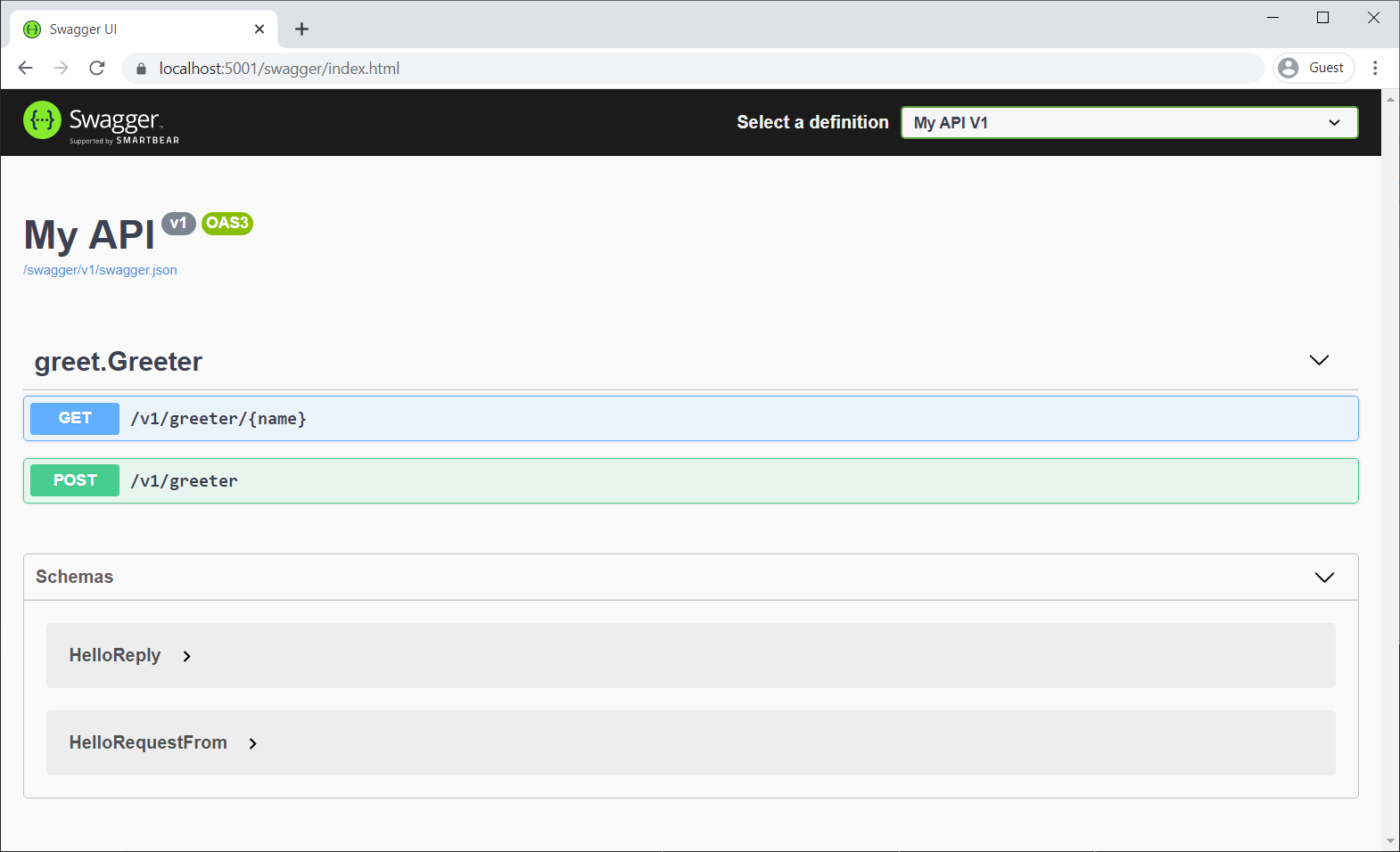
Figure: SwaggerUI with versioned API documentation
Adding Scalar support
Next, we can add Scalar support for our versioned APIs using the Scalar.AspNetCore package. This package provides middleware to serve the Scalar interface, which can be configured to point to your versioned OpenAPI documents, similar to how we set up SwaggerUI.
Again, the setup is the same for both controllers and Minimal APIs. We’ll cover the setup for Minimal APIs, but the same code can be used for controllers as well.
#:property PublishAot=false
#:sdk Microsoft.NET.Sdk.Web
#:package Asp.Versioning.Http@10.0.0
#:package Asp.Versioning.Mvc.ApiExplorer@10.0.0
#:package Asp.Versioning.OpenApi@10.0.0-rc.1
#:package Scalar.AspNetCore@2.13.0

using Asp.Versioning;
using Asp.Versioning.ApiExplorer;
using Scalar.AspNetCore;

var builder = WebApplication.CreateBuilder(args);

builder.Services.AddApiVersioning()
.AddApiExplorer(options =>
{
    options.GroupNameFormat = "'v'VVV";
})
.AddOpenApi();

var app = builder.Build();

app.MapOpenApi().WithDocumentPerVersion();

// Paste the API endpoints and records from the "API versioning for Minimal APIs" section here

// MapScalarApiReference sets up the Scalar UI at /scalar
// AddDocuments registers all known API versions so Scalar shows a dropdown to switch between them.
// You can enrich your OpenAPI document with Scalar specific integrations if you wish.
// To learn more: https://scalar.com/products/api-references/integrations/aspnetcore/openapi-extensions
app.MapScalarApiReference(options =>
{
    var descriptions = app.DescribeApiVersions();

    for (var i = 0; i < descriptions.Count; i++)
    {
        var description = descriptions[i];
        var isDefault = i == descriptions.Count - 1;

        // isDefault is used to mark the default API version in Scalar.
        // This decides which version is selected by default when users visit the Scalar UI.
        options.AddDocument(description.GroupName, description.GroupName, isDefault: isDefault);
    }
});

app.Run();
With app.MapScalarApiReference(), we register Scalar and feed it the same versioned documents via app.DescribeApiVersions(). Visit /scalar to browse and test your endpoints. Scalar is also highly configurable — select Configure in the top-right corner to tweak the theme, layout, and more.
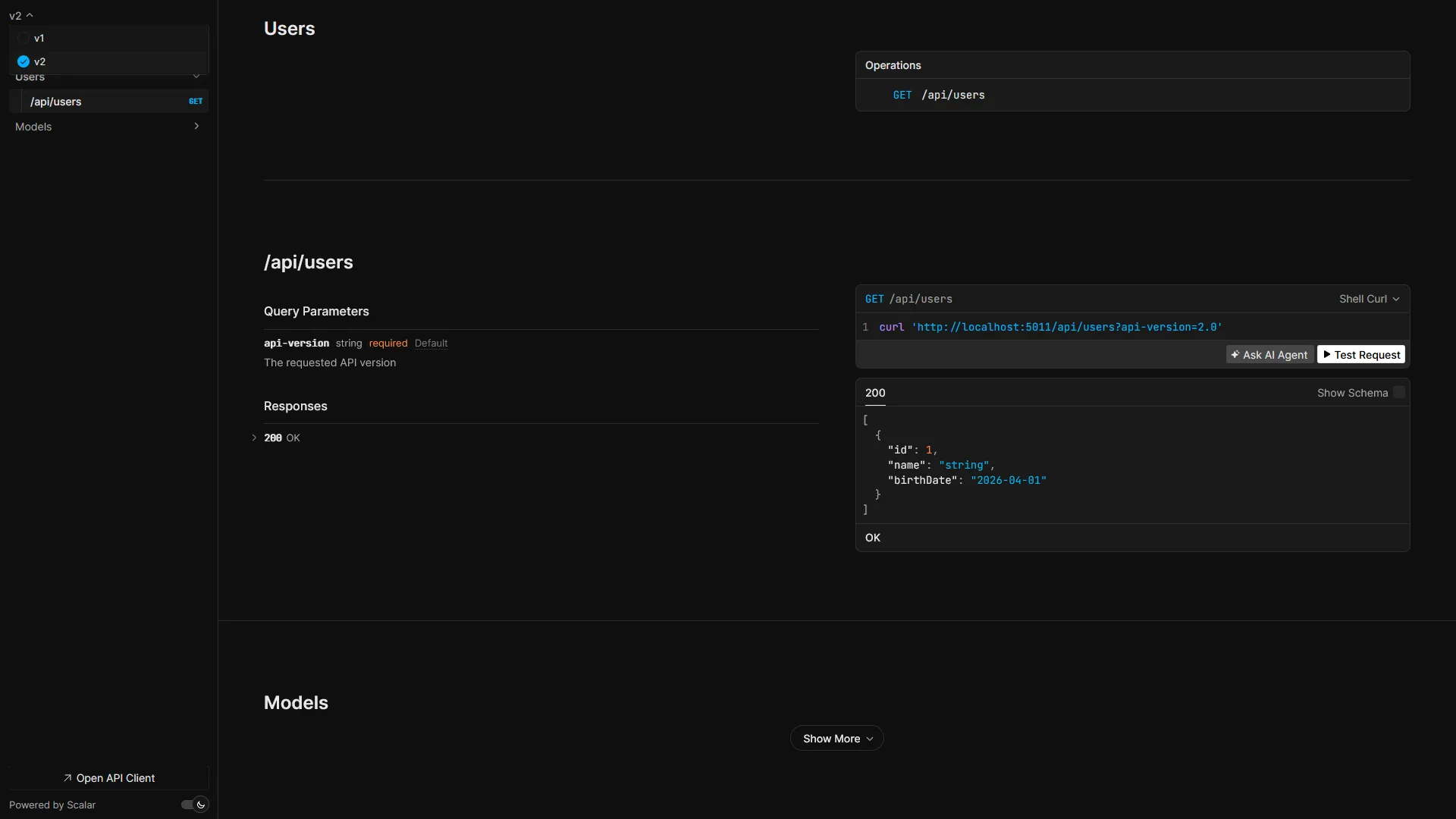
Figure: Scalar with versioned API documentation
Can’t decide between SwaggerUI and Scalar?
If you’re having trouble deciding between SwaggerUI and Scalar, you can actually use both! Both tools can be configured to point to your versioned OpenAPI documents, allowing developers to choose their preferred interface for exploring and testing your API endpoints. You can set up SwaggerUI at /swagger and Scalar at /scalar, giving developers the flexibility to use the tool they are most comfortable with.
We now have a complete setup for API versioning with OpenAPI in .NET 10, along with support for visualizing our API documentation using both SwaggerUI and Scalar!
Migrating from Asp.Versioning v8 to v10
You might encounter some breaking changes during the migration process, just like I did. This commit highlights some of the changes I had to make to get my sample application working with the new version. The most significant change is that the Asp.Versioning.OpenApi package is now required for both controllers and Minimal APIs, and that AddOpenApi() must be called from the Asp.Versioning namespace instead of the Microsoft.AspNetCore namespace, after activating API versioning.
During this migration, I actually found a bug in the new version of Asp.Versioning that caused the OpenAPI document to not generate correctly for Minimal APIs, so I created a PR for this. For more information about changes between versions, check out the changes from v8 to v10 in my sample repository and the official documentation for Asp.Versioning!
How Asp.Versioning v10 improves the setup of API versioning
This post has covered the new way of setting up API versioning with OpenAPI in .NET 10 using Asp.Versioning v10.0.0. It also made claims that this new approach reduces duplicate code and makes it easier to set up.
To understand what I mean by this, let’s compare the new approach to how you would set up API versioning with OpenAPI in Asp.Versioning v8.x.x:
Asp.Versioning v8.x.x:
var builder = WebApplication.CreateBuilder(args);

builder.Services.AddOpenApi("v1");
builder.Services.AddOpenApi("v2");

builder.Services.AddApiVersioning()
.AddApiExplorer(options =>
{
    options.GroupNameFormat = "'v'VVV";
});

var app = builder.Build();

// Code for the API endpoints using app.NewVersionedApi() can be placed here.

app.MapOpenApi();
Asp.Versioning v10.x.x:
var builder = WebApplication.CreateBuilder(args);

builder.Services.AddApiVersioning()
.AddApiExplorer(options =>
{
    options.GroupNameFormat = "'v'VVV";
})
.AddOpenApi();

var app = builder.Build();

// Code for the API endpoints using app.NewVersionedApi() can be placed here.

app.MapOpenApi().WithDocumentPerVersion();
The main differences are that in the new version, you only need to call AddOpenApi() once, instead of having to call AddOpenApi() multiple times for each version. This reduces duplicate code between your API endpoints where you already define your API versions. A combination of Asp.Versioning’s AddOpenApi() and WithDocumentPerVersion() achieves this behavior.
However, this is just the beginning. When you consider SwaggerUI/Scalar, tools many people use in their API development process, a lot more work was needed for Asp.Versioning v8 to get these tools working with versioned OpenAPI documents. Several OpenAPI transformers were needed to manually add the versioning information to the OpenAPI document. You can see the code that was needed to get SwaggerUI working with versioned OpenAPI documents using Asp.Versioning v8. These workarounds are no longer necessary as this is now included in Asp.Versioning v10.
Adding API linting to your versioned OpenAPI documents
We’ve covered API versioning, integration with OpenAPI, and how to visualize your versioned API documentation using SwaggerUI and Scalar. What’s next? Well, you can add API linting to your versioned OpenAPI documents to ensure that they adhere to best practices and organizational standards. This can be done using tools like:
- Spectral
- oasdiff
- or other OpenAPI diffing tools, like openapi-diff or openapi-changes.
Spectral is a powerful tool for linting your OpenAPI documents. By defining custom rules — or using community-built ones — you can enforce consistency across your API development process. This turns your “guidelines” into enforceable rules, which can be a game-changer for teams looking to maintain high-quality APIs.
You can, for example, add custom rules for validating that all APIs implement API versioning in a specific way. If a team forgets to add API versioning, Spectral can catch this during the pull request review process, preventing unversioned APIs from being released.
Next, there’s tooling like oasdiff, which allows you to compare different versions of your OpenAPI documents to identify changes, additions, or removals in your API. This is especially useful to detect unintended breaking changes between API versions, notifying the developer to introduce a new API version instead of breaking the existing one.
By integrating oasdiff into your CI/CD pipeline, you can let the pull request review process fail once a breaking change is detected, and instruct the contributor to use API versioning instead!
Finishing up
I hope you enjoyed this post! Whenever I had to implement API versioning with OpenAPI in .NET in the past, I often got caught up in the intricacies, so I’m glad I was able to write a setup that works for modern projects, and I hope you found it useful, too! If you have any questions or feedback, feel free to reach out or leave a comment below. Happy coding!
ASP.NET Core Community Standup
Catch the recent interview on the ASP.NET Core Community Standup: Combining API Versioning with OpenAPI:
Author:
Sander ten Brinke is a Microsoft MVP and Senior Software Engineer, with a passion for building scalable and maintainable applications. With over 10 years of experience in the industry, he has worked on a wide range of projects, from small startups to large enterprises. He focuses on .NET and Azure, but his interests extend beyond these technologies too, and he enjoys sharing his knowledge through blogging, speaking at conferences, and contributing to open source software, like some of the OpenAPI features he added to ASP.NET Core 10!
The post Combining API versioning with OpenAPI in .NET 10 applications appeared first on .NET Blog.