With just a single improvement in the REST API of Azure DevOps, we achieved a massive reduction in CPU usage and execution time when managing Git policies: 2x less CPU and 10-15x faster execution!
This change is already available to all users of Azure DevOps, and it’s time to share a bit more detail: the background, what the change is, and how it helped us improve the performance.
You may find this article useful if you maintain automation that manages Git policy configurations in Azure Repos using REST API.
Git policy governance at a big enterprise
Git policies are crucial for maintaining high quality of code and preventing malicious changes. They define rules enforced before code can land in repos and protected branches.
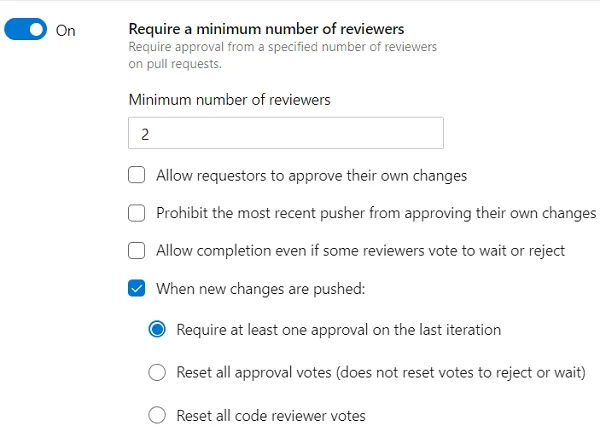
Azure Repos has a rich policy engine that lets you configure things like a minimum number of reviewers, specific reviewers who must sign off when certain parts of the code are updated, checking for credentials and secrets on push, and much more.
When the number of products, services and repos outgrows a certain point, ensuring the right policies are configured becomes a challenge. Human errors are unavoidable: it’s very easy to misconfigure something, for example, the service’s behavior when follow-up changes are pushed to an already approved pull request. Even if the initial state across the repos is correct, configuration often drifts over time when managed manually.
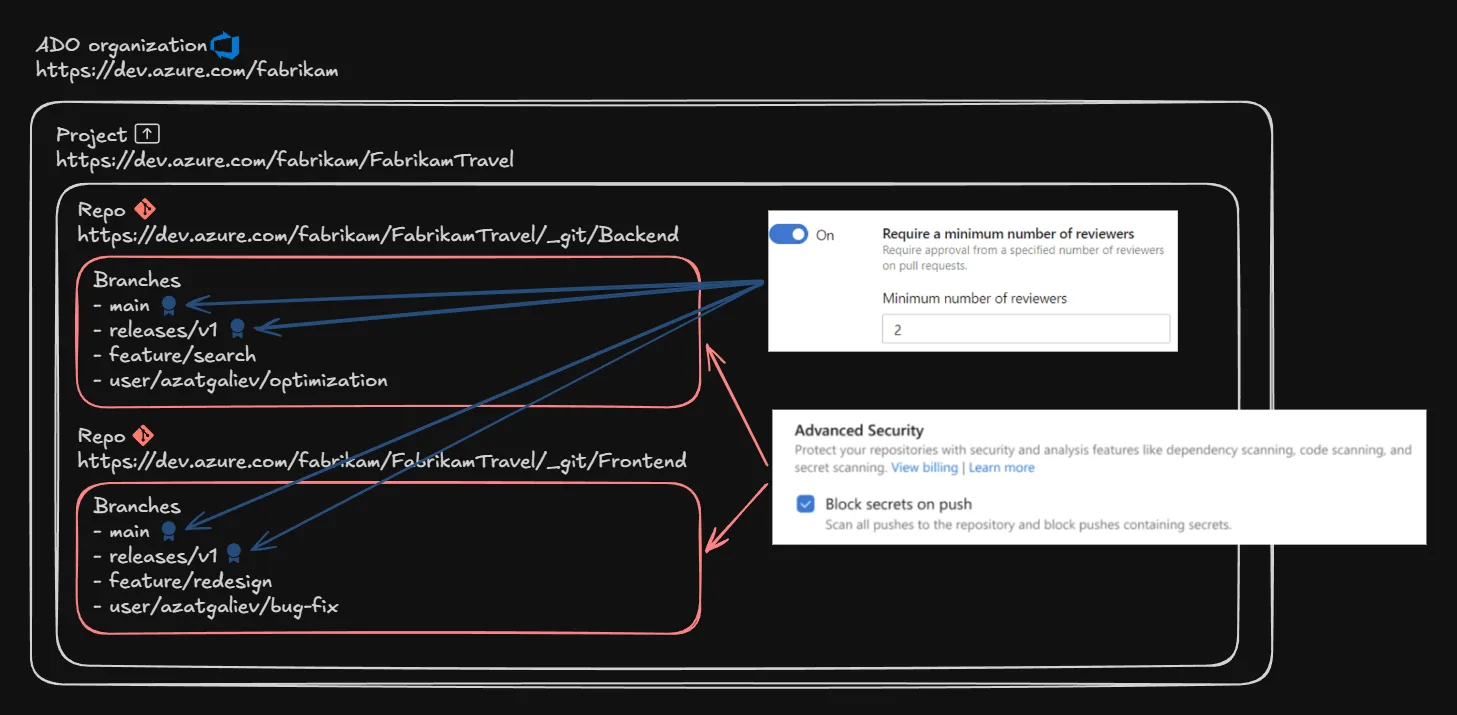
Microsoft offers a wide range of products. Our own code is exclusively hosted in Azure Repos and GitHub, across hundreds of thousands of Git repos, ranging from tiny polyrepos to the largest Git monorepos in the world.
For these reasons, we and many other big enterprises rely on the REST API in Azure DevOps and GitHub to audit and mitigate policy misconfiguration and drift across the entire portfolio of repos. A dedicated service defines the target state of policies and automatically updates them when the actual state drifts from the target.
Let me walk you through how the policies are stored and retrieved.
How policies relate to projects, repos and branches
There are two types of Git policies in Azure Repos: push and branch policies. They can also be called repository and pull request policies.
Push policies define the rules of what can enter repos and what cannot, no matter the branch. For example, if someone is trying to push new commits containing any secrets, such a push is rejected, even when pushed to a user branch.
Branch policies, on the other hand, protect specific branches (like main) and require all changes to go via pull requests. For example, they can enforce that code builds and all the tests are green before letting a change land on a protected branch.
In short, different types of policies affect either entire repos or branches inside them.
The policy engine also supports different scopes and inheritance. You can define a policy for a specific branch main in a specific repository, or you can configure a policy that will affect all branches matching releases/* in all repos in a project. The support of cross-repo policies and glob patterns partially solves the maintenance burden described earlier, but is not enough, especially when the repos are spread across many different projects and Azure DevOps organizations.
Two kinds of policies and support of inheritance define the architecture of how the policies are stored.
Each project has its own logical container for the policies, instead of each repo or branch having its own container. This helps to power cross-repo policies as well as support branch glob patterns like releases/*.
With that, all the policy configurations are linked to a specific project, but not a repo or branch. Then how does the engine know which ones to check for a specific operation, like a push or PR completion attempt? This is where the Scope field comes into play.
Policy scope
This is a simple string that specifies where in the inheritance hierarchy a given policy is defined. It contains one or two parts separated by a colon:
- Repo ID – which repo the policy applies to;
- Ref ID (optional) – which ref (branch) the policy applies to.
An example of a Scope value for a branch policy:
2c938d1f6e6f458d816484fc51e7cf74:refs/heads/main
Such a value makes the branch policy apply only to the main branch in the repo with ID 2c938d1f-6e6f-458d-8164-84fc51e7cf74.
A couple of edge cases:
2c938d1f6e6f458d816484fc51e7cf74– a push policy for the repo with that ID – doesn’t contain the ref part.*:refs/heads/releases/*– cross-repo branch policy that applies to the branches matchingreleases/v1,releases/v2, etc.
The last piece of the puzzle: the available endpoints to fetch the policies.
Querying the policies with REST API
Azure DevOps offers two REST API endpoints to list policy configurations:
The GET /_apis/policy/configurations is an older endpoint that allows querying all the policies in a project, with optional scope filtering without support of inheritance. If you pass 2c938d1f6e6f458d816484fc51e7cf74:refs/heads/releases/v1, it will only return the policies with that exact value of the scope, but it won’t return a policy with the scope of *:refs/heads/releases/*, which also applies to that branch.
The other endpoint is GET /_apis/git/policy/configurations (mind the /git/). Instead of the single exact value of scope, it accepts the repositoryId / refName pair.
If the first endpoint is useful to fetch which policies are defined at a specific scope, the second one is useful to fetch which apply to a specific scope by using inheritance-aware filtering.
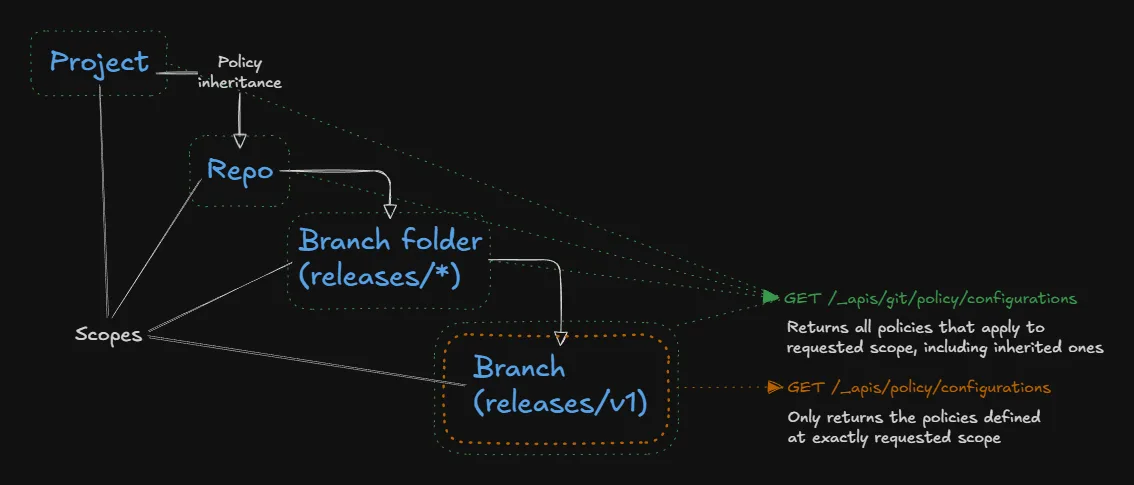
If you pass repositoryId=2c938d1f-6e6f-458d-8164-84fc51e7cf74 and refName=refs/heads/releases/v1, it will return all the policies defined at the following scopes:
2c938d1f6e6f458d816484fc51e7cf74*2c938d1f6e6f458d816484fc51e7cf74:refs/heads/releases/v1*:refs/heads/releases/v12c938d1f6e6f458d816484fc51e7cf74:refs/heads/releases/**:refs/heads/releases/*2c938d1f6e6f458d816484fc51e7cf74:refs/heads/**:refs/heads/*2c938d1f6e6f458d816484fc51e7cf74:refs/**:refs/*
Thanks to filtering by multiple scope values dynamically, it helps to answer the question “What protects my releases/v1 branch in repo X?”, instead of “Which policies are defined at the level of releases/v1 branch in repo X?”. It takes into account both the policies defined at that exact scope and any policies inherited from parent scopes.
With that context, here’s the problem with policy management at scale.
The Problem: Querying all the policies for one repo
The enterprise policy management service described earlier has one repo as a unit of work. It takes one specific repo, computes the target state of policies using predefined rules, retrieves the effective state currently configured in Azure DevOps, and then issues a set of policy create/update/delete requests if the effective state is misaligned with the target state. The service needs to see every single policy that applies to the repo as a whole, as well as any branch in that repo.
The only problem is… There was no way to ask the REST API “Give me all the policies that apply to a given repo and any of its branches”. At least, not until now.
As previously mentioned, the first endpoint (GET /_apis/policy/configurations) can only filter by the exact value of the scope, but many possible scope values can match a repo, and you can’t predict them all. You can pass repositoryId without specifying refName to the second endpoint (GET /_apis/git/policy/configurations), but you will only see the policies that apply to the repository as a whole: direct and inherited push policies. Branch policies aren’t included because they don’t affect the whole repository.
How did our service work before the change? The only option was to query all the policies for the entire project using the first endpoint, and perform client-side filtering. This is not critical for most projects, but becomes a big challenge for the ones with thousands of repos and hundreds of thousands of policies. The service ended up serializing and returning hundreds of megabytes of data for every request, and the client had to deserialize and process it. This implied massive overhead, much longer execution time, and more CPU cycles spent by the server and the client.
The Solution
The second inheritance-aware endpoint (GET /_apis/git/policy/configurations) now supports a special value ~all for the refName parameter. When passed together with repositoryId, it returns every single branch policy affecting any branch in the repo, as well as any push policy affecting the entire repo, inherited and defined at the scopes within the repo.
Internally, the service takes all the policies in a project and only keeps the ones with scope starting with * (project-level policies affecting all the repos) or with 2c938d1f6e6f458d816484fc51e7cf74. This includes both push and branch policies.
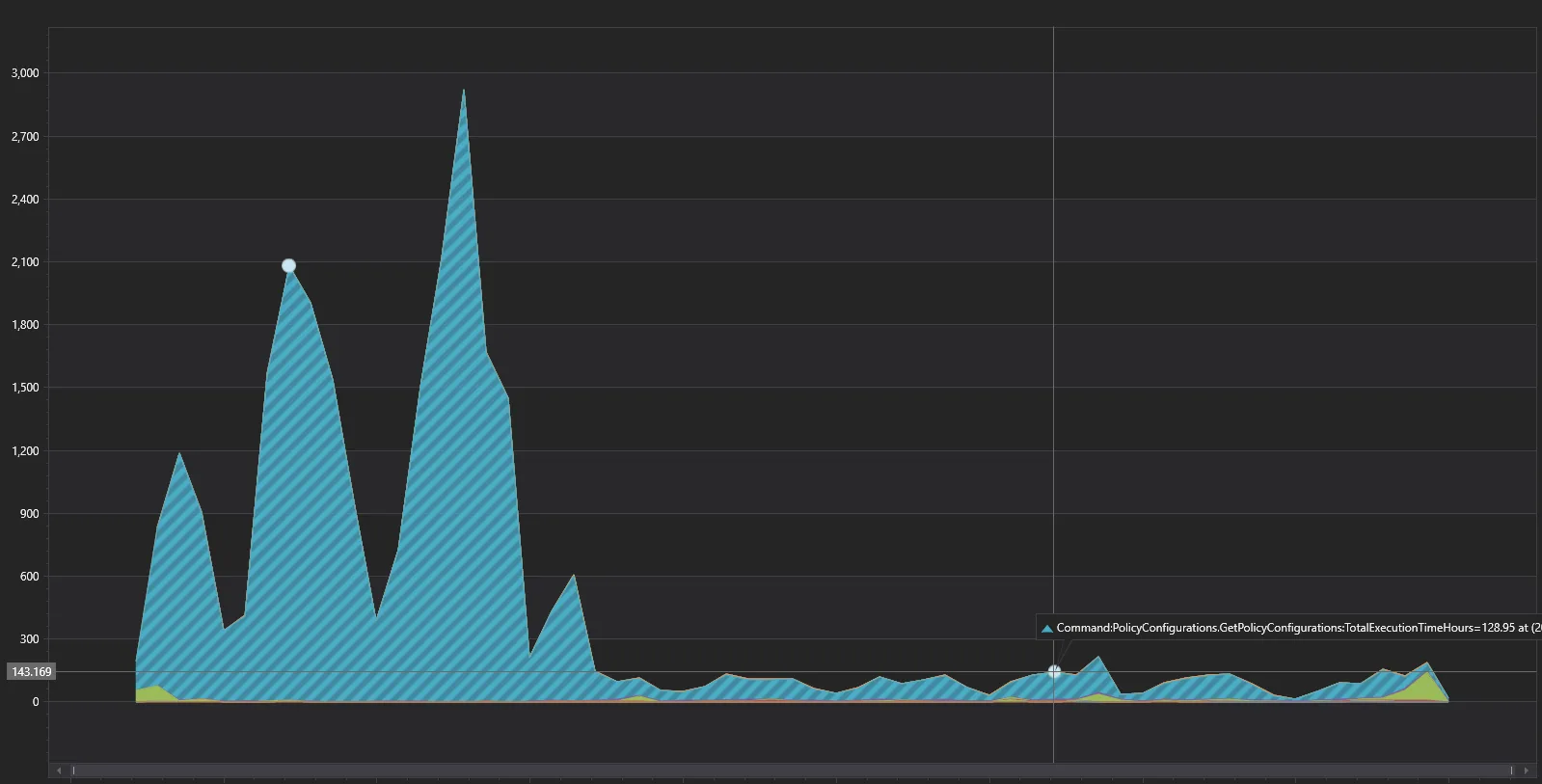
After switching the policy management client to using refName=~all instead of doing client-side filtering, the overall server-side CPU consumption dropped by half, across all the endpoints for this client.
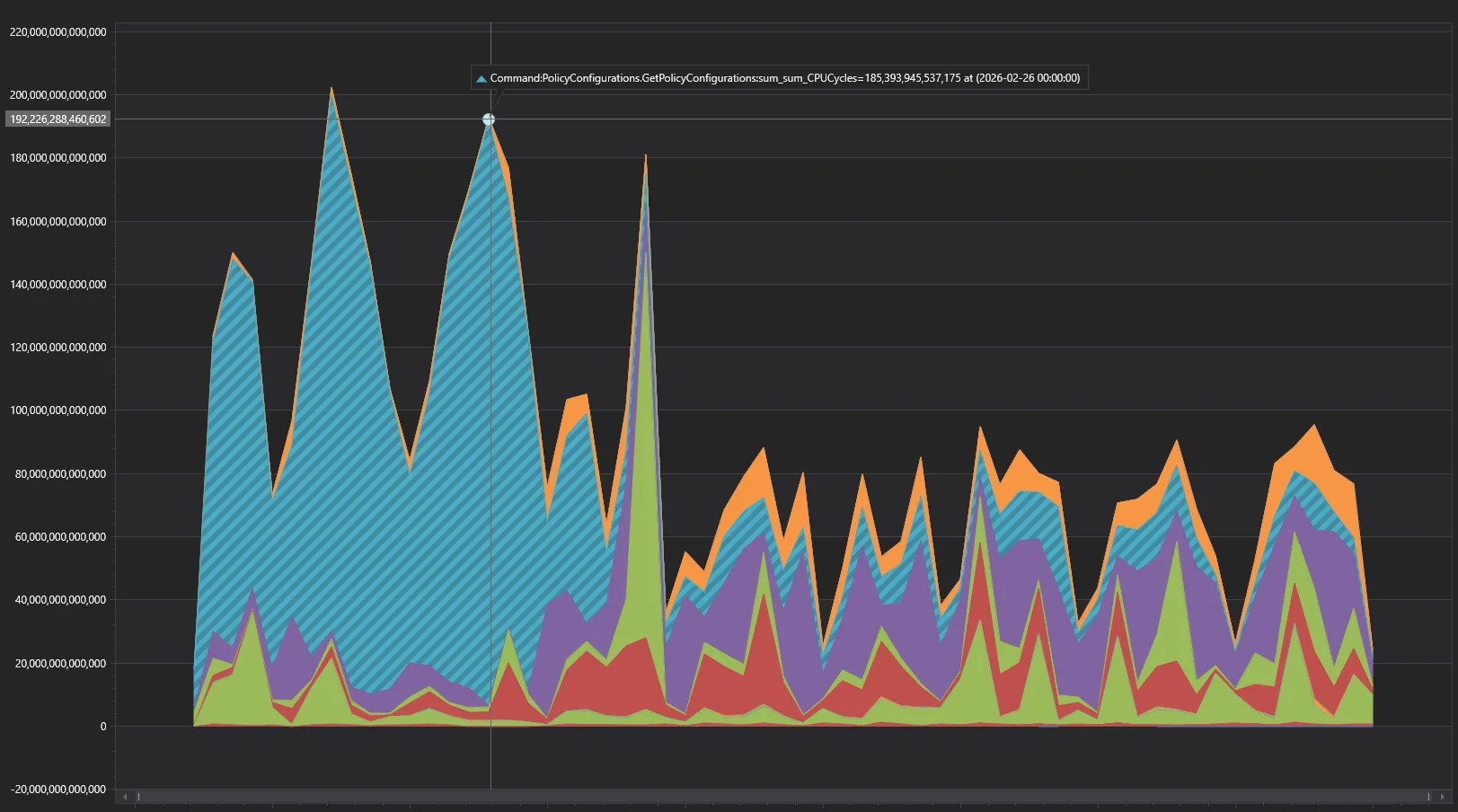
The drop in total wall-clock time across all requests is even more impressive – from 1-3 thousand hours per day down to only ~100-150, more than 10x-15x improvement!
Conclusion
For enterprises with large engineering teams, automated policy governance becomes a necessity. The new refName=~all feature further simplifies this process and can significantly improve the performance of your automation. Make use of our REST API to achieve that:
For more information about Git policies, see these docs on Microsoft Learn:
Let me know in the comments below if your team faces similar challenges. I’ll be happy to chat and answer your questions.
The post Optimizing Git policy management at scale appeared first on Azure DevOps Blog.