For years, accessibility feedback at GitHub didn’t have a clear place to go.
Unlike typical product feedback, accessibility issues don’t belong to any single team—they cut across the entire ecosystem. For example, a screen reader user might report a broken workflow that touches navigation, authentication, and settings. A keyboard-only user might hit a trap in a shared component used across dozens of pages. A low vision user might flag a color contrast issue that affects every surface using a shared design element. No single team owns any of these problems—but every one of them blocks a real person.
These reports require coordination that our existing processes weren’t originally built for. Feedback was often scattered across backlogs, bugs lingered without owners, and users followed up to silence. Improvements were often promised for a mythical “phase two” that rarely materialized.
We knew we needed to change this. But before we could build something better, we had to lay the groundwork—centralizing scattered reports, creating templates, and triaging years of backlog. Only once we had that foundation in place could we ask: How can AI make this easier?
The answer was an internal workflow, powered by GitHub Actions, GitHub Copilot, and GitHub Models, that ensures every piece of user and customer feedback becomes a tracked, prioritized issue. When someone reports an accessibility barrier, their feedback is captured, reviewed, and followed through until it’s addressed. We didn’t want AI to replace human judgment—we wanted it to handle repetitive work so humans could focus on fixing the software.
This is how we went from chaos to a system where every piece of accessibility feedback is tracked, prioritized, and acted on—not eventually, but continuously.
Accessibility as a living system
Continuous AI for accessibility weaves inclusion into the fabric of software development. It’s not a single product or a one-time audit—it’s a living methodology that combines automation, artificial intelligence, and human expertise.
This philosophy connects directly to our support for the 2025 Global Accessibility Awareness Day (GAAD) pledge: strengthening accessibility across the open source ecosystem by ensuring user and customer feedback is routed to the right teams and translated into meaningful platform improvements.
The most important breakthroughs rarely come from code scanners—they come from listening to real people. But listening at scale is hard, which is why we needed technology to help amplify those voices. We built a feedback workflow that functions less like a static ticketing system and more like a dynamic engine—leveraging GitHub products to clarify, structure, and track user and customer feedback, turning it into implementation-ready solutions.
Designing for people first
Before jumping into solutions, we stepped back to understand who this system needed to serve:
- Issue submitters: Community managers, support agents, and sales reps submit issues on behalf of users and customers. They aren’t always accessibility experts, so they need a system that guides them and teaches accessibility concepts in the flow of work.
- Accessibility and service teams: Engineers and designers responsible for fixes need structured, actionable data—reproducible steps, WCAG mapping, severity scores, and clear ownership.
- Program and product managers: Leadership needs visibility into pain points by category, trends, and progress over time to allocate resources strategically.
With these personas in mind, we knew we wanted to 1) treat feedback as data flowing through a pipeline and 2) build a system able to evolve with us.
How feedback flows
With that foundation set, we built an architecture around an event-driven pattern, where each step triggers a GitHub Action that orchestrates what comes next—ensuring consistent handling no matter where the feedback originates. We built this system largely by hand starting in mid-2024. Today, tools like Agentic Workflows let you create GitHub Actions using natural language—meaning this kind of system could be built in a fraction of the time.
The workflow reacts to key events: Issue creation launches GitHub Copilot analysis via the GitHub Models API, status changes initiate hand-offs between teams, and resolution triggers submitter follow-up with the user. Every Action can also be triggered manually or re-run as needed—automation covers the common path, while humans can step in at any point.
Feedback isn’t just captured—it continuously flows through the right channels, providing visibility, structure, and actionability at every stage.
*Click images to enlarge.

1. Actioning intake
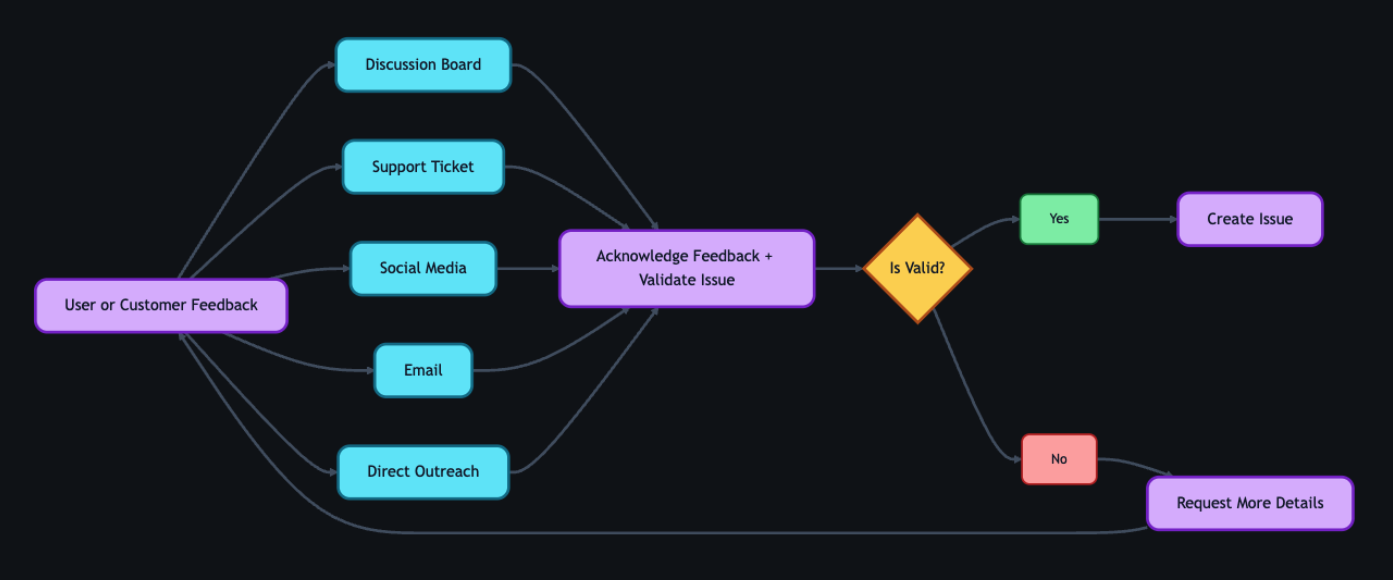
Feedback can come from anywhere—support tickets, social media posts, email, direct outreach—but most users choose the GitHub accessibility discussion board. It’s where they can work together and build community around shared experiences. Today, 90% of the accessibility feedback flows through that single channel. Because posts are public, other users can confirm the problem, add context, or suggest workarounds—so issues often arrive with richer detail than a support ticket ever could. Regardless of the source, every piece of feedback gets acknowledged within five business days, and even feedback we can’t act on gets a response pointing to helpful resources.
When feedback requires action from internal teams, a team member manually creates a tracking issue using our custom accessibility feedback issue template. Issue templates are pre-defined forms that standardize how information is collected when opening a new issue. The template captures the initial context—what the user reported, where it came from, and which components are involved—so nothing is lost between intake and triage.
This is where automation kicks in. Creating the issue triggers a GitHub Action that engages GitHub Copilot, and a second Action adds the issue to a project board, providing a centralized view of current status, surfacing trends, and helping identify emerging needs.
2. GitHub Copilot analysis
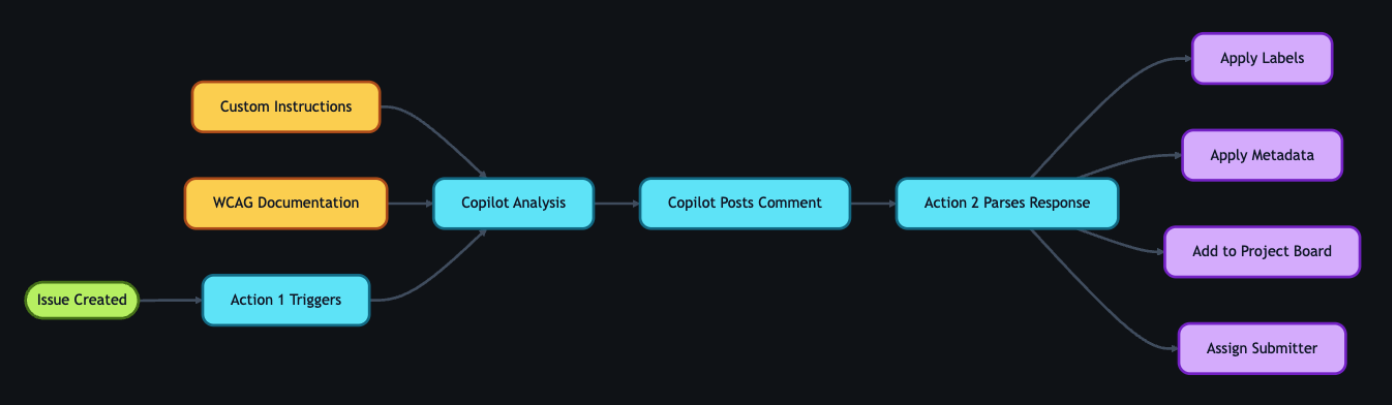
With the tracking issue created, a GitHub Action workflow programmatically calls the GitHub Models API to analyze the report. We chose stored prompts over model fine-tuning so that anyone on the team can update the AI’s behavior through a pull request—no retraining pipeline, no specialized ML knowledge required.
We configured GitHub Copilot using custom instructions developed by our accessibility subject matter experts. Our prompt serves two roles: triage analysis, which classifies issues by WCAG violation, severity, and affected user group, and accessibility coaching, where GitHub Copilot acts as a subject-matter expert to help teams write and review accessible code.
These instruction files point to our accessibility policies, component library, and internal documentation that details how we interpret and apply WCAG success criteria. When our standards evolve, the team updates the markdown and instruction files via pull request—the AI’s behavior changes with the next run, not the next training cycle. For a detailed walkthrough of this approach, see our guide on optimizing GitHub Copilot custom instructions for accessibility.
The automation works in two steps. First, an Action fires on issue creation and triggers GitHub Copilot to analyze the report. GitHub Copilot populates approximately 80% of the issue’s metadata automatically—over 40 data points including issue type, user segment, original source, affected components, and enough context to understand the user’s experience. The remaining 20% requires manual input from the team member. GitHub Copilot then posts a comment on the issue containing:
- A summary of the problem and user impact
- Suggested WCAG success criteria for potential violations
- Severity level (sev1 through sev4, where sev1 is critical)
- Impacted user groups (screen reader users, keyboard users, low vision users, etc.)
- Recommended team assignment (design, engineering, or both)
- A checklist of low-barrier accessibility tests so the submitter can verify the issue
Then a second Action fires on that comment, parses the response, applies labels based on the severity GitHub Copilot assigned, updates the issue’s status on the project board, and assigns it to the submitter for review.
If GitHub Copilot’s analysis seems off, anyone can flag it by opening an issue describing what it got wrong and what it should have said—feeding directly into our continuous improvement process.
3. Submitter review
Before we act on GitHub Copilot’s recommendations, two layers of review happen—starting with the issue submitter.
The submitter attempts to replicate the problem the user reported. The checklist GitHub Copilot provides in its comment guides our community managers, support agents, and sales reps through expert-level testing procedures—no accessibility expertise required. Each item includes plain-language explanations, step-by-step instructions, and links to tools and documentation.
Example questions include:
- Can you navigate the page using only a keyboard? Press “Tab” to move through interactive elements. Can you reach all buttons, links, and form fields? Can you see where your focus is at all times?
- Do images have descriptive alt text? Right-click an image and select “Inspect” to view the markup. Does the
altattribute describe the image’s purpose, or is it a generic file name? - Are interactive elements clearly labeled? Using a screen reader, navigate to a button or link. Is its purpose announced clearly? Alternatively, review the accessibility tree in your browser’s developer tools to inspect how elements are exposed to assistive technologies.
If the submitter can replicate the problem, they mark the issue as reviewed, which triggers the next GitHub Action. If they can’t reproduce it, they reach out to the user for more details. Once new information arrives, the submitter can re-run the GitHub Copilot analysis—either by manually triggering the Action from the Actions tab or by removing and re-adding the relevant label to kick it off automatically. AI provides the draft, but humans provide the verification.

4. Accessibility team review
Once the submitter marks the issue as reviewed, a GitHub Action updates its status on the workflow project board and adds it to a separate accessibility first responder board. This alerts the accessibility team—engineers, designers, champions, testing vendors, and managers—that GitHub Copilot’s analysis is ready for their review.
The team validates GitHub Copilot’s analysis—checking the severity level, WCAG mapping, and category labels—and corrects anything the AI got wrong. When there’s a discrepancy, we assume the human is correct. We log these corrections and use them to refine the prompt files, improving future accuracy.
Once validated, the team determines the resolution approach:
- Documentation or settings update: Provide the solution directly to the user.
- Code fix by the accessibility team: Create a pull request directly.
- Service team needed: Assign the issue to the appropriate service team and track it through resolution.
With a path forward set, the team marks the issue as triaged. An Action then reassigns it to the submitter, who communicates the plan to the user—letting them know what’s being done and what to expect.

5. Linking to audits
As part of the review process, the team connects user and customer feedback to our formal accessibility audit system.
Roughly 75–80% of the time, reported issues correspond to something we already know about from internal audits. Instead of creating duplicates, we find the existing internal audit issue and add a customer-reported label. This lets us prioritize based on real-world impact—a sev2 issue might technically be less critical than a sev1, but if multiple users are reporting it, we bump up its priority.
If the feedback reveals something new, we create a new audit issue and link it to the tracking issue.

6. Closing the loop
This is the most critical step for trust. Users who take the time to report accessibility barriers deserve to know their feedback led to action.
Once a resolution path is set, the submitter reaches out to the original user to let them know the plan—what’s being fixed, and what to expect. When the fix ships, the submitter follows up again and asks the user to test it. Because most issues originate from the community discussion board, we post confirmations there for everyone to see.
If the user confirms the fix works, we close the tracking issue. If the fix doesn’t fully address the problem, the submitter gathers more details and the process loops back to the accessibility team review. We don’t close issues until the user confirms the fix works for them.

7. Continuous improvement
The workflow doesn’t end when an issue closes—it feeds back into itself.
When submitters or accessibility team members spot inaccuracies in GitHub Copilot’s output, they open a new issue requesting a review of the results. Every GitHub Copilot analysis comment includes a link to create this issue at the bottom, so the feedback loop is built into the workflow itself. The team reviews the inaccuracy, and the correction becomes a pull request to the custom instruction and prompt files described earlier.
We also automate the integration of new accessibility guidance. A separate GitHub Action scans our internal accessibility guide repository weekly and incorporates changes into GitHub Copilot’s custom instructions automatically.
The goal isn’t perfection—it’s continuous improvement. Each quarter, we review accuracy metrics and refine our instructions. These reviews feed into quarterly and fiscal year reports that track resolution times, WCAG failure patterns, and feedback volume trends—giving leadership visibility into both progress and persistent gaps. The system gets smarter over time, and now we have the data to show it.

Impact in numbers
A year ago, nearly half of accessibility feedback sat unresolved for over 300 days. Today, that backlog isn’t just smaller—it’s gone. And the improvements don’t stop there.
- 89% of issues now close within 90 days (up from 21%)
- 62% reduction in average resolution time (118 days → 45 days)
- 70% reduction in manual administrative time
- 1,150% increase in issues resolved within 30 days (4 → 50 year-over-year)
- 50% reduction in critical sev1 issues
- 100% of issues closed within 60 days in our most recent quarter
We track this through automated weekly and quarterly reports generated by GitHub Actions—surfacing which WCAG criteria fail most often and how resolution times trend over time.
Beyond the numbers
A user named James emailed us to report that the GitHub Copilot CLI was inaccessible. Decorative formatting created noise for screen readers, and interactive elements were impossible to navigate.
A team member created a tracking issue. Within moments, GitHub Copilot analyzed the report—mapping James’s description to specific technical concepts, linking to internal documentation, and providing reproduction steps so the submitter could experience the product exactly as James did.
With that context, the team member realized our engineering team had already shipped accessible CLI updates earlier in the year—James simply wasn’t aware.
They replied immediately. His response? “Thanks for pointing out the –screen-reader mode, which I think will help massively.”
Because the AI workflow identified the problem correctly, we turned a frustration into a resolution in hours.
But the most rewarding result isn’t the speed—it’s the feedback from users. Not just that we responded, but that the fixes actually worked for them:
- “Huge thanks to the team for updating the contributions graph in the high contrast theme. The addition of borders around the grid edges is a small but meaningful improvement. Keep it up!”
- “Let’s say you want to create several labels for your GitHub-powered workflow: bug, enhancement, dependency updates… But what if you are blind? Before you had only hex codes randomly thrown at you… now it’s fixed, and those colors have meaningful English names. Well done, GitHub!”
- “This may not be very professional but I literally just screamed! This fix has actually made my day… Before this I was getting my wife to manage the GitHub issues but now I can actually navigate them by myself! It means a lot that I can now be a bit more independent so thank you again.”
That independence is the point. Every workflow, every automation, every review—it all exists so moments like these are the expectation, not the exception.
The bigger picture
Stories like these remind us why the foundation matters. Design annotations, code scanners, accessibility champions, and testing with people with disabilities—these aren’t replaced by AI. They are what make AI-assisted workflows effective. Without that human foundation, AI is just a faster way to miss the point.
We’re still learning, and the system is still evolving. But every piece of feedback teaches us something, and that knowledge now flows continuously back to our team, our users, and the tools we build.
If you maintain a repository—whether it’s a massive enterprise project or a weekend open-source library—you can build this kind of system today. Start small. Create an issue template for accessibility. Add a .github/copilot-instructions.md file with your team’s accessibility standards. Let AI handle the triage and formatting so your team can focus on what really matters: writing more inclusive code.
And if you hit an accessibility barrier while using GitHub, please share your feedback. It won’t disappear into a backlog. We’re listening—and now we have the system to follow through.
The post Continuous AI for accessibility: How GitHub transforms feedback into inclusion appeared first on The GitHub Blog.