An 82-year-old German industrial engineer, a 22-year-old UI framework, and an AI that finally understands WinForms Designer serialization walk into a hotel room at midnight. There’s no punchline. Just a dead dongle and a dead … line. Well, I admit, it’s sort of hard to believe, but how these three are connected is really no joke. But let’s connect the dots, and start with my mom, who I’d say is the main character in this absolutely true story.
This post walks through the full journey — from capturing requirements in German via Teams, to transforming a messy transcript into an English specification using LLMs, to generating Designer-compatible WinForms code through cascaded prompting — and what it reveals about prompt-driven development.
My mom is—let’s use the grammatically fitting tense here—retiring. Present Continuous. Emphasis on the -ing. In 2007, she turned 65 and officially retired, but kept working in her profession as a REFA-engineer with her own, little but effective consultancy business. Since then, every autumn, she declares: “Next February, I’m definitely retiring for good.”
If you’ve never heard of REFA, well, don’t worry. It’s a pretty European thing. Actually mainly used in Germany and the adjacent countries alright, and the methodology never really made it over the pond. We get to that later in more detail. In any case, the following story is not made up—it’s 100% true. It happened exactly as described here. Well, to be fair, it happened the way I remember it for those parts of the story where I didn’t have notes or better memory aids. And I have quite a few of those aids, which, by the way, makes them an important part of the story—but more on that also later.
As if I do not have enough to do already
The day IT happened was a day when I had been particularly undisciplined. I looked at my Todo list, and once again it became painfully clear: you cannot make open items disappear by staring at them. I was supposed to write quite a few of those typical year-end reflection pieces for a series of colleagues and—of course—my manager. And that’s something that never really flows easily from my fingertips. What was easier, though, was listening to Dara O’Briain, my favorite comedian, who had somehow made his way into my current YouTube playlist.
“…I’m a numbers guy, I’m a dweeb all right and I apologize, I am a bit of a nerd…” Oh, are you, Dara? Guess who else is and cannot concentrate. “…and I am sorry, if you’re into homeopathy—it’s water! How often does this need to be said…” And before he could continue his rant about this particular field of medicine, my phone rang. Saturday, 1:30 PM Redmond time is pretty unusual for someone to call from here, which in my case makes Germany as the origin of the call more likely. But that’s then again also concernedly late for Germany and could only mean one thing: my mom. My problem: I heard the phone but couldn’t see it. My definitely not Dara O’Briain-compatible assumption: mobile phones are only physically present when you don’t need them. The moment they ring, they teleport somewhere else. I tried to track-down the ringing, while Dara continued “…well, they get on my nerves with their ‘well, science doesn’t know everything.’—see, science knows it doesn’t know everything… otherwise, it’d stop!…” I had to join the laughter of the crowd. Noticing the ringing getting louder, and being literally on a good trajectory, I nodded while Dara continued: “…but just because science doesn’t know everything doesn’t mean you can fill in the gaps with whatever fairy tale most appeals to you…” Damn, Dara, I couldn’t agree more. And, oh, there it was. The phone. My mom.
German-style naming – “Verband für Arbeitsstudien und Betriebsorganisation eV”
Growing up in Germany, I always thought every German compound word starting with the prefix “Reich-” would be so negatively connoted that I probably shouldn’t even go near it. And I know, especially in the 80s and 90s, A LOT of my fellow Germans thought that way. So whenever friends and classmates from school asked, “Hey, what do your parents do?”, I stated truthfully my dad is a traveling salesman, and – without going into explaining that REFA term any further – my mom was a REFA engineer. Which is not only true, it’s also something nobody could really do anything with—even in Germany, where the whole REFA thing had been invented back in 1924. And although the original abbreviation—not a secret, mind you—”Reichs-Committee for Working-Time Determination” was renamed around the 1970s to “Verband für Arbeitsstudien und Betriebsorganisation e.V.” (Work Studies and Business Organization Association), in German-speaking countries the REFA methodology for optimizing workplace ergonomics and time studies was and still is known pretty much exclusively by these four letters: REFA. And the reason it is such an important part of the economy in the German-speaking area of Europe is that it is one of the very few methodologies which is accepted and agreed on by most of the unions and bigger companies’ own work councils.
“Hey, how are you doing?” I asked my mom. “Don’t even get me started,” she replied. “Here, when I try to start it…”
It took me a moment to find out what ‘it’ was. But from context and level of indignance, it was quickly pretty clear that she was talking about her very special, Windows Win32-based consulting—or better: time-study—software.
She continued, “it says something about a General Protection Fault in Model something-or-other, and then, well anyway, I can’t take any time-span samples. And the support-folks already tried using Windows Quick Assist, hung around in my Surface (Go 3, let me add) for more than an hour, but they couldn’t figure out anything meaningful either. I’m here at my client’s (…industrial laundry plant…) in Waibstadt, and I can’t do …!” Well, let’s not translate what she said next—but know that she can “swear like a Pipe Sparrow,” as they say in German, although the correct translation of that bird is presumably Reed Bunting. We just call them Pipe Sparrows in German. Anyway. Conclusion: The reporting part of the software would run without the dongle, alright. But the time study module—which was literally why she was there—not a chance to get that repaired and running.
So, What Happened to Her?
My mom uses a time study software from a reputable German ISV that specializes in REFA methodology. The principally very solid, well-designed software for the domain, maintained by professionals who actually understand industrial time studies, has one catch: the actual time tracking functionality requires a hardware dongle. Classic software protection from an era when copy protection meant physical dongles, not cloud licensing.
And here’s where hardware reality meets the modern Surface ecosystem: The dongle uses USB-A. The Surface Go 3 – a remarkably light and portable Windows tablet that’s perfect for walking industrial floors all day – has only USB-C. So naturally, my mom was using some kind of USB hub. Convenient, yes. Robust when you’re carrying it between industrial ironer stations daily? Not so much.
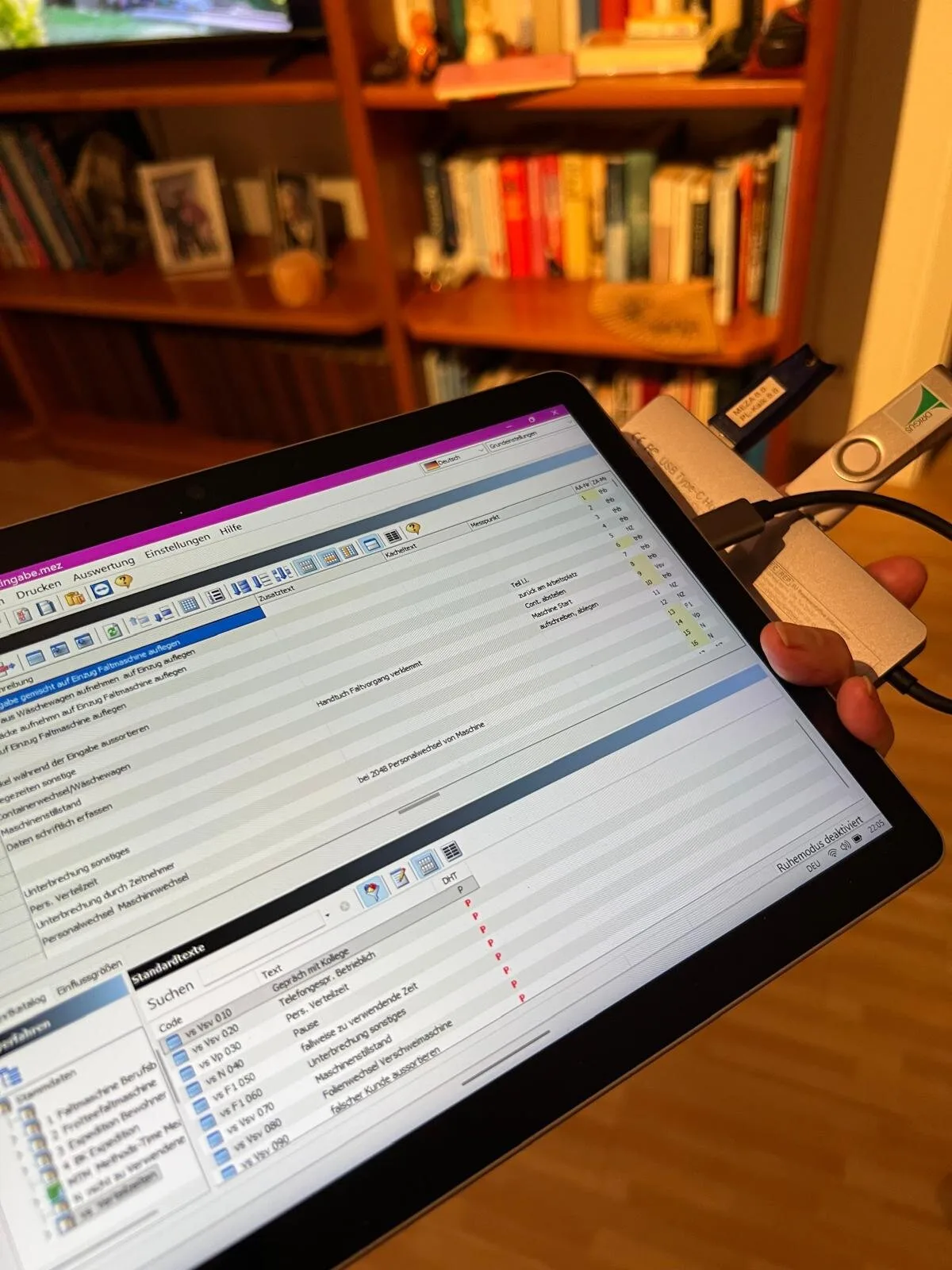
Now, this is all assumptions, and bottom line: It also doesn’t really matter (or rather didn’t, when the effect of the symptoms became clear): Over time, either the hub itself developed a cable break, or the USB-C port on the Surface had simply fatigued from all that dangling weight. A dongle, mostly hanging off a hub hanging off a tablet that gets moved around industrial laundries? That’s a mechanical failure waiting to happen. So, they tried, then I tried, but ultimately: no dice. The GPF was there to stay.
Why Ask an 82-Year-Old on a 500-Mile Journey
So, here’s the question: Why would an industrial laundry fly in (well, trust Deutsche Bahn to transport) an 82-year-old REFA time-study engineer from 500 miles away? The answer is: experience. Specifically, experience in one critical aspect of REFA methodology that can’t be automated. And here is where I’d ask you to bear with me with some German terms: Starting with the so-called Leistungsgrad (degree of performance) – a special form of visually and from observation assessed performance rating of employees, usually working in production plants.
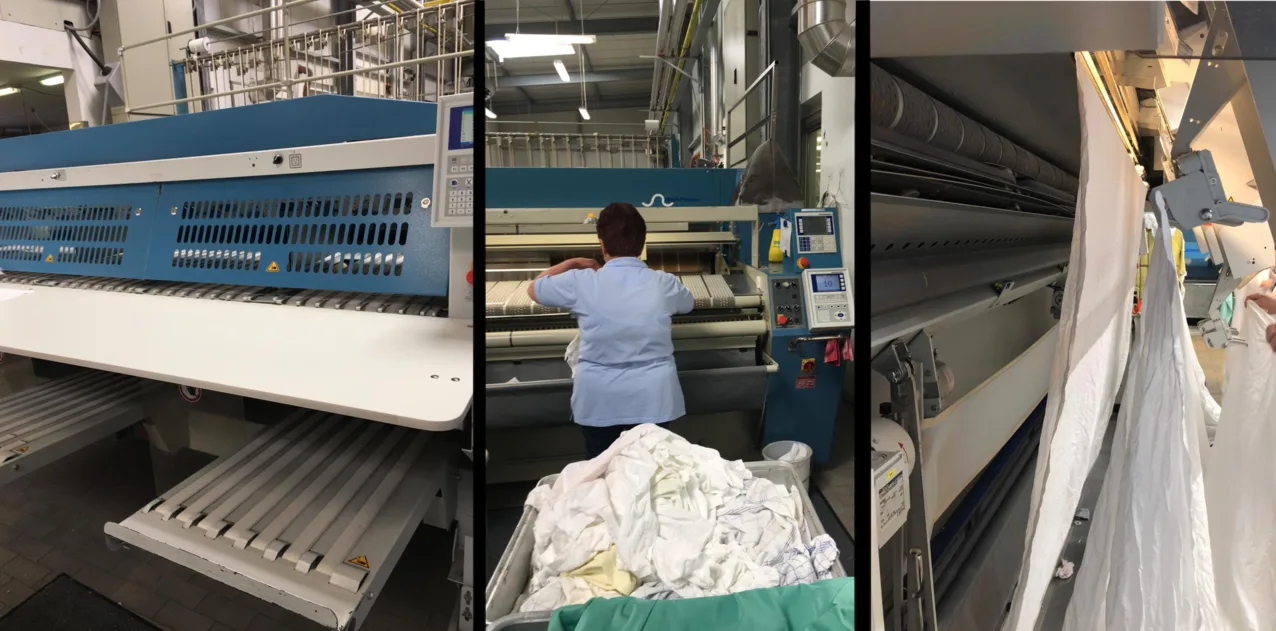
When my mom conducts Zeitaufnahmen (time studies), she’s not just clicking a stopwatch. She’s measuring Ablaufabschnitte (process steps) – in the case of the ironer: grabbing laundry, clipping it in, handling pieces that fall out – and for each step, she’s estimating whether the worker is operating at 100% normal pace, faster, or slower. That judgment call, honed over decades, is what makes the resulting work values fair. Too generous, and the company overpays. Too strict, and workers can’t achieve bonuses no matter how hard they try.
This was important because this particular client had just installed new industrial ironers. These massive units process hundreds of kilograms of linens per hour, operated by teams of up to five workers per station. The company pays incentive wages: base salary plus bonuses when teams exceed the performance baseline. But to calculate that baseline fairly, you need accurate time studies. And for accurate time studies on new equipment, you need someone with the experience to judge “normal” performance on day one.
That’s the win-win: The laundry gets a fair, union-approved wage system that improves productivity. The workers get transparent performance targets and real earning potential. And my mom gets to keep doing what she’s loved doing for – let’s not count the years too precisely.
Why This Business Case Is a Perfect WinForms Scenario
Let’s pause and recognize what we have here, because it matters for understanding why this is your absolute typical WinForms Line of Business application type, and also, why WinForms development has been so successful and popular (and honestly, still is):
- It’s culturally and geographically specific. REFA methodology is a Central European thing – primarily German-speaking countries. The terminology (Zeitaufnahme, Ablaufabschnitt, Leistungsgrad) doesn’t translate cleanly. This is industrial engineering born from post-war German manufacturing culture, still practiced today in ways that would seem antiquated to Silicon Valley but are perfectly rational in context.
- It’s incredibly niche. How many time study applications for incentive wage systems in industrial laundries exist? How many developers have ever heard of Zeitarten (time types like “machine time”, “handling time”, “interruption time”)? This is domain knowledge that lives in REFA training books and practitioners’ heads – not Stack Overflow threads.
- It’s exactly what WinForms was designed for. A specialized tool, very user-interaction demanding, for a specialized profession, running on a Surface tablet in an industrial environment. No web framework needed. No cloud dependency. Just a robust, offline-capable Windows application that does one thing really well: capture time measurements accurately.
This is the WinForms sweet spot: domain-specific, business-critical, and economically viable only because development effort can be contained. In the past, building such an application would require either (a) a developer spending weeks learning REFA methodology, or (b) a REFA expert learning to code – neither economically feasible for such a narrow use case. (But, just as a side-remark, often enough the main target audience for classic Visual Basic V4 to V6 at the time, and – for what it’s worth – Python today.)
A Year Earlier: No Chance. But Now?
Under the normal IT-industry circumstances we learned to love over the last 40 years, that phone call would at that point have reached nearly the finish line. It may have turned me into an amateur therapist – listening sympathetically, maybe offering to cover unexpected hotel costs. But that would have been it. But – something fundamentally shakes the industry up. And that’s why and where I got bold for the first time in the IT space beyond the Microsoft walls – and also yet oddly confident at the same time. Because an idea popped into my head, which was: building a replacement application from scratch. From scratch? In a weekend? While she’s on-site? Was I kidding myself?
See, this was no longer constrained by the status quo of Rapid Application Development from just a year ago – the discipline that made WinForms famous and accepted for over 25 years. This was, well, this is now Rapid-RAD, if you will. And not without a bit of pride, I might add: WinForms was the exact right candidate for it, since the new Visual Studio Copilot-based WinForms Expert Agent I had been working on the previous months had just found its way into the latest released VS version, and was now waiting for me to test it under absolute real-life conditions.
But this wasn’t a year ago. This was November 2025. And I had Visual Studio 2026, GitHub Copilot, and – crucially – the understanding that I didn’t need to be a REFA engineer myself. I just needed enough domain-specific knowledge to follow her explanations, and then by asking targeted questions to capture what my mom knows. And guess what: That’s exactly how a typical User Story collecting, Customer/Product Owner/Developer meeting is supposed to be done!
“Mom,” I said, “I think I might actually be able to help you. Not with the dongle – that’s dead. But maybe I can build you something that lets you do your time recordings. At least well enough to get through this assignment.”
There was a pause. My mom has seen enough technology promises to be skeptical. But she also knows I wouldn’t make offers lightly – ones I can only attempt to deliver.
“Okay,” she said. “What do you need from me?”
“Tell Me Everything” – Via Microsoft Teams
“Let’s do a Teams call,” I said. “I need you to explain exactly what you do during a time study. What buttons you see on your Surface’s screen, when and why you press them, what data you capture, what the workflow looks like. Everything.”
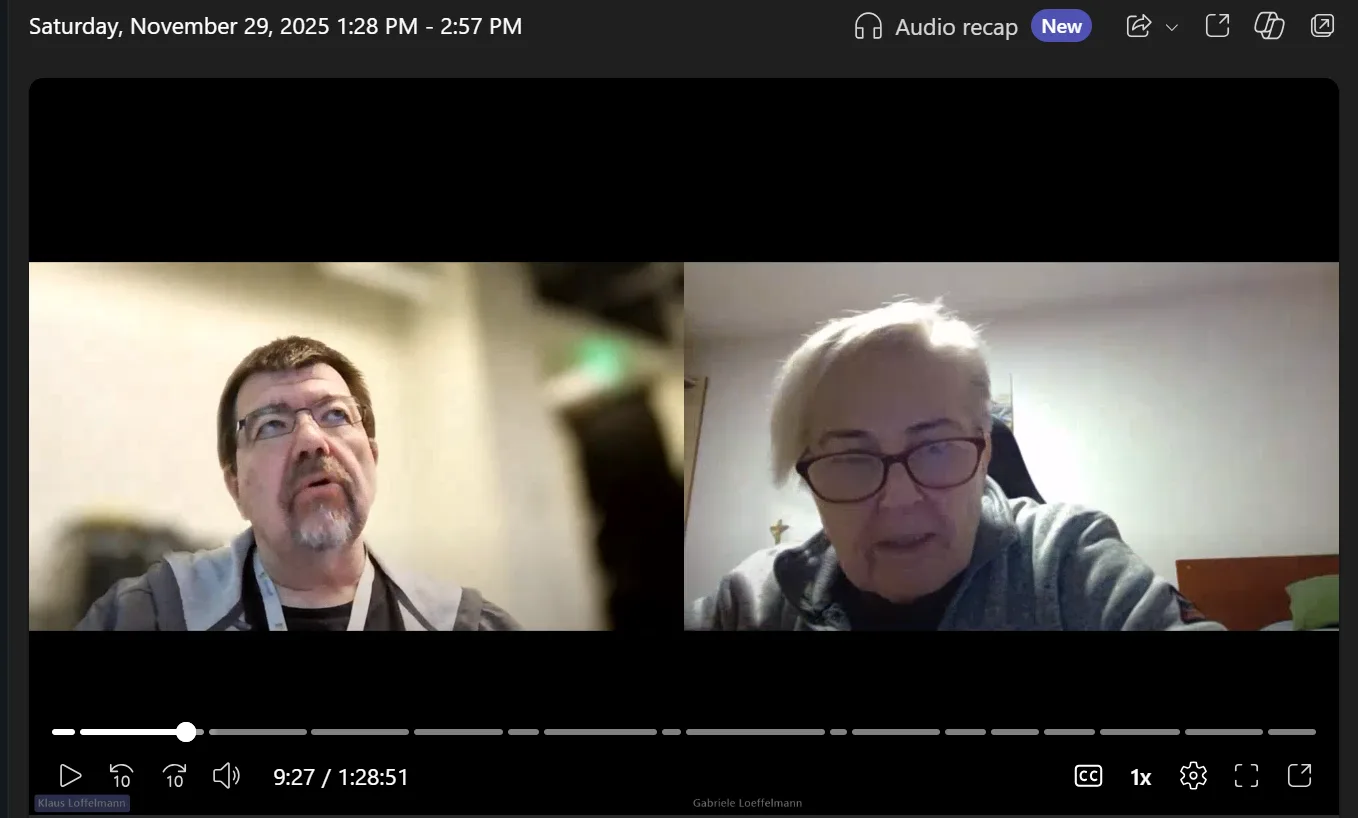
For about an hour and a half, my mom walked me through the entire process: how she defines process steps before starting, how each step gets a numbered button, how the master clock runs continuously while individual timings are captured per button press, how interruptions are categorized, how the data exports to CSV for further analysis in Microsoft Excel.
She told me about the industrial ironer stations, the clips that carry laundry through heated rollers, the percentage of pieces that fall out, and why machine counts never match actual operator workload. She explained performance rating – how she walks the floor first to get a sense of “normal,” then adjusts measurements when workers speed up because they’re being observed (which, by the way, would actually hurt their incentives later – just saying).
And somewhere in there, she told me about the time she stood in an operating room during actual surgeries with a sterilized clipboard, measuring process differences using washed, sterilized reusable surgery cloth versus throw-away surgery cloths for a hospital cost analysis. But that’s a story for another time. (Guess what though – washing won.)
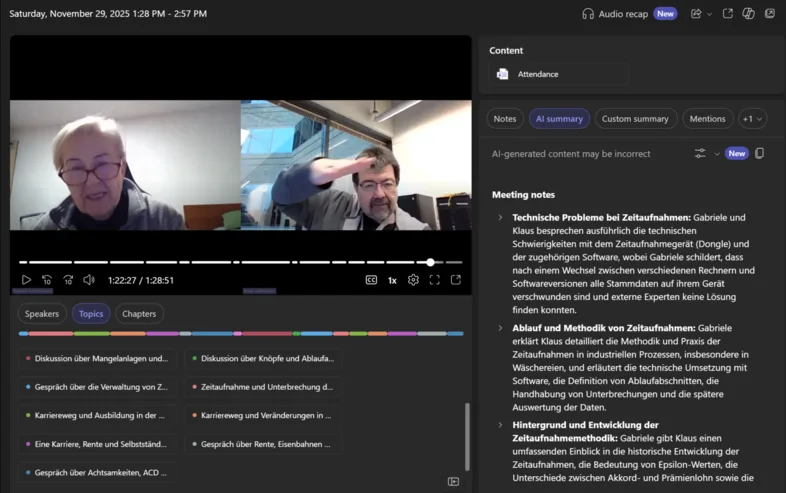
The call ended past midnight German time. My mom went to bed, probably still skeptical but at least feeling heard. I had a Teams recording and an automatically generated German transcript, and the rest of the Saturday.
From Transcript to Specification: Enter Copilot
While she went to bed, I got to work. In this case, the time difference between Germany and Washington State was actually quite helpful.
I started with the Teams transcript. It was a … well, let’s say, it started out actually pretty usable, until it was not. And I’m not sure whether having the conversation in German helped the quality. We had:
- Speakers talking over each other, which considerably screwed up the transcript quality and led to
- misaligned timestamps, and then of course,
- both my mom and I have ADHD (yes, I’m convinced at least aspects of it are heritable), so during those 90 minutes we were naturally jumping between topics: domain terms mixed with personal anecdotes and tangents about industrial crane manufacturers in the Saudi Arabian desert.
But here’s where it got interesting.
I fed the transcript to Copilot with a prompt to this effect:
I need your help with the following content: This is a transcript with sections that don't reliably reflect what was said. The root cause is most likely that people were talking over each other in their enthusiasm. Please straighten this up and rewrite the sections that clearly don't make sense in context. The goal is to create coherent, meaningful discussion paragraphs that flow logically from one to the next.Now, you could argue: isn’t this changing what was said? Well, maybe. Maybe that happened here and there. And maybe you could be of the opinion that if Teams had done a better job transcribing what was said, then I could or should have proceeded and based the next steps on that. Because now the information was not reliable and not usable?
I don’t see it that way. There’s enough information in the resulting form of the transcript that it could be enriched by what another LLM was trained on for error correction to get the transcript sufficiently precise. That’s, FWIW, the Project Captain’s judgment call, and in my experience when working with LLMs and the different Copilot incarnations of the current zeitgeist, a permanently continuing task. Guide and conduct Copilot (and yes, if that means consulting or including additional Copilots, that’s totally legitimate!) through your knowledge and experience to the best possible outcome, where you are the guardrail – not as the technical source of truth, but ultimately as the responsible and reliable instance that neither another human nor an LLM – what did Dara say? – will “fill in the gaps with whatever fairy tale most appeals to you.”
This is a German transcript of a conversation between me and my mother about REFA time studies. Please separate the private/personal content from the domain-specific explanations. Then create a structured requirements document for a time study application based on what she described.When I read the result, I made that call, and I decided that for what I wanted to achieve, the result had a high enough confidence level to base the next steps on:
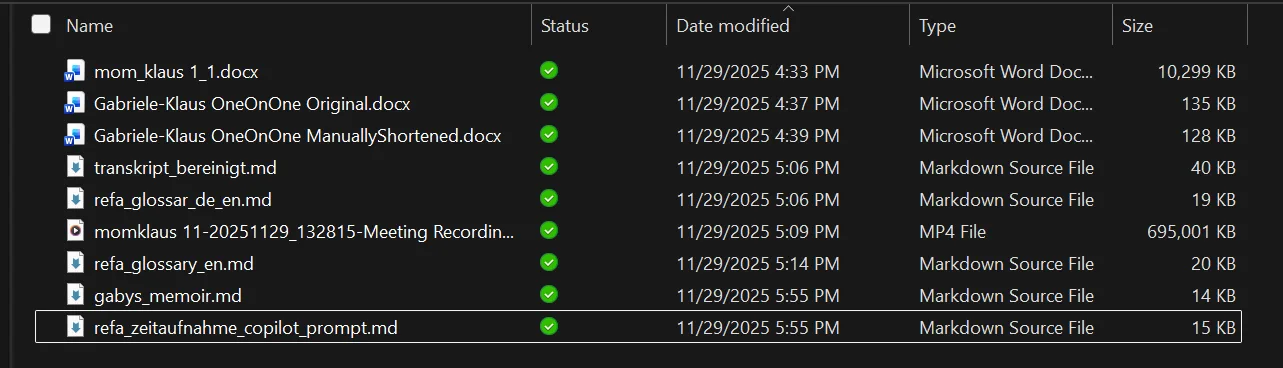
So, within seconds… OK, make it about an hour in total, Copilot had:
- Step 1: Cleaned up the original docx that came from Teams, which I had only very quickly purged of information that had been just too personal. The resulting transcript was WAY better than the original Teams transcript and would work as a basis for what I had in mind: _transskriptbereinigt.md (bereinigt meaning cleaned up).
- Step 2: Identified and set aside the personal tangents (the OR story, the career history, the retirement jokes) into a neat little document called _gabysmemoir.md.
- Step 3: The same prompt yielded 2 other documents: A glossary in German around REFA so I could bring myself up to speed, and the same glossary translated into English.
- Step 4: The actual prompt document for Copilot in Visual Studio, which basically held the extracted core workflow of the WinForms app I wanted it to create: start clock, define process steps, assign numbered buttons, capture times per button press, handle interruptions, export to CSV.
Part of that were also the list of required UI elements: a master clock, configurable process step buttons, interrupt categories, a running log of measurements. This also included noted edge cases my mom had mentioned: what happens when you forget to stop the clock, how “empty” time segments are handled, why certain button numbers (18, 19, 40) are reserved for standard interrupt types.
I had gone from “my mom is stranded with a broken dongle” to “I have a complete functional specification” in less than two hours. Most of that time was the original Teams call, mind you, and a good 60 minutes of that we also had fun mocking the state of the German train system.
Now that I had everything, came the real test: Could Copilot actually build the thing?
Entering Copilot in Visual Studio and the New Agent Support
Agents in Visual Studio are very much a work in progress. And I think it’s safe to assume that we’re rather at the beginning of that journey. This, by the way, is also the main reason for Visual Studio’s new update cadence – it’s simply a necessity to keep pace with the development. Both to provide the latest capabilities in terms of utilizing the most advanced Large Language Models (ChatGPT, Anthropic’s Claude Sonnet and Opus, Google’s Gemini, and what have you), but also to provide the security guardrails, which are certainly more than a “nice-to-have.”
But here’s the thing: With every new feature around Copilot Chat and Agents, we also need to provide users an option to include that feature for an Ask or an Agent task – or not. That’s why – specifically for WinForms – the first attempts to let an agent create something useful in terms of WinForms LOB (Line-of-Business) apps can be both impressive and underwhelming at the same time. Here, let me show you what I mean.
First, let’s quickly revisit how we can work with Copilot best for WinForms apps, and what the different Copilot modes actually mean. The linchpin for everything Copilot is the GitHub Copilot Chat tool window, which you’ll typically see in a tab cluster along with the Solution Explorer, most likely the Git Changes tool window, and the good old Property Grid.
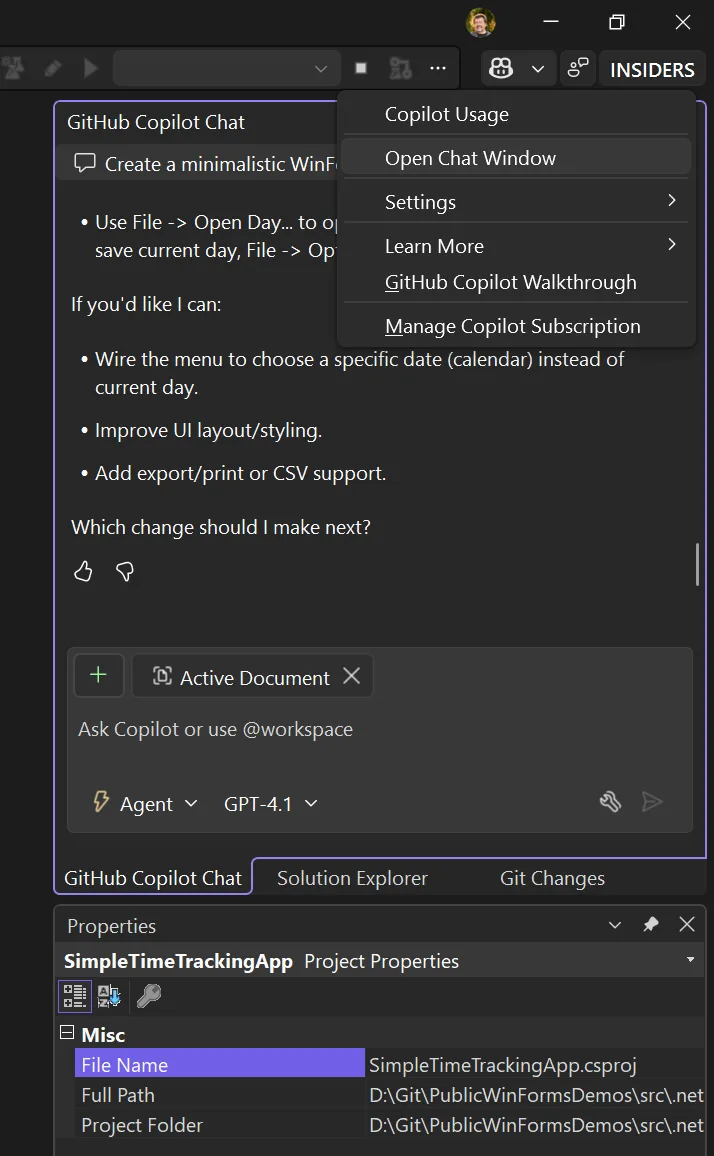
Should you not see the Chat Window, just click on the Copilot symbol in the upper right corner of Visual Studio’s UI and activate it with Open Chat Window.
OK, so we’ve made sure we’re in the Chat Window, we’ve enabled Agent mode (using some free model initially to later see the difference), and now we’re typing our first app generation prompt and sending it off. And for that, let’s not begin with the more complicated REFA stuff, let’s keep it simple, for a Time Tracking approach, we all know.
Create a minimalistic WinForms Time Tracking App with:

**Main Form:**
- A UserControl for time entry with fields: Start Time, End Time, Task Description, and an "Is Break" checkbox
- A ListView (Details mode) showing all entries for the current day
- A StatusStrip displaying: Total Attendance, Working Time, Break Time

**Validation:**
- Plausibility check on time input (end > start, valid times)
- No overlapping entries allowed for the same day

**Editing:**
- Clicking a ListView entry loads it into the UserControl for editing
- Deleting entries

**Persistence:**
- One JSON file per day (auto-named by date)
- Open/edit/save day files
- Options dialog to set the default storage directory
The result can be… let’s call it: suboptimal.
As you can see in that animated gif: The button sizes are completely off – you can barely read the captions. Same for the table headers. Controls don’t resize when the Form resizes. These things should work out of the box.
The results also depend on the model you’re using and how well it was trained on WinForms data.
But while these hiccups are fixable, the biggest issue is (also visible in the gif): open a Form in the Designer, and you get either nothing or the “White Screen of Darn”:
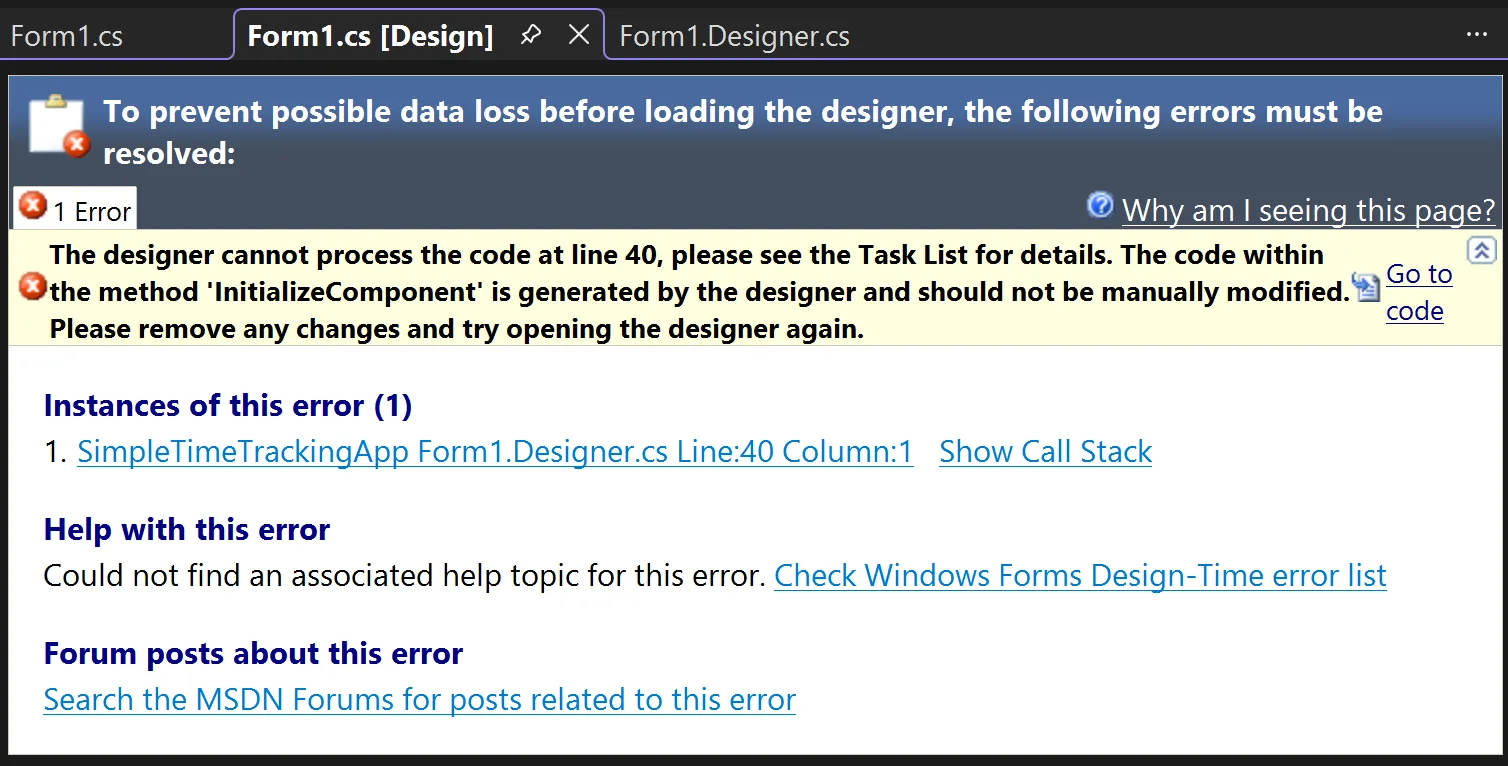
Without certain adjustments, the code Copilot creates isn’t compatible with the WinForms Designer.
Choose Your Options – and Use the Model Wisely
You can and should adjust GitHub Copilot options for WinForms. The model you use largely determines outcome quality: cheaper models exist, but the more expensive ones usually yield way better results.
I personally get the best results with Anthropic’s Claude models. Sonnet 4.5 produces results that never stop amazing me. And Opus 4.5… you just have to see for yourself.
Regardless of model choice, make sure these options are activated in Tools/Options under GitHub:
Enable Agent mode in the chat pane: Relevant for WinForms!
Unlike Ask mode, Agent mode autonomously handles multi-step tasks, edits code across files, runs terminal commands, monitors build/test results, and iterates until complete. Access it via the mode dropdown in Copilot Chat.
Enable MCP server integration in agent mode:
Connects Agent mode to Model Context Protocol (MCP) servers for extended capabilities. MCP lets Copilot interact with external tools like GitHub issues, Azure resources, and databases. Configure servers via .mcp.json files.
Enable Planning: Relevant for improving Quality in WinForms!
For complex requests, Copilot generates a Markdown plan with task breakdown, research steps, and progress tracking. Takes more time but yields magnitudes better results for WinForms tasks.
Enable View Plan Execution: Useful for WinForms!
Shows real-time progress during Planning execution. I recommend keeping the result as part of your project and GitHub history.
Enable project capability specific instructions: Most important setting for WinForms!
Automatically injects framework-specific guidance based on detected project type. For Windows Forms, Copilot receives relevant conventions and patterns without manual configuration.
Enable memories for repo-level preferences: Useful for WinForms!
Copilot learns project-specific coding standards from your interactions and saves them to .editorconfig, CONTRIBUTING.md, or README.md. Not WinForms-specific, but helpful for team work.
With those options set and one of Anthropic’s latest models, the result is spectacular:
That little app is now usable right from the get-go:
- HighDPI-proofed layout using TableLayoutPanel consistently throughout.
- Proper spacing and logical control grouping – way more intuitive.
- StatusStrip correctly positioned at the bottom with a sensible grab handle.
- Most importantly: Forms and UserControls are WinForms Designer compatible.
How Relevant is the Human Language?
Remember that my mom and I held our Teams conversation in German? I asked Copilot (the web-based version using ChatGPT o1) to generate the Visual Studio prompt in English from that German transcript.
You might think this was just preference or convenience. After all, LLMs work based on meaning rather than literal words – so there shouldn’t be translation issues, right?
Well, yes and no. And this is where it gets interesting.
The English Advantage (Whether We Like It or Not)
Does the human language of a prompt actually matter for code generation quality?
A 2024 study on multilingual code generation found significant disparities when using non-English prompts. Using Chinese instructions led to an average 17.2% drop in Pass@1 rates for base models generating Python code. For instruction-tuned models, still a 14.3% drop. CodeLlama-34B’s Java generation plummeted by 37.8% with Chinese instead of English instructions.
The researchers tested obvious fixes: prompt translation, data augmentation, fine-tuning. None adequately solved the problem.
Even GPT-4 shows “slightly varying error profiles” across languages – and struggles more with Hindi and Chinese compared to European languages.
Why Does This Happen?
When you prompt in English, the model draws from its massive English training corpus. Prompt in German, Chinese, or Hindi, and you’re asking it to work with a smaller, less refined slice of its knowledge.
One researcher put it bluntly: models maintain somewhat independent “piles” of knowledge per language, and how these inform each other during generation isn’t entirely clear – but they behave quite independently. English simply has the largest pile.
This isn’t a moral judgment – it’s just current training reality. Most leading LLMs come from English-dominant companies: OpenAI, Anthropic, Google, Microsoft. Even DeepSeek, a Chinese company, shows the same English-favoring pattern.
What About Code-Mixing?
Here’s another wrinkle: many developers naturally code-mix with AI assistants. You might write “Denglisch”: “Erstelle eine Funktion, die den user input validated.” Seems natural, right?
Research using a benchmark called CodeMixBench found that code-mixed prompts consistently degrade Pass@1 performance compared to pure English. Degradation worsens at higher mixing levels, and smaller models (1B-3B parameters) suffer more.
The takeaway? Even partial German (or Spanish, or Chinese) introduces friction.
The Cascaded Prompt Pattern
What’s the practical solution for international teams? Based on a bit of research, but most of all my own experience, I suggest the Cascaded Prompt Pattern:
- Capture requirements in the native language. Let stakeholders express domain requirements in whatever language they’re most comfortable with. You’ll get more precise, complete information. If you use AI for audio transcript, use further AI/LLM passes to ensure the best knowledge data basis.
- Translate and restructure to English. Use an LLM to convert native-language input into a well-structured English prompt. This isn’t just translation – it’s transformation into a format optimized for code generation.
- Improve and verify. Have the LLM review that once more for clarity, precision, and completeness.This is also where grammar matters more than you’d think. Consider:
- “Let’s eat, grandma!” – calling grandma to dinner
- “Let’s eat grandma!” – suddenly we’re generating code for a cannibal simulator
The classic “only” placement disaster:
- “Give the intern access only to the test database.” – intern gets test DB, all is well
- “Only give the intern access to the test database.” – ambiguous: do others get access too?
- “Give only the intern access to the test database.” – suddenly only the intern has access, everyone else is locked out
For non-native English speakers, these pitfalls multiply:
German thinking: “Gib dem Praktikanten nur Zugriff auf die Testdatenbank.”
This could become:
 “Give the intern access only to the test database” – correct, limiting scope
- “Only give the intern access to the test database” – wait, what about everyone else?
- “Give only the intern access to the test database” – congratulations, you just locked out your entire team
An LLM reviewing your prompt can catch these subtleties before they derail code generation.
- Execute in English. Run code generation against the polished English prompt for best output quality.
- Limit tokens without changing meaning. LLMs know about LLMs – we humans use filler words that add no concrete content. “Straighten up” or “shorten” requests help keep context windows manageable.
 “Give the intern access only to the test database” – correct, limiting scope
 “Only give the intern access to the test database” – wait, what about everyone else?
 “Give only the intern access to the test database” – congratulations, you just locked out your entire team
Cascaded Prompting gives you native-language precision for requirements gathering and English-language performance for code generation. Best of both worlds.
What that does improve for Your Team
If you’re working internationally:
- Colleagues gathering requirements in their native language are improving requirement quality by expressing themselves naturally.
- But the execution prompt should be English – not because English is “better,” but because that’s where models perform best today.
That prompt for my mom’s software? No one really wrote it, yet it became nearly 15 KB of precise solution description. I believe prompts responsible for major code generation should be part of your solution. I always create a Copilot subdirectory to hold generation prompts and major refactoring requests.
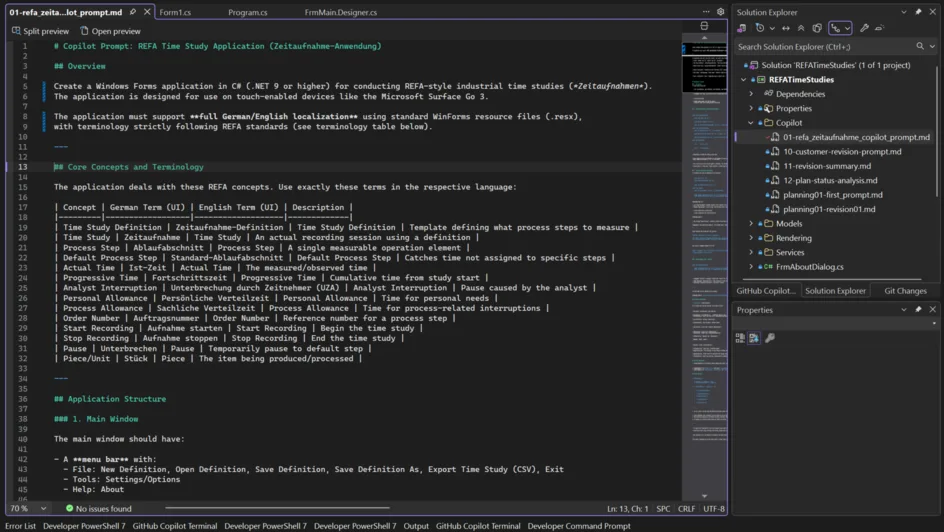
Cede Magnum Opus
So, at this point, we were at the ideal base situation:
- We got the Options set which were ideal for WinForms Agent runs.
- We had an English prompt, which was generated and probably edited and then rechecked by an LLM.
- We planned to get one of the most sophisticated Models to work – Anthropic’s new Opus 4.5.
It was time to say: Give it a go, let’s run it and see what happens!
IntelliSense in your prompt, references to your solution files
What I always did, before I let Copilot loose and take over: I created the project. I wanted to make sure I got the project naming right, I set the correct Target Framework, and the whole solution landed in the right folder. And, if it wasn’t a “need a tool for the next 3 minutes”-kind of app, then I also created a GitHub repo. And so, here is how I started:
- I created the GitHub repo, and called it RefaTimeStudies.
- I cloned the repo locally.
- I created a subfolder src, and in that folder I created a new WinForms project, like so:
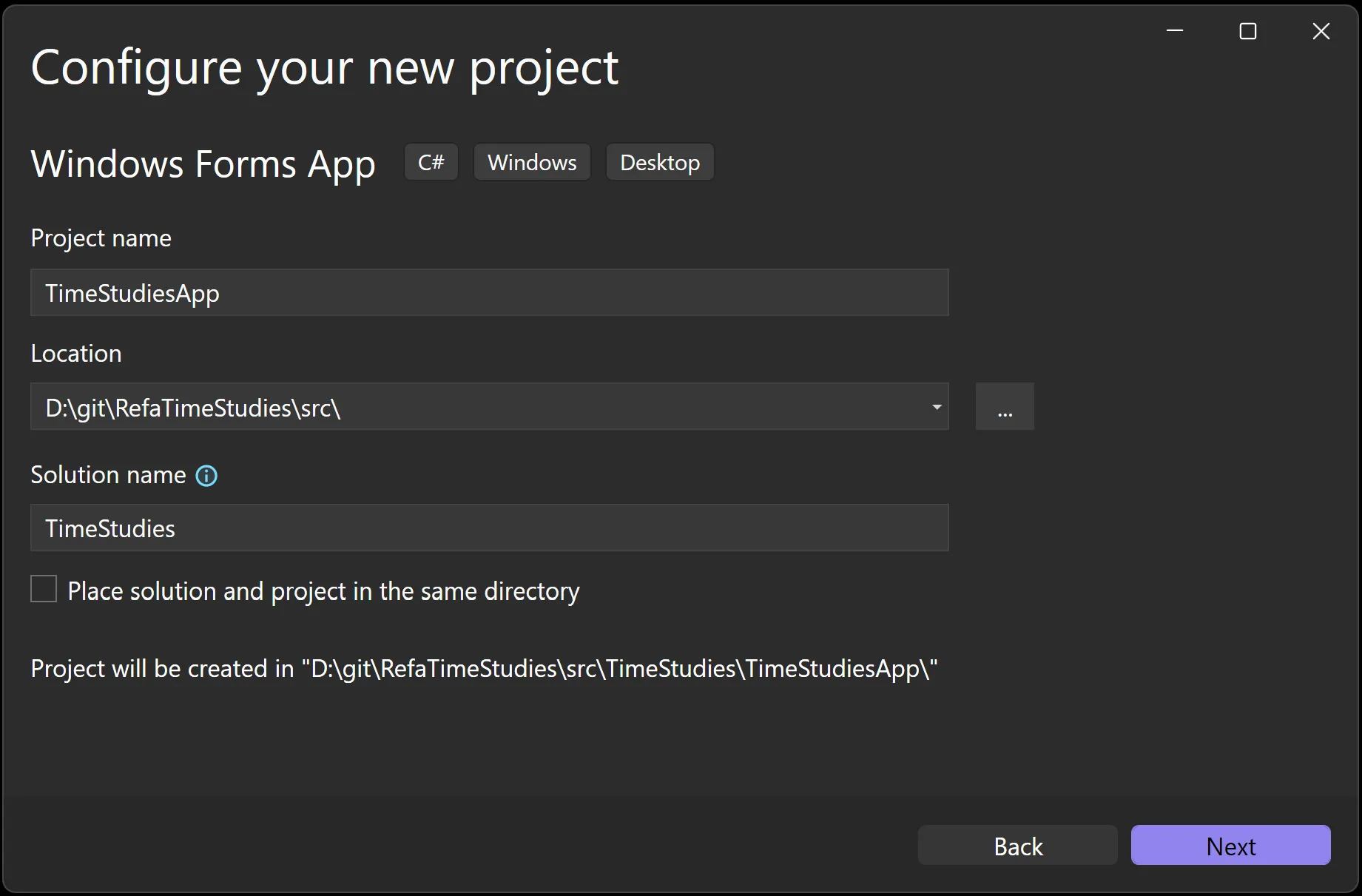
- Once Visual Studio had the project created, I renamed
Form1intoFrmMain, because this was the first thing I did since VB4 times. It’s a habit. A quirk. - I also went through all existing code files, and changed the namespaces definition to be file scope namespaces. (And yes, that is something, we’re planning to address for WinForms templates in .NET 11 – promised!)
- I created a solution folder, named
_solution folder. I really start that name with an underscore to make sure that folder really sits on top of everything else. - In the file explorer, I created a .github folder, and I further created a subfolder named AppPrompts. Everything I had generated so far, I copied into that folder, added it in VS to that solution folder, and that was the baseline I checked in as the initial app frame commit, with a Solution structure that looked like this:
IntelliSense for References in Prompts
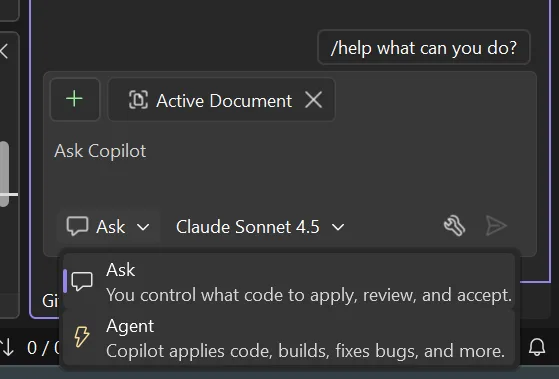
Now, here’s where Visual Studio’s Copilot Chat really shines: you can work in two distinct modes—Ask and Agent—and understanding the difference is crucial for effective development.
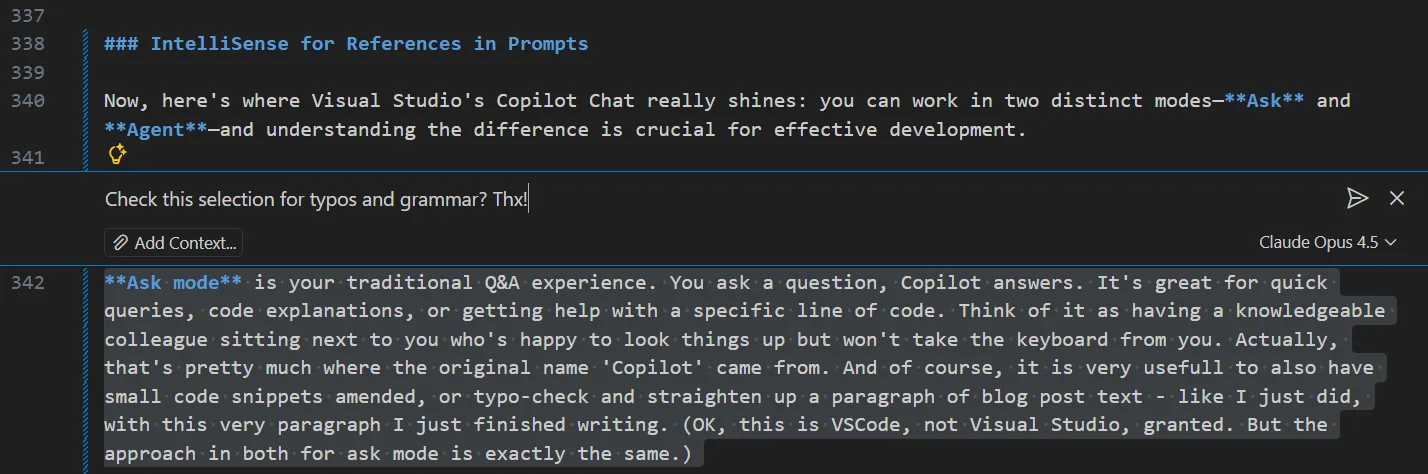
Ask mode is your traditional Q&A experience. You ask a question, Copilot answers. It’s great for quick queries, code explanations, or getting help with a specific line of code. Think of it as having a knowledgeable colleague sitting next to you who’s happy to look things up but won’t take the keyboard from you. Actually, that’s pretty much where the original name ‘Copilot’ came from. And of course, it is very useful to also have small code snippets amended, or to check for typos and straighten up a paragraph of blog post text—like I just did with this very paragraph I just finished writing. (OK, this is VS Code, not Visual Studio, granted. But the approach for Ask mode is exactly the same in both.)

Agent mode, on the other hand, is where the magic happens for multi-step tasks. When you switch to Agent mode (via the dropdown in the Copilot Chat window), you’re not just asking questions – you’re delegating. The Agent can autonomously edit files across your solution, run terminal commands, monitor build results, and iterate until the task is complete. For building our REFA time-study app, Agent mode was essential: it needed to create multiple files, extend the existing project structure, implement the WinForms Designer-compatible code, and handle all the interdependencies between them.
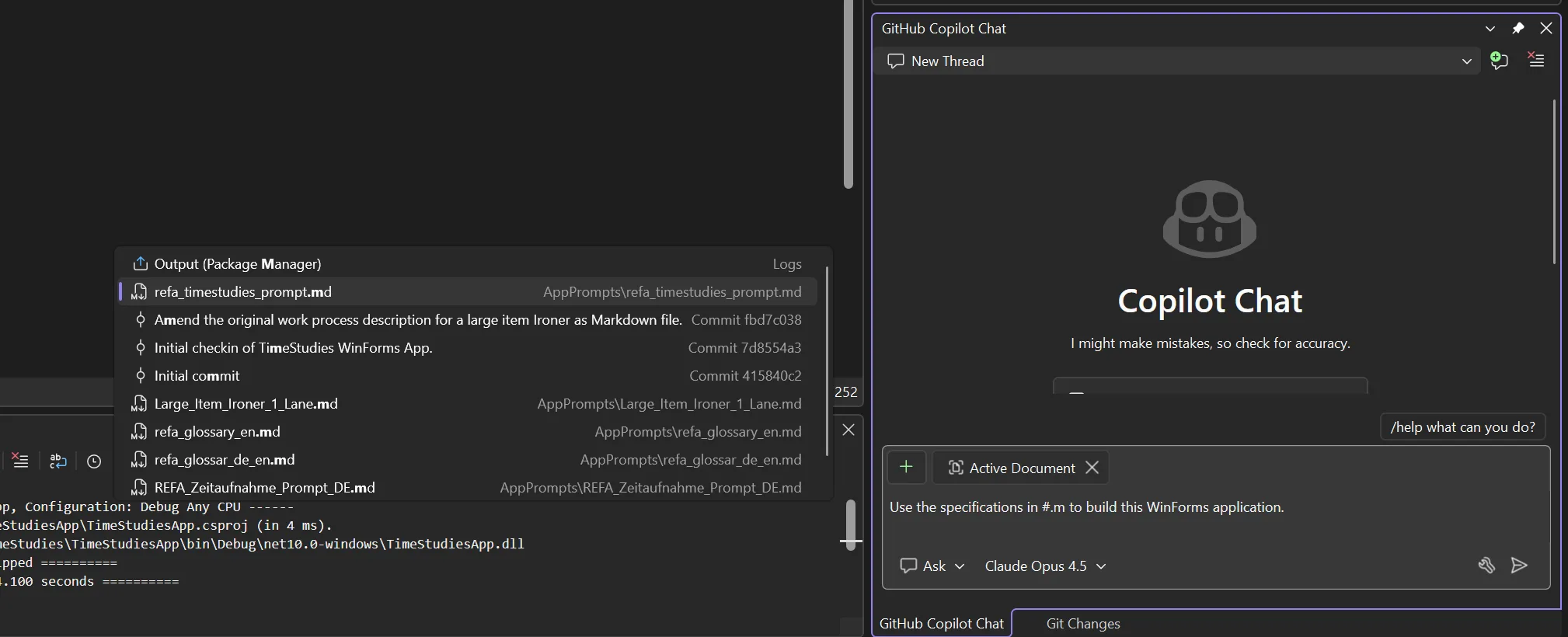
But here’s where it gets even better: you don’t have to type out lengthy prompts in the chat window. Visual Studio Copilot Chat supports file references directly from your solution. Simply type a # (hash symbol) in your prompt, and IntelliSense springs to life, showing you all files in your solution that you can reference. Type #.md and it filters to show only Markdown files—perfect for when you have a well-crafted prompt document ready to go.
This is precisely what I did: after having used the web portal of the LLM of my choice (use Copilot, ChatGPT, Claude – whatever makes you happy!) to generate and refine the main REFA time-study prompt in English, I saved it as refa_timestudies_prompt.md in the solution. Now, instead of pasting thousands of characters of instructions into the Copilot chat window, I could simply write something like: “Use the specifications in #refa_timestudies_prompt.md to build this WinForms application.”
This is cascaded prompting in action: first, an LLM helps craft the prompt – I did that with Anthropic’s Claude Sonnet. Then, another LLM (through Copilot in Visual Studio – I chose Anthropic’s Opus 4.5 back then – but I’ll be honest: I did it again for this blog post, out of curiosity about the results with Opus 4.6) consumes that prompt to generate the actual code.
The prompt document becomes part of your solution—versioned, reviewable, and reusable. It’s not just a convenient shortcut; it’s a documentation artifact that captures exactly what your application should do, in a format that both humans and machines can understand.
The direction I dare to suggest for prompt-driven development
And my honest opinion is: we should drive the development of tools with way more focus on that. Coding is a developer’s way to express intent. But so is writing prompts. The argument against treating prompts on the same level as code is that compiler output is predictable, while LLM-generated source code is not—and that’s true on a certain level. But the question is how relevant that difference really is. Bottom line: we will only be able to truly review or unit-test the new and often insane amounts of code we’re now dealing with when our review and test principles reach the same abstraction level as code generation itself.
And think about it: you’re not really reviewing the generated IL code, or writing unit tests in IL, when you use a tool like the C# compiler or the VB compiler to express your intent for what an app should do in which circumstances, right? You’re reviewing C# and you’re writing the unit tests in C#—so why aren’t we exploring feasible ways to review in natural language, or write the unit tests for the results in natural language? Because that doesn’t work? Well, I would even agree—for now. But I would also say: let’s find a way to make that work!
And then Copilot WinForms Expert Agent did its thing:
- It created everything—Forms, UserControls, models, data structures, the whole nine yards.
- It encountered a few errors in its own generated code, but identified and fixed them autonomously.
- Total generation time: about 15 minutes. Not bad for what would have taken me days to build manually.
The first thing I tested when Copilot completed its run: could I open the Forms in the Designer? This is where the WinForms Expert Agent earns its keep. Getting the separation of concerns right—ensuring Designer-managed code lands in the .Designer.cs file while business logic stays in the main code file—took considerable effort. In complex Forms, there might still be edge cases. We’re getting there — but, 3 months after release to production, my pulse still increases by 30 beats per minute while waiting for the Designer to come up.
Lo and behold, though, everything opened perfectly in the WinForms Out-Of-Proc Designer. No errors, no glitches, no “White Screen of Darn.”
And actually, the layout was pretty cool, too. But, ok, I get it, I might be biased.
In the Designer at least.
Second Customer Iterations
The first run was… somewhat OK. OK-ish. On the surface. But there were – let’s say: misunderstandings.
Here, let’s look. In the very first version Copilot generated back in December with Opus 4.5, the English UI was mostly OK. But the German version had – surprise – problems with the umlauts. Don’t we all love Unicode, particularly when it’s not used? My last name here in the US has many, many variants. In the Microsoft internal system, I became Loffelmann after I migrated to Redmond from Munchen. In the Campus pharmacy, it’s usually Loeffelmann. Most of the time. But of course, my most favorite ones are still L ffelmann and Löffelmann.
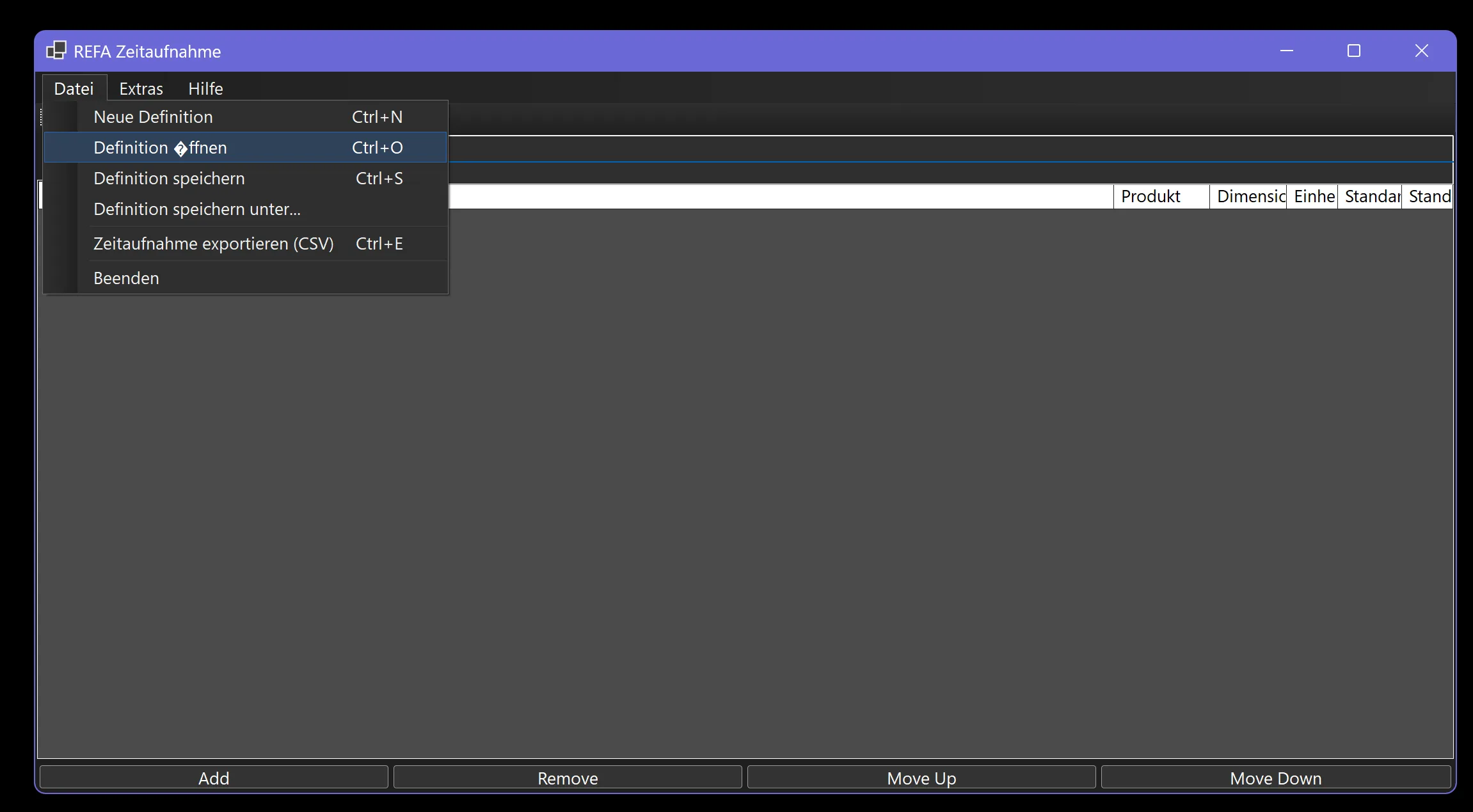
So, as you see — the Diamond in question (that’s probably $10 in the pun jar right there) found its way into the UI here as well. And trying to fix this directly in the resource file was also not as simple as I would have thought:
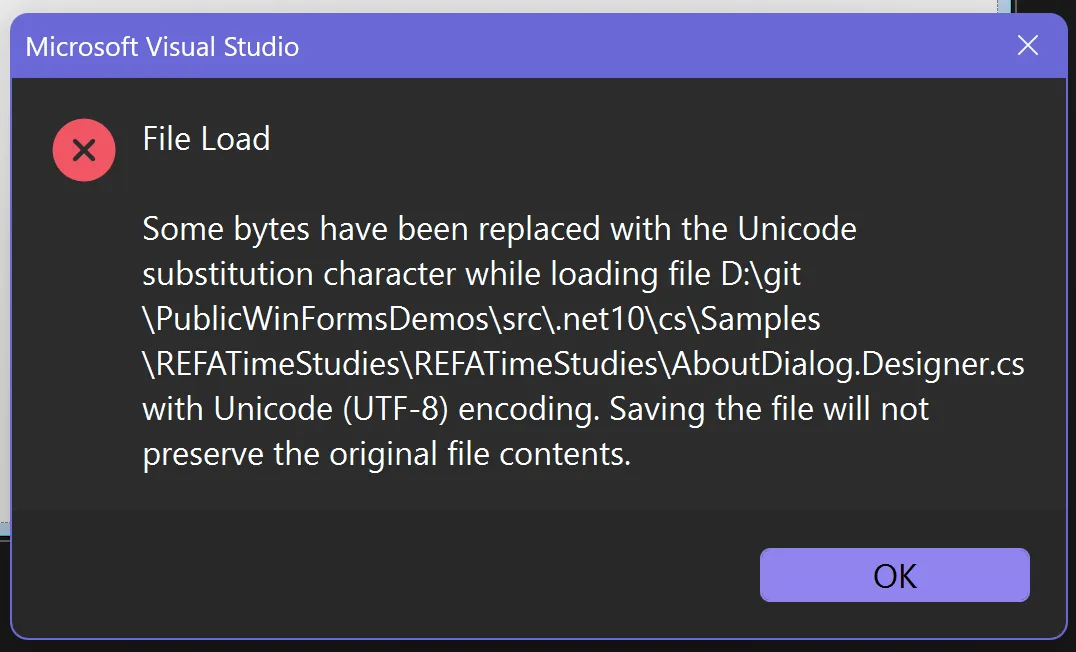
And while those weren’t really show stoppers back then, three months later the quality is yet again way better, but still not perfect:
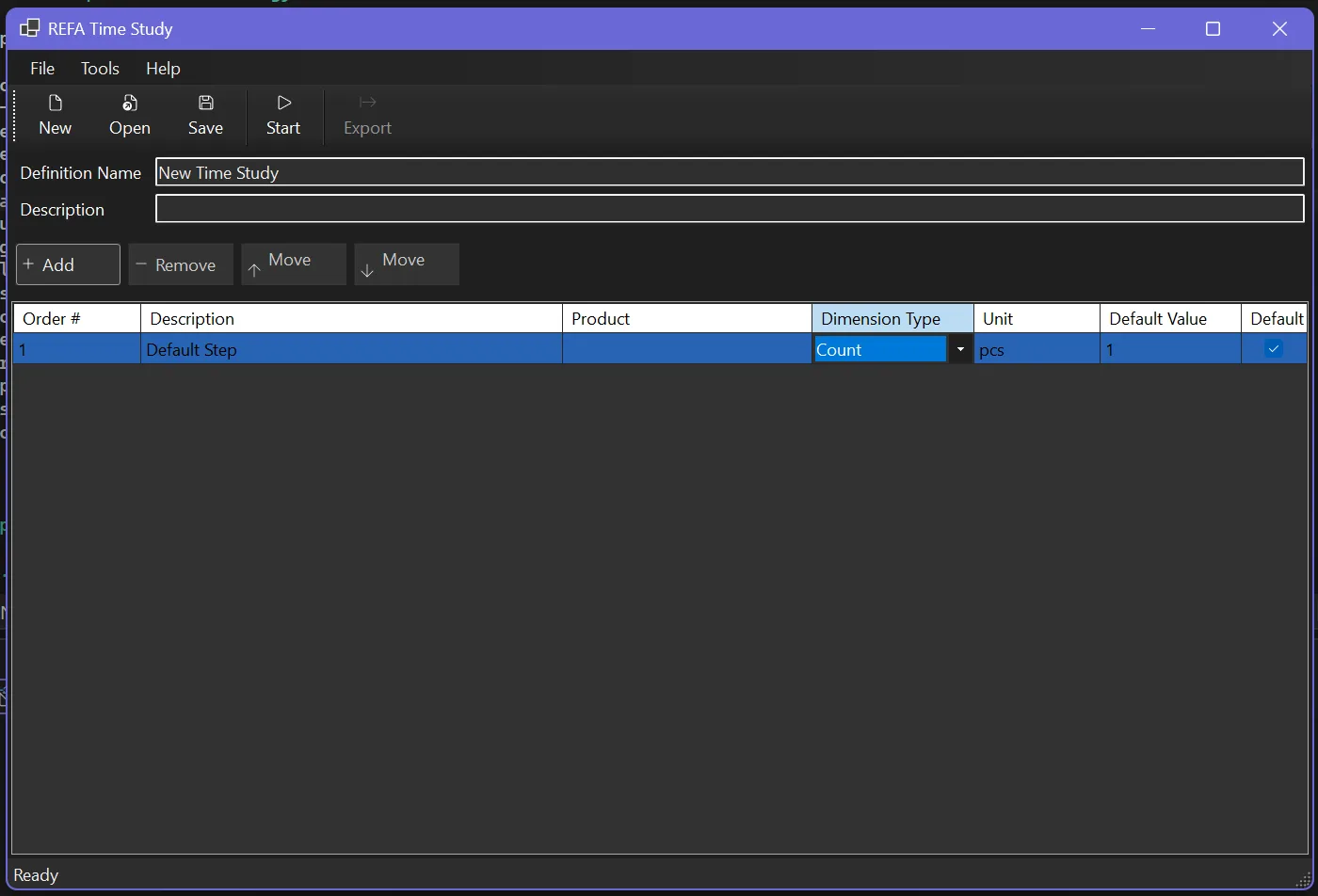
Obviously, though, those things were all pretty superficial and therefore would also have been pretty quick to fix. But. What about the domain-specific part? Did Copilot understand what my Mom really wanted?
Know what the customer wants, not what the customer says they want
This is where prompt-driven development enters a domain that is very, very painful for many developers. I’ve heard developers often say “Copilot can be made to do what I want. But I have to tell it in great detail!” Well, guess what. Every Scrum Product Owner hears that and says “Welcome to my world!” — they know how to translate “customerish” into “work-item-ish” that the developer then understands, aaand — when it’s an experienced Scrum Product Owner — which is spelled out so unambiguously well that it does not leave much leeway for the decisive areas of the domain specifics. But enough play to get the best of the developer’s creativity, enthusiasm, and out-of-the-box thinking into the work. It’s a constant juggling of compromises and fine-tuning, and exactly that is prompt-driven development. Leave “temperature” for uniqueness and originality, but nail the essentials with the predictability of JSON-structured LLM code generation. We all know by now, both are possible and reliably possible. The art is how you guide the LLM to produce what you want. And also, to be honest, it gets easier with every new dot-release.
The hour of truth – what did Customer Mom say
Well, as soon as I shared my screen, and she saw the dialog: “Ach herje, das ist aber mal dunkel…” (Yeah, mom, it is not particularly bright. That’s why we call it dark mode. And it was one of the most requested features, and your son—) “…und wie soll man denn in nur einer Zeile die Beschreibung eingeben, ne, so geht das nicht.” (Well, the time study description in one line…she’s got a point. Should have been a multiline TextBox.) “…außerdem…”
So…we tested what we have, and it became, let’s say, a somewhat longer list. I thought it might be entertaining to show it in its original German, pretty much unedited version of the change notes – should you be curious what it means, just use Copilot to have it translated. Should you then also want to know, what it means in terms of REFA – then also ask Copilot. Use it for your own experiments – I hope, it can serve as the right and typical document for testing, experimenting and ramping up.
# Nachbesserungsanfrage nach Besprechung

* Das Eingabefeld für "Definition Name" einen deutlichen größeren Zeichensatz verwenden, damit die Orientierung in der Maske gewahrt ist. Wir sollten von 16 Punkt Schritgröße ausgehen und Fettschrift.

* Das Description-Feld muss mehrzeilig sein (mindestens 4 Zeilen hoch) und einen Scrollbar haben.

* Aktuell können Daten in die Grundfelder eingegeben werden, bevor auf _New Definition_ geklickt wurde – das Speichern schlägt dann fehl. Die Buttons und Textfelder sollten daher initial deaktiviert sein und erst nach Klick auf _New Definition_ aktiv werden.

* Die drei Schaltflächen am unteren Rand in die Toolbar konsolidieren.

* Die Toolbar soll kontextabhängig nur die jeweils relevanten Schaltflächen anzeigen (gesteuert durch eine interne Logikmatrix). Wichtig ist es aber dennoch, dass die Breite der MenuItems stets gewahrt bleibt, damit ihr jeweiliger Inhalt nicht abgeschnitten wird.

  Beispiele für die ToolStripButton-Steuerungslogik:

    * Solange keine Definition erstellt (_New Definition_) oder geladen (_Open Definition_) wurde, werden _Add Step_ und _Export CSV_ nicht angezeigt.
    * Wenn eine Definition keine Process Steps enthält, kann keine Zeitaufnahme gestartet werden.
    * Wenn kein Step in der Liste vorhanden oder markiert ist, wird _Remove Step_ nicht angezeigt.
    * ...

* Die Schaltflächen im ToolStrip sollten die in den Optionen definierte Mindestgröße haben, zuzüglich 5 px × Scalingfaktor Padding, sowie eine gezeichnete Umrandung mit abgerundeten Ecken. Es gibt eine neue .NET 10 API für abgerundete Rechtecke, die vielleicht in diesem Kontext nutzbar ist.

* Bei aktiviertem DarkMode muss die Farbgebung im DataGridView angepasst werden. Dabei sollen absolute Farbwerte statt SystemColors verwendet werden, um die Farbnuancen gezielt steuern zu können.

* Das Padding der GroupBox, die das DataGridView enthält, sollte an den seitlichen Rändern etwas größer sein.

* Wir sollten Order # in Step No/Schritt Nr. umbenennen.

* Wir benötigen eine zusätzliche Spalte mit dem Titel "Codierung/Code No".

* Schaltflächen mit Pfeil nach oben/unten hinzufügen (Icons aus einem Symbolzeichensatz generieren), um Ablaufabschnitte zu verschieben. Wichtig: Verschoben werden kann nur in numerische Lücken. Beispiel: Bei den Schritt-Nr. 1, 2, 3, 5, 7, 9, 10 kann 10 auf Position 8 oder 6 springen, und 1 kann auf 4, 6, 8 oder 11 springen. Die Schritt-Nr. wird dabei entsprechend aktualisiert.

* Beim Ändern der Schritt-Nr. wird die gesamte Ablaufzeile verschoben, sofern der neue Wert noch nicht existiert. Andernfalls muss eine Fehlermeldung erscheinen – doppelte Schritt-Nr. sind nicht erlaubt.

## Änderungen bei Zeitaufnahmen

Die Buttons der Zeitaufnahmen sollten linksbündig, untereinander angeordnet sein, und neben der Schritt Nr. auch den Code als Aufschrift beinhalten. Neben der Schaltfläche sollten die ersten Zeichen der Schrittbeschreibung angezeigt werden. Die einzelnen Ablaufabschnitte müssen aber während der Zeitaufnahme deutlich von einander visual getrennt sein, damit die Orientierung gewahrt bleibt. Es könnte hier sinnvoll sein, die Schaltflächen in einem eigenen Panel mit abgesetztem Hintergrund zu platzieren.

Am unteren Rand des Bildschirms soll es ein zusätzliches Texteingabefeld geben, in dem man für den aktuelle Arbeitsablauf-Schritt Notizen eingeben kann. Diese Notizen sollten in der CSV-Exportdatei in einer eigenen Spalte mit exportiert werden. GGf. müsste hier das interne Datenmodell angepasst werden, um die Notizen pro Schritt zu speichern.

## Domänenspezifische, notwendige Änderung bei Einheiten und Zeitarten

Die Funktionsbeschreibung der Einheiten war faktisch falsch. Die Einheiten werden nur für einen gesamten Ablauf definiert, nicht pro Schritt. Daher muss die Einheit in der Definitionstabelle definiert werden, und die Schritte sollten nur die Zeitarten (tr, te, tg) enthalten.

Die entsprechenden Umbauarbeiten sind damit:

* Anpassen des Datenschemas, sodass die Einheiten in der Definitionstabelle definiert werden und nicht in den Schritten.
* Hinzufügen eines neuen Eingabefelds für die Einheit in der Definitionserstellung/-bearbeitung.
* Anpassen des Datenschemas für die Schritte, sodass sie nur die Zeitarten (tr, te, tg) enthalten (siehe untenstehende Tabelle und Bedeutung)
* Sowohl Einheiten der Definition als auch die Zeitarten in den Schritten haben nur dokumentarischen Charakter, sie haben keinen Einfluss auf die Berechnung der Zeiten oder die Logik der Ablaufsteuerung.

Die Zeitarten laut REFA haben folgende Bedeutung:

| Code | Bezeichnung             | Beschreibung                                                      |
| ---- | ----------------------- | ----------------------------------------------------------------- |
| tb   | Brachzeit               | Zeit, in der der Werker während des Maschinenbetriebs untätig ist |
| ter  | Erholungszeit           | Erholungspausen zur körperlichen/geistigen Regeneration           |
| tg   | Grundzeit               | Direkte Ausführungszeit für die Kernaufgabe                       |
| th   | Hauptzeit               | Zeit, in der das Werkstück aktiv bearbeitet wird                  |
| tn   | Nebenzeit               | Hilfszeit (Beladen, Entladen, Positionieren)                      |
| tp   | Persönliche Verteilzeit | Zeit für persönliche Bedürfnisse                                  |
| tr   | Rüstzeit                | Vorbereitungs- und Nachbereitungszeit je Auftrag                  |
| ts   | Sachliche Verteilzeit   | Zeit für betriebliche Störungen (Werkzeugwechsel usw.)            |
| tt   | Tätigkeitszeit          | Zeit der tatsächlichen menschlichen Tätigkeit                     |
| tv   | Verteilzeit             | Zusätzliche Zeitzuschläge (persönlich + sachlich)                 |
| tw   | Wartezeit               | Unvermeidbares Warten (prozessbedingt)                            |
| te   | Zeit je Einheit         | Gesamtausführungszeit je produzierter Einheit                     |
Context, context and again, context
Now. There were several options, which I now had:
- I could have taken this whole German change-request-monster and fed it directly into the prompt. But remember what we said earlier? Try to apply instructions in the English language, the results will often be noticeably better.
- I could have translated this, let’s say, in Anthropic’s Web-Portal, or in Microsoft’s Copilot Web-Portal, or also directly here in the Copilot chat into an English prompt, let’s say, CustomerChangeRequest.md.
- I could also have requested Copilot to write a detailed English prompt which would have held the change request instructions in maximum detail to generate the actual changes.
And I went for option 3 for the following reasons.
Now, we’re really cascading
a) When you add customer changes yourself, you change the requested spots where the intention is stated. In C#, that’s the C# code that you change. In VB, the VB code, and so on. Well, when you apply prompt-driven development, you already had one very detailed prompt with all the intentions phrased out for the first version. Now, to get to the change-request prompt, you want to not only generate that prompt just based on the customer’s change request. You also want to take the complete existing codebase into account, which sort of re-engineers missing natural language information from the existing code-base back into the prompt that you’re generating, to make it even more precise! But that’s not the only reason, because:
b) Since you can apply all the customer change requests pretty quickly, you create a new branch right after you generated the loooong change request prompt, but right before you let Copilot then implement those changes!
Because, now this happens: Copilot generates the changes, and you start the App 10 minutes later, and you see, “damn — I actually forgot to amend 2 little details.” Now, two things you can do:
- You prompt these changes in. But then, the big change request prompt that you have is no longer in sync with your changed codebase, which you want to show your customer in an hour, and maybe go from there, and create the next bigger change request prompt, for the V3 version of the app.
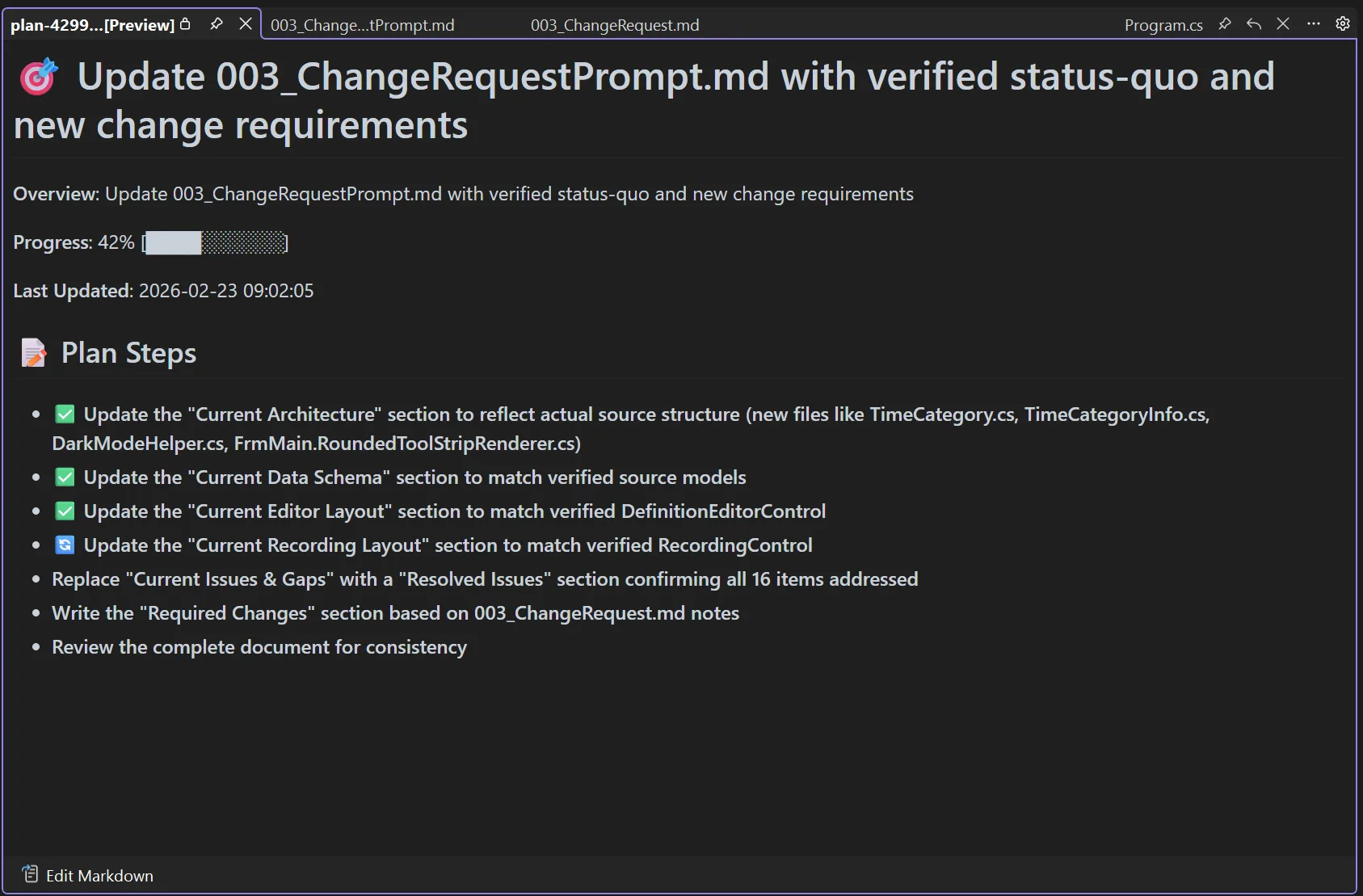
- You prompt to modify the big change request prompt based on the latest finding. And what then happens is almost fascinating to see (and is not only what I’d suggest to do, but also what I did). But when you see the screenshot, the benefits of that approach become immediately clear:
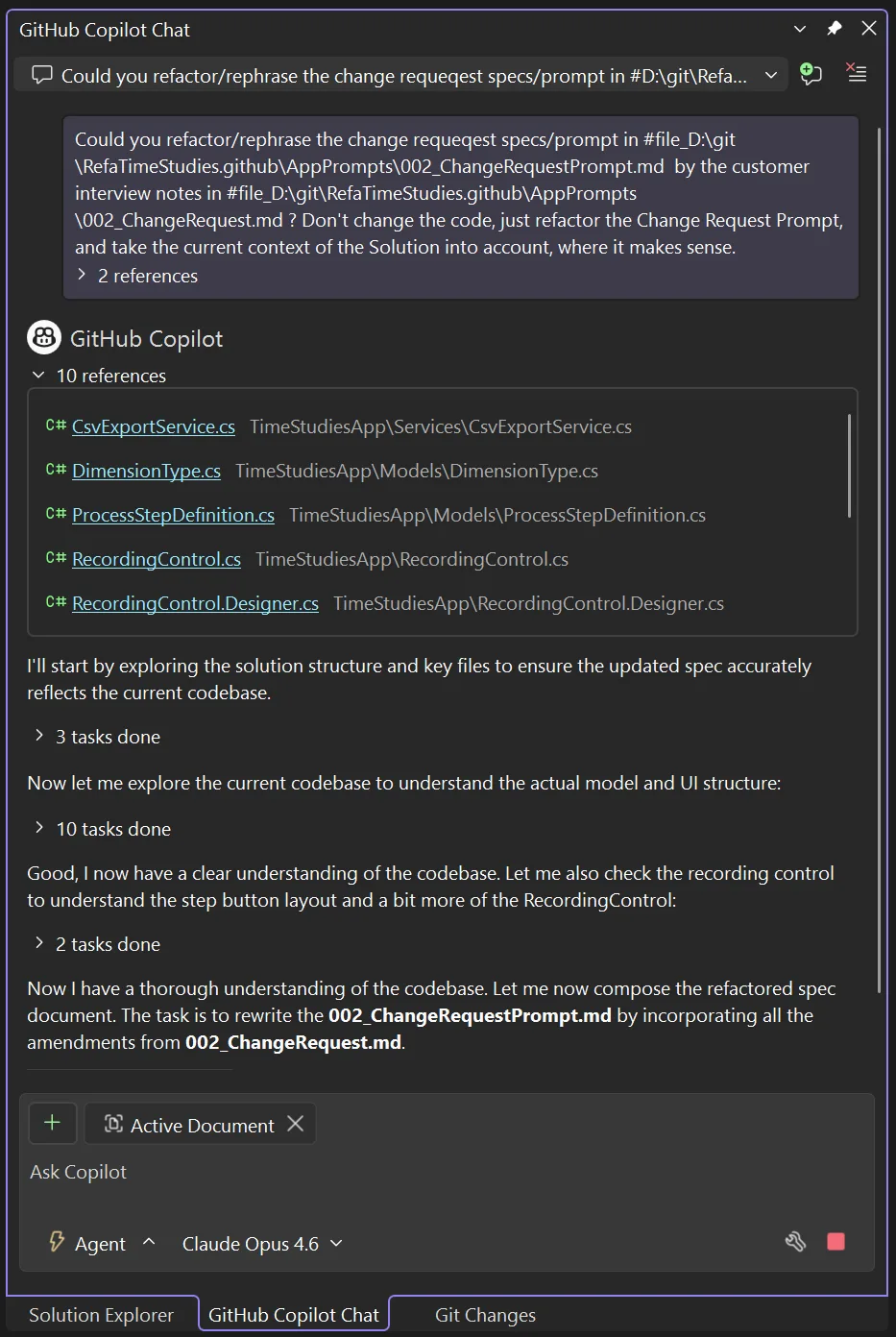
Copilot takes the whole existing Solution into account by finding the relevant references which will later be subject to change. That of course increases the quality of the resulting prompt tremendously.
But the second positive effect is: You will later find the delta of the changed prompts in GitHub exactly as you would find changed code in the past in GitHub. You move the phrasing of your intent just one level up — but the principle of how you do it is the same.
And with an increased reliability of the results which Copilot will produce with newer models, it’s not only the scaling of writing the code that works — it will also solve the scaling of reviews and unit tests:
When something does not work as planned, you start at that level. If you already detect a flaw in the prompts, which you made part of your source code — or rather, intent statements — then looking at the code is probably no longer necessary. At least not at the point where you are still in the iterating phase, because approaching it this way, you are not adding to the existing code. You roll an existing change at the code base completely back, iterate the prompt and then generate again. And since with each iteration the prompt gets more precise, the resulting code does the same.
Does that mean, reviewing on source code level will be a thing of the past? I don’t know. I would openly state “I would say cautiously optimistic claim ‘yes’, while I am thinking ‘Hell, yeah, absolutely’”. But I would not say that openly. Not yet.
Now — after the change request prompt run — where did that bring us? Honestly: pretty far, as you can tell from the following animated gif which shows the design of a first complete time study definition template. And please note: Up to this point, we did not touch the WinForms Designer or the code editor a single time for any change. We just used those to look at preliminary results. But… that was all.
And the whole definition of the specs which resulted from the conversation with my mom, including the amendments of the change requests — every single thing had been implemented down to the exact point I also would have understood the specs to be implemented.
Honestly: Once in a while I even thought — wow, nice job, Copilot — that layout based on TableLayoutPanels is really slick and — which is really remarkable for WinForms, believe me, I know what I am talking about — even HighDPI compliant!
Observing the generation and reacting on demand
While developing the WinForms Expert Agent, I do not know, how many little WinForms Tools I wrote, and more so: How often I wrote them again and again. One thing I learned during that process:
You could just go away and do something else, while Copilot is writing the next feature of your App. But … you could also observe what it’s doing and act, when you see, what it’s currently thinking might be ending in a dead end.
Now, think about this from the perspective of how a customer would describe how those arrows are supposed to work. What should a click on the Down button do? Decrease the order number? That would move the whole entry up. So, increase the order number? That would move the entry down visually, yes — but it wouldn’t lower anything. “Down” is one of those words that means opposite things depending on whether you’re thinking about the visual position or the numeric value. Classic ambiguity trap — and exactly the kind of thing that causes subtle bugs in production.
Here’s what actually happened. I was reading along while Copilot was working through step 5 of its plan — the up/down arrow implementation. And as I watched its reasoning unfold in real time, I saw it wrestling with FindGapBelow() and scanning logic for free slots between entries. That’s when the thought hit me: wait, did we get the semantics right?
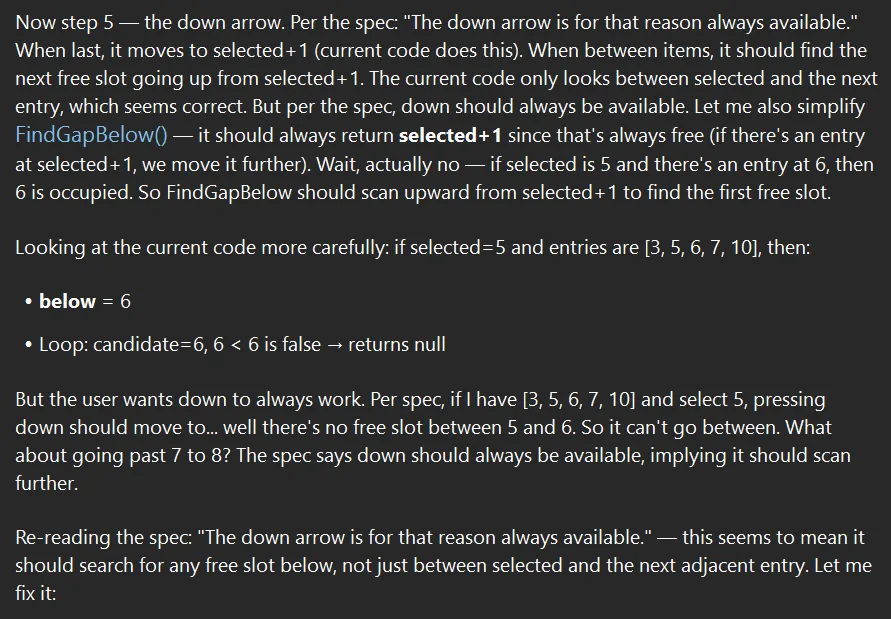
So I interrupted. I stopped the generation, read what it had figured out more carefully, and then prompted my concern:
Oh wait. Maybe we have confused down and up arrow. Because: is the down arrow the arrow that points down? Or the arrow which decreases the order no value? Because down for me means moving the row down, but that works by increasing the value.

If you'd agree, please take that base into account, and take that into account for the current plan.
And here’s the beautiful part: Copilot didn’t just blindly “fix” it. It actually double-checked the existing implementation, confirmed the semantics — down arrow (▼) moves the row down visually, which means increasing the order number, which calls FindGapBelow() to find a higher value — and concluded: “No changes needed — the logic is correct as implemented.”
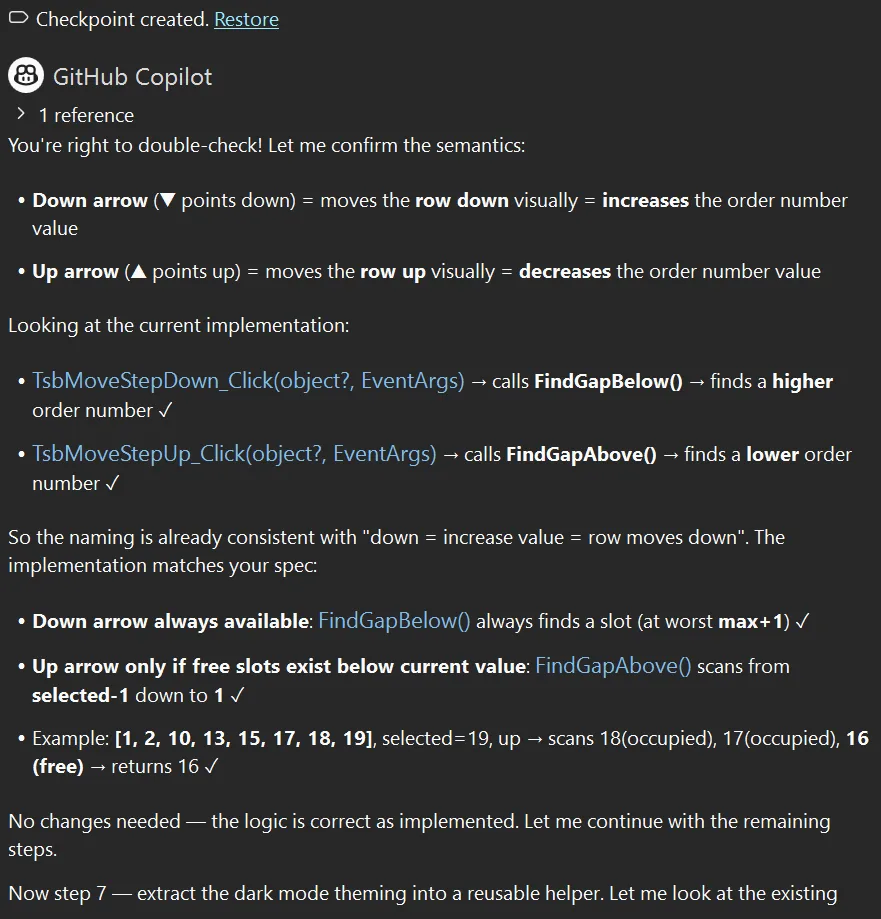
It was a false alarm. But here’s why this matters:
Tip: Watch the generation, don’t just wait for it. Copilot’s “thinking” phase isn’t just a loading screen — it’s a window into its reasoning. Reading along lets you catch misunderstandings before they turn into code. In this case, my interruption cost maybe 30 seconds. Had the semantics actually been wrong, it would have saved a debugging session.
Tip: Interrupt early, not late. If you see Copilot heading in a direction that feels off, stop it. Don’t wait for the full generation to complete and then try to untangle the result. A short clarifying prompt mid-generation is vastly cheaper than a corrective prompt after 200 lines of wrong code exist.
Tip: Trust but verify — and let Copilot verify, too. Notice that I didn’t tell Copilot to change anything. I raised a concern. It investigated, showed its work, and arrived at the right conclusion independently. That’s the conductor-orchestra dynamic in action: you flag a potential issue, the orchestra re-checks its sheet music, and either corrects course or confirms it was right all along.
Bringing It Home
Was the result—which I could finally install on my mom’s machine via Quick Assist—a polished, production-ready commercial application I could now earn millions with? Certainly not. The original software had years of refinement, edge case handling, and—this is the most decisive and important point—domain expertise baked in. What we built in a weekend was maybe 10% of that functionality. But as absolutely impressive as it was that it worked, and that we got it running in the time we had, it was the critical 10%: the time study capture module that my mom absolutely needed to complete her assignment.
She used it for the remaining days of her trip. And it did what we envisioned it to do—absolutely perfectly and reliably. Not a single crash in any of her time study recordings. The CSV exports worked. The timing data was accurate. The industrial laundry got their REFA-certified time studies. The workers got fair performance baselines. And Deutsche Bahn eventually got my mom back home—though I suspect the return journey had its own adventures.
WinForms Expert Agent saved the day. Well, actually, the week.
Are Developers Still Needed?
So here’s the question everyone asks: Does this work so well that developers will no longer be needed?
I think the question itself doesn’t make sense. I’d rather ask: Is the definition of a software developer from last year still the same as it will be next year? That one I can answer: absolutely not. What it will exactly look like, I don’t know.
But whatever that definition will be—I’m equally convinced that yes, developers will still be needed. Depending on our level of bringing out-of-the-box thinking and creativity to the table, more than ever.
What’s happening, FWIW, is that we’re lifting our execution level one meta-layer up. We’re becoming conductors rather than instrumentalists—but conductors still need to understand the music deeply, or the orchestra produces noise instead of symphony. This change, I’m convinced, will be disruptive—and will also provide enormous new chances. It will shift the industry completely, and it will not leave a single work approach unturned.
This isn’t unprecedented. It’s remarkably similar to what happened with the advent of the first compiler—the Formula Translator, which most of us know by its short name: Fortran. There’s a beautifully done documentary on YouTube by Coding Shorts called The Untold Story of Fortran. Highly recommended. It shows: back then, “real programmers” insisted that no machine could ever write assembly code as efficiently as a human. They were wrong about efficiency. But they were right that someone still needed to understand what the code should do.
History doesn’t just repeat itself—it rhymes. Knowing this helps navigate the transition with less anxiety.
The Evidence Question
So, my mom obviously is not your typical 82-year-old mom. They say ADHD is hereditary — I know for sure I am ADHD, my bosses know that for sure and so do my colleagues. My mom never had an official diagnosis, and I doubt she will try to get one at 82. But there is more than enough evidence she is. Positively put, she talks more with “Chatty” (that’s what she calls it) than many of my colleagues. And that she’s better in Excel than I am, or that my Adriana and I call her when we have questions about specific iPhone or Watch features — go figure. But for this reason, she now also knows how comparatively easy it is for me to add new features. Which, as it turns out, is not necessarily information you want to share with your 82-year-old mom.
To be perfectly frank, while she was using the improvised software back in December, we had another meeting, and I even had to amend something manually. We had yet another meeting just recently, in which we added a bit of functionality, and she is considering — for another gig in April (you did not really think she had retired in February, did you?) — to actually use this new version now on purpose.
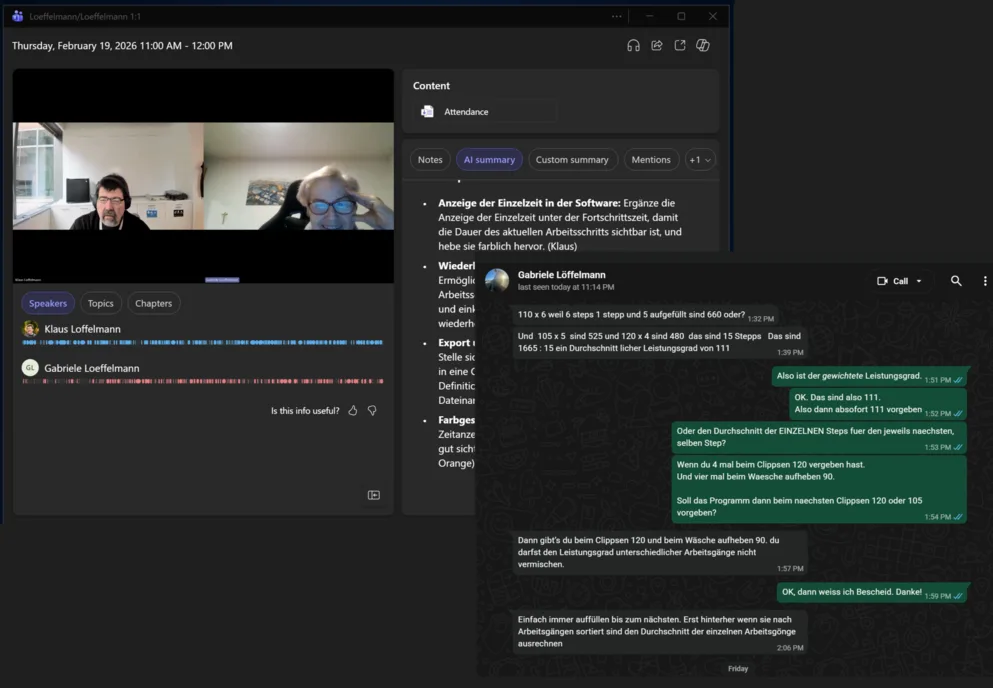
But she also very quickly got into the general mindset of prompt-driven development. She trapped me the other day in a WhatsApp discussion about the performance features, and pulled the same trick she’d used in the first version: documenting everything in Excel. But it was difficult for her to remember, so defining this in a special way during the recording makes her life way easier. When I said, however, “Mom — I am really busy,” she replied: “Hä, du brauchst doch den WhatsApp Screenshot nur Chatty zu geben, und dann macht doch Chatty die Änderungen, oder nicht?” — Sure, she was right, there was no escape. I did exactly that. Well, I still did it with my approach to sync the change request prompts — but she was correct. I took the WhatsApp screenshot and the screenshot of our Teams meeting summary, and the new version of the Time Study software was in the making 15 minutes later.
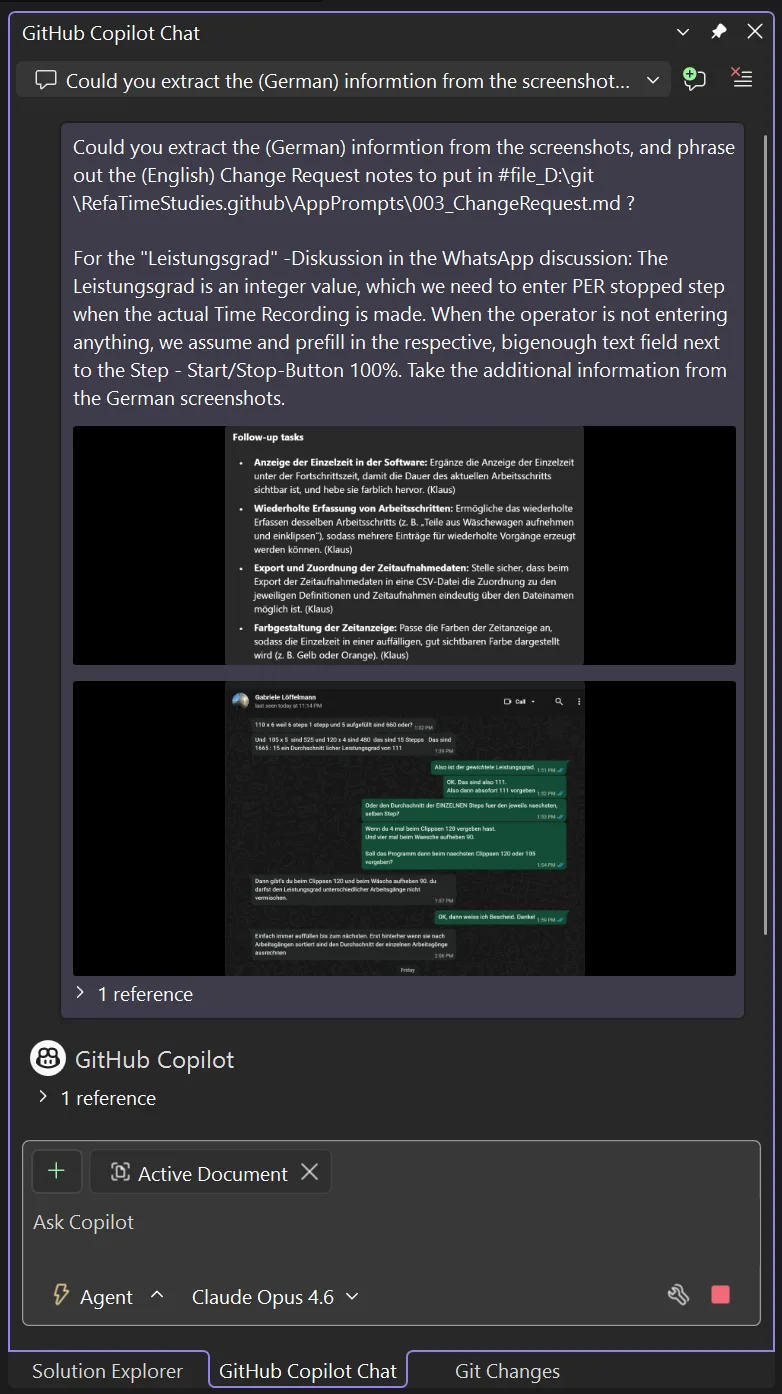
Already during the planning that Copilot derived from those screenshots, it became clear — this pretty much looked like a new version of the software that would work after the very first attempt, straight from the get-go.
Flashback 3 months: When my mom was finally set to complete her work and did her job, she unfortunately caught something — and no, not a software bug, though those exist too — and had to leave somewhat early. But she had the important things she came for anyway. And when she was finally back home, some days later I had time to finish that Dara O’Briain comedy special—the one where he “talks funny in London.” And somewhere in his routine about misinformation and conspiracy theories, he made a point that stuck with me.
He was describing people who believe things without evidence, and the response they give when challenged: “Do you have any evidence for that?” And they go, “Oh… there’s more to life than evidence.” Dara paused. Then: “Get in the fu—”
And at that exact moment, my phone rang. Germany country code.
It was my mom, calling to say thank you. The client was happy. The assignment was complete. The data was solid.
Here’s the thing about working with LLMs: they’re remarkably capable of filling in gaps. But gaps filled with plausible-sounding nonsense are still nonsense. The transcript cleanup worked because I verified it against what I remembered. The code generation worked because I tested it. The final app worked because my mom—the actual domain expert—validated every output against reality.
LLMs don’t have a conscience. They are not sentient. They don’t have a stake in being truthful. They optimize for plausibility, not accuracy. That’s not a bug; it’s the architecture. Which means the responsibility for truth stays exactly where it always was: with us.
“There’s more to life than evidence” is a great line for comedy. It’s a terrible approach to software engineering.
Keep your antennas up. Verify everything. And when an LLM gives you an answer that seems too convenient, ask yourself: would this survive contact with an 82-year-old REFA consultant standing in an industrial laundry at 6 AM?
If yes—ship it.
Happy coding, and good vibrations!
PS: No Copilot-generated EM-dashes have been harmed or killed in the editing process of this blog post.
The post The Dongle Died at Midnight – WinForms Agent Saved my German Mom’s Business Trip appeared first on .NET Blog.