Earlier this year, we announced that all major .NET test frameworks now support Microsoft.Testing.Platform. The next logical step? Making sure it works seamlessly with your CI/CD pipelines. Today, we’re announcing comprehensive Azure DevOps integration for Microsoft.Testing.Platform.
What’s New in Azure DevOps
Azure DevOps now provides first-class support for Microsoft.Testing.Platform with two key improvements:
- Run tests using the familiar DotNetCoreCLI task; no more workarounds required.
- Handle test retries intelligently—publish multiple TRX files from retry attempts with proper grouping and exit codes.
Whether you’re migrating from VSTest or starting fresh with Microsoft.Testing.Platform, the experience is now smooth and intuitive.
About Microsoft.Testing.Platform
If you’re new to Microsoft.Testing.Platform, here are some helpful resources to get you up to speed:
- Testing in .NET gives an overview of the testing tools used in .NET. In particular, it clarifies the difference between a test platform and a test framework.
- Testing with ‘dotnet test’ explains the different modes that the ‘dotnet test’ command can operate in.
- Microsoft.Testing.Platform overview covers what Microsoft.Testing.Platform is and how to run tests with it.
- Enhance your CLI testing workflow with the new dotnet test shows the ‘dotnet test’ support for Microsoft.Testing.Platform that was added in .NET 10 SDK.
In short, Microsoft.Testing.Platform is a modern alternative to VSTest.
Running Tests in Azure DevOps
The DotNetCoreCLI task now supports Microsoft.Testing.Platform starting in version 2.263.0!
You have two main options for running tests with Microsoft.Testing.Platform in Azure DevOps:
Option 1: Use the DotNetCoreCLI task (Recommended)
The DotNetCoreCLI Azure DevOps task now supports Microsoft.Testing.Platform starting in version 2.263.0.
- task: DotNetCoreCLI@2
  displayName: 'Run tests'
  inputs:
    command: 'test'
    projects: '**/*Tests.csproj'
    arguments: '--no-build --report-trx'
What changed? Microsoft.Testing.Platform uses different command-line flags than VSTest. For example, use --report-trx instead of --logger trx. See the Microsoft.Testing.Platform CLI documentation for the full list of options.
Option 2: Run ‘dotnet test’ directly
You can run the dotnet test command directly using a script or command-line task. This gives you maximum flexibility and doesn’t require specific Azure DevOps task updates.
- task: CmdLine@2
  displayName: 'Run tests'
  inputs:
    script: 'dotnet test --no-build --report-trx'
When to use this? Choose this approach if you need custom scripting around test execution or want to avoid dependencies on specific task versions.
Migrating from VSTest task
The VSTest Azure DevOps task was designed exclusively for VSTest and will not support Microsoft.Testing.Platform.
If you’re currently using the VSTest task:
- Switch to Option 1 (DotNetCoreCLI task) for the most similar experience
- Update your command-line arguments to use Microsoft.Testing.Platform syntax
- Test your pipeline to ensure test discovery and execution work as expected
Both Option 1 and Option 2 provide the same test execution capabilities as the VSTest task.
Publishing test results with retry support
Here’s the challenge: when you use the Retry extension to automatically re-run failed tests, Microsoft.Testing.Platform generates a separate TRX file for each attempt. Previously, the PublishTestResults task treated these as independent test runs, leading to two problems:
- Incorrect exit codes: The task would fail even when tests eventually passed after retry
- Confusing UI: Test results appeared as separate runs instead of grouped retry attempts
We’ve solved this! The PublishTestResults task now intelligently handles multiple TRX files from retry attempts, correctly grouping them and setting appropriate exit codes.
What you need to know
Microsoft.Testing.Platform uses the standard TRX format (also known as VSTest test results format) through the Microsoft.Testing.Extensions.TrxReport package. The PublishTestResults task has always supported TRX files. What’s new is the intelligent handling of retry scenarios.
Required Configuration
To enable retry-aware test result publishing, set the AllowPtrToDetectTestRunRetryFiles variable to true in your pipeline. This opt-in flag activates the new behavior that correctly interprets multiple TRX files as retry attempts rather than separate test runs.
Important: This variable must be set at the pipeline level (in your YAML file or pipeline variables). It will not work if set at the project or organization level.
Complete pipeline example
Here’s a full pipeline demonstrating test execution with retries and proper result publishing:
trigger:
- main

jobs:
- job: MyJob
  variables:
    AllowPtrToDetectTestRunRetryFiles: true

  steps:

  # Your usual steps to install .NET SDK, restore, and build.

  - task: CmdLine@2
    displayName: 'Run tests'
    inputs:
      script: 'dotnet test --no-build --report-trx --retry-failed-tests 3 --results-directory TestResults'

  - task: PublishTestResults@2
    displayName: 'Publish test results'
    inputs:
      testResultsFormat: 'VSTest'
      testResultsFiles: '**/*.trx'
      mergeTestResults: true
      failTaskOnFailedTests: true
    condition: succeededOrFailed()
Key points in this pipeline:
- The
AllowPtrToDetectTestRunRetryFiles: truevariable enables retry-aware behavior - The
--retry-failed-tests 3flag tells the test platform to retry failed tests up to 3 times - The
condition: succeededOrFailed()ensures test results publish even if tests fail
Understanding the retry outcomes
Let’s see how the Azure DevOps UI displays results across different retry scenarios. Imagine a test suite with one stable test that always passes and one flaky test with intermittent failures.
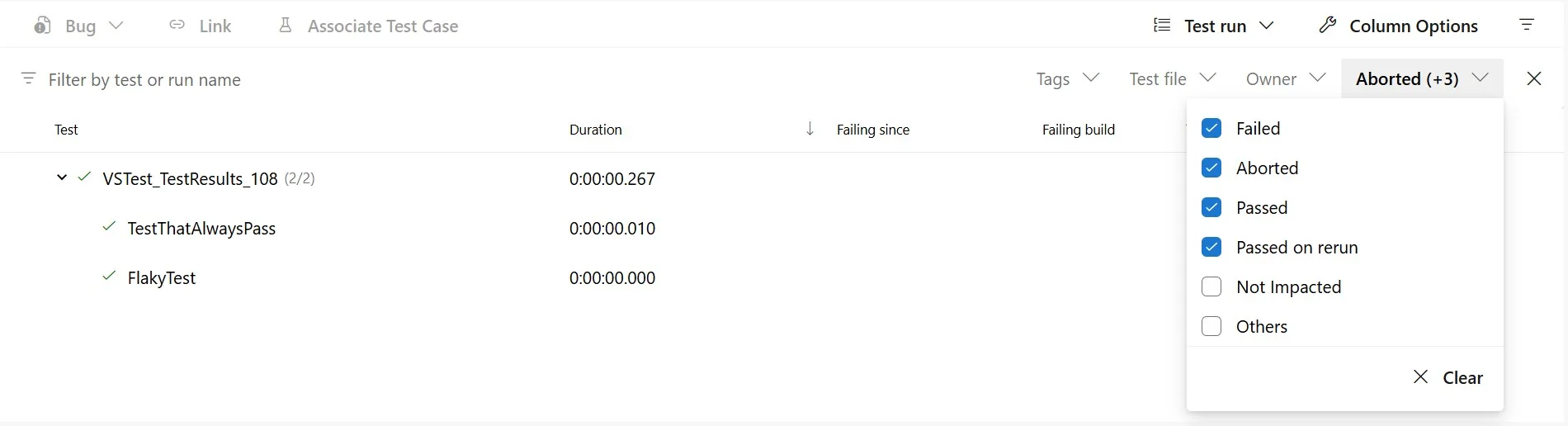
Scenario 1: All tests pass on first attempt
When all tests pass immediately, you see standard success indicators. The PublishTestResults task completes successfully.
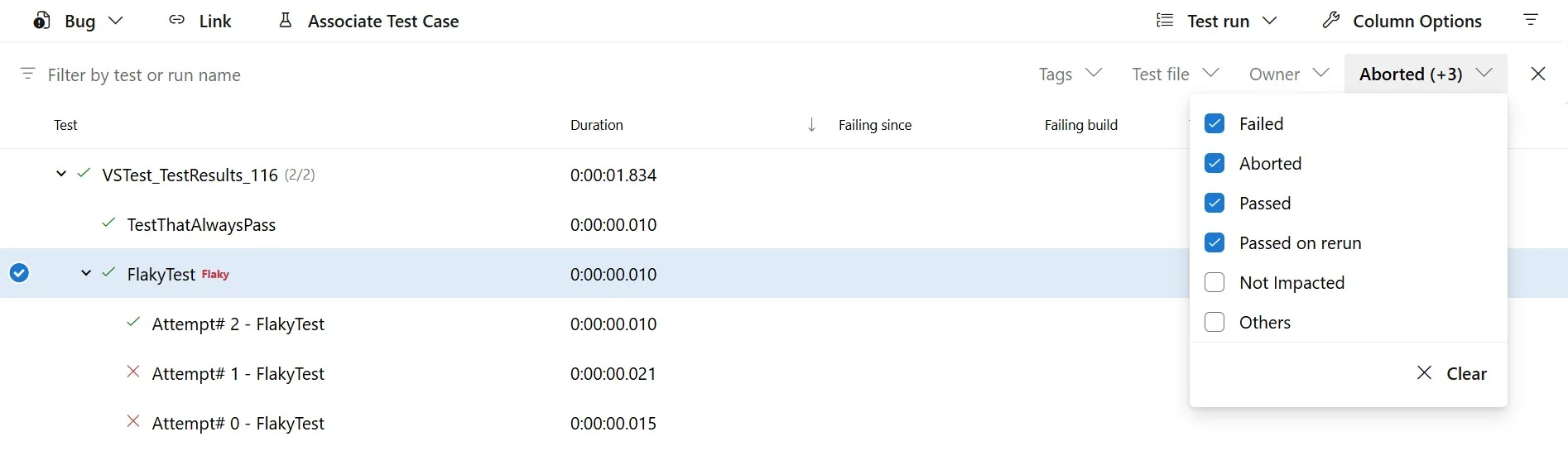
Scenario 2: Test passes after retry
This is where the new behavior shines. The UI shows the test failed on attempts 1 and 2 but succeeded on attempt 3. Even though there were initial failures, the PublishTestResults task passes because the test eventually succeeded. This is the correct behavior for handling flaky tests.
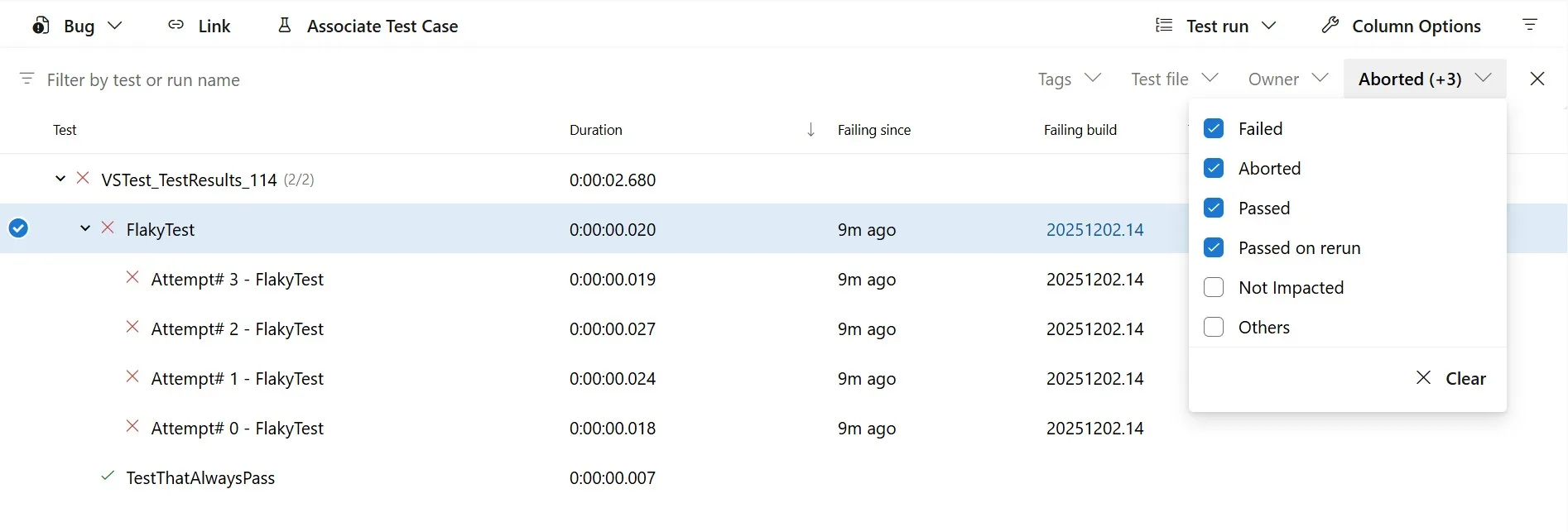
Scenario 3: Test fails all retry attempts
When a test fails across all attempts, the UI groups all failures together for easy review. You can examine each individual failure to identify patterns or differences. The PublishTestResults task fails as expected when failTaskOnFailedTests is true.
Why This Matters
The distinction between VSTest and Microsoft.Testing.Platform is important here: VSTest never had built-in retry support, so this scenario couldn’t occur naturally. With Microsoft.Testing.Platform’s Retry extension, you get automatic retry handling with proper Azure DevOps integration; no custom scripting required.
Get Started Today
Azure DevOps now has full support for Microsoft.Testing.Platform—from running tests to publishing retry results with intelligent handling.
Ready to migrate?
- Update to .NET SDK 10
- Add the Retry extension to your test project
- Set
AllowPtrToDetectTestRunRetryFiles: truein your pipeline - Run your tests with
--retry-failed-testsflag
Need help? We’re here for you:
- Ask questions: GitHub Discussions
- Report issues: GitHub Issues
- Learn more: Microsoft.Testing.Platform documentation
The post Microsoft.Testing.Platform Now Fully Supported in Azure DevOps appeared first on .NET Blog.