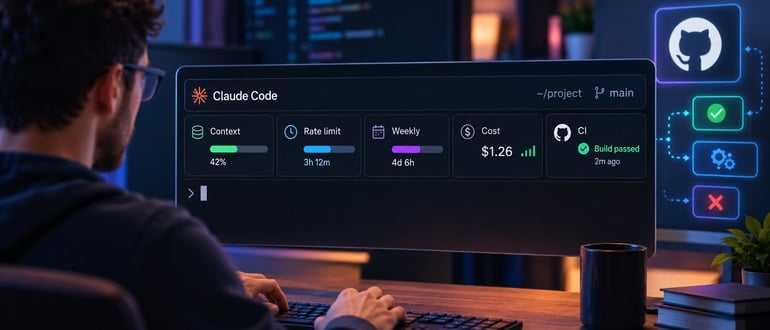

AI coding agents burn through resources in ways that are hard to see. A developer starts a long task in Claude Code, and the session quietly eats into a context window, a five-hour rate limit, a weekly cap, and a budget. Most of the time, nobody notices until something runs out.
An open-source project called Claude Statuspane takes a crack at that problem. Built by developer Anji Xu and published on GitHub under an MIT license, it adds a floating status card above the Claude Code prompt in the terminal. The card shows the active model and reasoning effort level, how much of the context window is in use, progress against five-hour and seven-day rate limits with reset countdowns, the current directory and git branch, and the session’s running cost.
It’s a small tool. But it points to a bigger issue for DevOps teams. As AI agents take on longer, more autonomous work, the people running them need the same kind of telemetry they already expect from build systems and production services.
Claude Code already supports a statusLine setting that runs a shell script and prints a single line of text. Statuspane goes further by using Claude Code’s new mod system, which lets plugins draw interface elements inside a terminal session. That system is still in early access, and the project’s README warns that the API may change between Claude Code releases.
Instead of plain text, the card uses gauges. A context bar might show 42%, or 222,000 of 1 million tokens. Bars shift to a warning color at 60% and an error color at 85%. A compact button sits next to the context gauge, so a developer can trigger /compact before a session hits its limit. The card follows Claude Code’s themes and collapses to a single button when it’s in the way. It requires Claude Code 2.1.287 or later and a terminal at least 70 columns wide. It doesn’t run in the Claude Code desktop app, which has its own status display.
The most useful feature for DevOps teams may be the GitHub CI integration. With the GitHub CLI signed in, the card can show the latest GitHub Actions run for the current branch. It checks every minute, and every 10 seconds while a run is active. A second option tracks runs triggered by a git push or gh pr merge and keeps them on screen for 10 minutes after they finish. The card shows whether a job is running, failed, or deployed, and how long ago.
That closes a loop that agents often leave open. An agent pushes a change, and the developer switches to a browser tab to see whether the pipeline passed. Putting build status beside the prompt keeps the human and the agent looking at the same result.
Statuspane also includes a simple progress API. Any script can write a small JSON file to a progress folder with a label, a percentage, a short text field, a time-to-live, and a state of running, ok, or error. The card watches the 20 most recently written files and refreshes every second. Rows disappear when their TTL expires, so stale jobs don’t pile up. Shell and Python helpers are included, and other mods can call the API directly.
The author also built in some sensible guardrails. The progress folder accepts only JSON files up to 64 KB, and it strips control characters, bidirectional marks, and zero-width characters from text fields. That matters. Anything that renders text inside an agent’s terminal is a possible path for injected content. Everything runs locally, and CI lookups use the developer’s own GitHub CLI credentials rather than a third-party service.
The project is brand new, has little adoption so far, and depends on an early-access API that a Claude Code update could break. Teams should treat it as an experiment.
But the idea behind it is sound. Usage-based limits and token costs are now part of daily developer work. A team that can’t see per-session costs can’t manage them. And as agents run longer jobs on their own, the human in the loop needs a quick way to see what’s happening without digging through logs.
Still, one developer’s view only goes so far. “Statuspane gives one developer a gauge, which is useful and stops short of governance,” said Mitch Ashley, vice president and practice lead for CIO & Technology Buyers and Software Lifecycle Engineering at The Futurum Group. “Agent deployment pace is set by what an organization can observe, control, and prove, and a personal status card shows a team none of those.”
Ashley said the real measure lies elsewhere. “The test is whether spend, limits, and pipeline outcomes per agent session can be collected centrally and audited. Watch whether agent platforms ship that telemetry natively.”
Expect more tools like this as coding agents become extensible platforms. Statuspane solves a real problem for the person at the keyboard. The bigger job for DevOps and platform teams is getting the same data into shared systems, where every agent session’s spend, limits, and pipeline results can be tracked and reviewed. Until agent platforms provide that, a personal status card is a useful start, not the finish line.