When a test fails in CI, “the build is red” is only the starting point. The useful questions are whether this
change caused the failure, whether the test has failed before, and where to find the evidence. If answering
them means searching a job log, downloading an artifact, and finding the teammate who remembers how that test
behaved last month, the report has not done enough.
MTP reporting shortens the path from a failed build to the decision a developer or reviewer needs to make.
Microsoft.Testing.Platform (MTP) powers
dotnet test, the Test Explorer
in Visual Studio and Visual Studio Code, and test runs in CI. Over the past year its reporting has been closing
that gap — putting failures where reviewers already work, and preserving the evidence when a run falls over.
This works on whichever test framework you already use: MTP is supported by
MSTest, NUnit, xUnit.net, TUnit and Expecto.
Most capabilities in this post require MTP 2.3.0 or later. The examples were validated with MSTest.Sdk 4.3.3
and MTP 2.3.3; the GitHub Actions, JUnit and CTRF reporters currently ship as preview packages.
Most of what follows is provider-independent, but two of the strongest features read your build history, and
that part is Azure DevOps only today:
| Capability | GitHub Actions | Azure DevOps |
|---|---|---|
| Inline failure annotations and job summary | Yes | Yes |
| Live result publishing while the run is going | Not yet | Yes |
| Flaky-vs-regression history, quarantine, slow-test history | Not yet | Yes |
| Crash-resilient reports, report formats, JSON discovery | Provider-independent | Provider-independent |
Start with inline reporting on either provider: it moves the next failure out of the raw log. If you use Azure
DevOps, add history-based triage next so reviewers can distinguish a new regression from a recurring failure.
Put the failure where the author is already looking
A report that lands in an artifact is a report someone has to go and fetch. Both providers can surface results
inline instead, and MTP now emits the annotation format each one understands natively.
Enable --report-gh
in a GitHub Actions job and a failing test becomes an annotation on the line of code that failed. Skipped tests
appear as warnings, each assembly is collapsed into its own log group, and the same run writes a summary straight
to the workflow page:
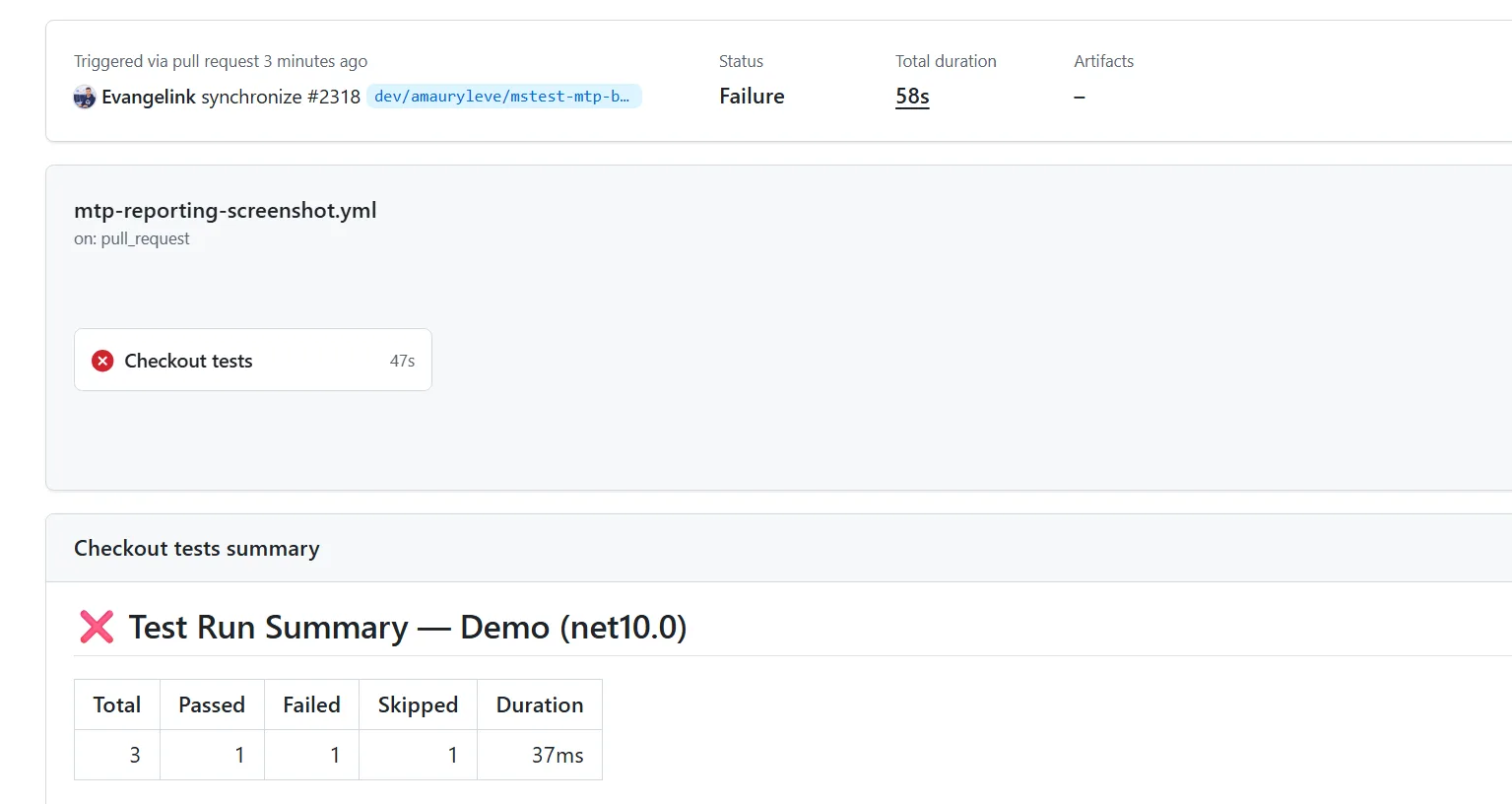
The failure is visible from the job page and the pull request without downloading a report artifact.
Annotations, log groups, the summary and slow-test notices can each be configured independently.
Azure DevOps has the same shape behind
--report-azdo,
and it offers something GitHub Actions doesn’t have yet. With --publish-azdo-test-results, results stream into
the Tests tab while the run is still going — instead of arriving from a separate publish step that only runs if
the job survives to reach it. The two are independent: --report-azdo handles annotations and logging,
--publish-azdo-test-results handles the Tests tab, and either works alone.
Azure DevOps: tell a genuine regression from a known flake
This is the central decision that build history unlocks: not only which test failed, but whether the current
change is likely to have caused it.
In a large suite, intermittently failing tests train reviewers to read red as background noise. Once “probably
just flaky” is the reasonable first guess, real regressions inherit the same shrug — and the cost isn’t the
flaky tests, it’s the response time on everything else.
Azure DevOps only
The build-history annotations, known-flaky demotion, quarantine and history-based slow-test detection in this section are Azure DevOps-only. The GitHub Actions reporter doesn’t offer them yet.
Azure DevOps already exposes this evidence in the Tests tab. In this testfx run, the current build reported no
failures across 86,406 tests, while the 14-day history still called out one unique failing test:
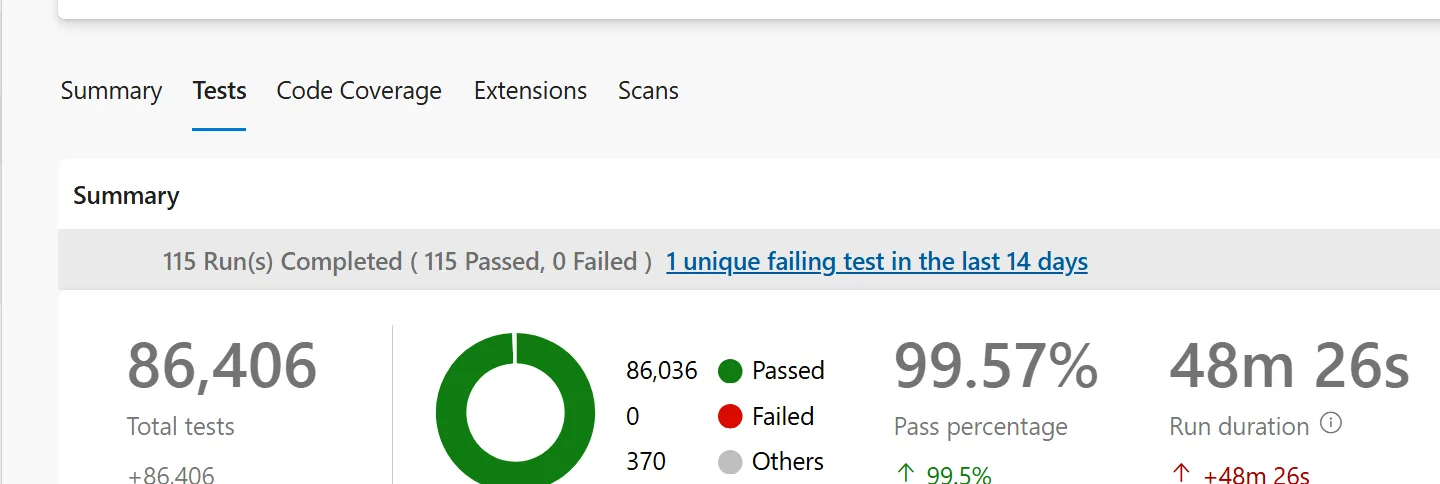
For the testfx team, that context narrows the first investigation step: a failure with no history gets immediate
regression attention, while a recurring failure starts with its existing flaky record.
Pass that same 14-day window to the reporter, and it queries the pipeline history and attaches the context to
each failure:
dotnet test --report-azdo --report-azdo-flaky-history 14A test that has been failing on and off for two weeks is labelled with its record:
[flaky: failed 3/20 in last 14d]A test with no such history gets the label that matters:
[REGRESSION]That turns “someone should look at this eventually” into “this pull request broke something,” and it reaches
the reviewer at the point of decision instead of depending on who remembers what. If you want CI to act on it
rather than merely say it, --report-azdo-demote-known-flaky turns known-flaky failures into warnings while
regressions stay errors.
In the testfx pipeline we use the history annotations but leave automatic demotion off, so every failure stays
blocking and history only guides triage. Other teams will reasonably choose to demote. The decision worth
making explicitly is whether history should inform a reviewer or change CI severity on its own.
The same history powers slow-test detection. Instead of one threshold that is wrong for every project,
--report-azdo-slow-test-history compares each test against its own past. The threshold is a configurable
multiple over a minimum number of runs, so a single cold start won’t trip it.
Keep the evidence when the run crashes
History helps determine whether a failure is new, but triage still stalls if the run loses the evidence needed
to investigate it. The run you most need a report from is the one that died. That used to be the run that
produced nothing, because results were serialized at the end.
TRX results are now streamed to disk as they are produced, so a hard crash no longer takes the whole report
with it. Pair --report-trx with the
crash-dump extension
and the run is supervised by a controller process that finalises the partial report when the host dies:
dotnet test --report-trx --crashdumpYou get a valid TRX containing every test that completed, plus a console list of the ones that didn’t:
The following tests were still running when the test host crashed:
[00:00:00] D_crash_the_host
That names the test that took the process down, without rerunning the suite to find it. The extension also
writes a *.crash.sequence.log recording every test start and end, so a test that started and never finished
is unambiguous even when several were running in parallel.
Attachments got the same treatment. Crash dumps, hang dumps and extension artifacts are no longer silently
dropped on .NET Framework when the path exceeds the Windows MAX_PATH limit, and an attachment that can’t be
copied is now surfaced on the console rather than only inside the TRX file. An incomplete run is now visibly
incomplete, instead of a green-looking report with the evidence quietly missing.
One run, reports for people and tools
Choose the output based on who consumes it. Use TRX for .NET tooling, HTML for direct inspection, and JUnit or
CTRF for dashboards and cross-stack automation. A single run can enable any combination, removing the
format-conversion step teams often wire into their pipelines.
| Format | Enable with | Package | Status |
|---|---|---|---|
| TRX | --report-trx |
Microsoft.Testing.Extensions.TrxReport |
Stable |
| HTML | --report-html |
Microsoft.Testing.Extensions.HtmlReport |
Stable |
| JUnit XML | --report-junit |
Microsoft.Testing.Extensions.JUnitReport |
Preview |
| CTRF JSON | --report-ctrf |
Microsoft.Testing.Extensions.CtrfReport |
Preview |
CTRF is worth knowing about if you aggregate results across languages: it’s a shared JSON
schema, so .NET reports into the same shape as the rest of a polyglot estate.
Only TRX and JUnit are formats a CI system parses into a results view. HTML and CTRF are for people and
dashboards, so they show up as downloadable artifacts instead — and on Azure DevOps,
--report-azdo-upload-artifacts files collects them automatically. Pick TRX or JUnit when something downstream
reads the results; add HTML or CTRF for whoever has to look at them.
Report names no longer collide either. Each reporter takes a --report-<format>-filename accepting
build-specific placeholders
such as {asm} and {tfm}, resolved under the results directory:
dotnet test --report-trx --report-trx-filename "reports/{asm}_{tfm}_{time}.trx"Left alone, TRX, HTML and JUnit now default to a deterministic <asm>_<tfm>_<arch> name. If you multi-target,
net8.0 and net8.0-windows write separate files instead of reporting over each other — a quiet data-loss bug
in matrix builds that is worth checking for in your current setup.
Stable output for automation
People need actionable context in the pull request; automation needs the same context in a stable, structured
format. Scripts, dashboards, IDE integrations and coding agents cannot reliably consume terminal prose.
--list-tests json emits a schema-versioned document describing every discovered test, down to its source
location:
{
  "schemaVersion": 1,
  "tests": [
    {
      "uid": "11a3aade-7a31-8389-89ce-eab6ff0db7f3",
      "displayName": "Total_includes_shipping",
      "location": { "file": "CheckoutTests.cs", "lineStart": 13, "lineEnd": 13 }
    }
  ]
}
That schema is a stable input for test selection, impact analysis or IDE integration, instead of scraping
console text that changes between releases.
MTP also adapts its own output for these consumers. In an agent or LLM environment it suppresses the banner,
ANSI escapes and progress animation, and defaults --show-stdout and --show-stderr to failed, so what
comes back is results rather than redrawn progress bars. You can set the same behaviour by hand — the platform
honors NO_COLOR, and exposes --ansi and --progress for the rest.
Try it today
- Confirm that one test project runs MTP 2.3 or later.
- Enable the reporter for your CI provider through
MSTest.Sdkor a direct package reference. - Add
dotnet test --report-ghin GitHub Actions ordotnet test --report-azdoin Azure DevOps. - Use the next failure to check whether the report reduced the time you spent searching logs.
Scale it across a repository
Once you have chosen a reporting policy, keep it in the repository rather than everyone’s shell history. Every
option in the
MTP CLI reference can
live in a checked-in
testconfig.json
beside your test project, under commandLineOptions:
{
  "commandLineOptions": {
    "report-trx": true,
    "report-html": true,
    "report-azdo": true,
    "report-azdo-flaky-history": 14
  }
}
Local and CI runs then produce the same reports by default, and a developer can still override any of it from
the command line. Misspelled settings fail at startup with a message naming the file, rather than being
silently ignored:
In testconfig.json under 'commandLineOptions': Unknown option '--report-trxx'For a repo-wide rollout:
-
Centralize once you’ve decided. With
MSTest.Sdkeach reporter is an MSBuild property, so one
Directory.Build.propsapplies your policy to every test project in the repo:<Project> <PropertyGroup> <EnableMicrosoftTestingExtensionsHtmlReport>true</EnableMicrosoftTestingExtensionsHtmlReport> <EnableMicrosoftTestingExtensionsAzureDevOpsReport>true</EnableMicrosoftTestingExtensionsAzureDevOpsReport> </PropertyGroup> </Project>The properties follow one pattern (
EnableMicrosoftTestingExtensions+ reporter name), and
<TestingExtensionsProfile>AllMicrosoft</TestingExtensionsProfile>switches on the stable set in one line —
TRX, HTML, Azure DevOps, GitHub Actions, crash dump, hang dump and retry. JUnit and CTRF stay opt-in. - On other frameworks, check the version. Outside
MSTest.Sdkyou reference the reporter package
directly, and it has to match the MTP version your framework targets. These reporters are built on MTP 2.x,
so adding one to a project on an older framework release fails at startup with aMissingMethodException.
MTP 2.x support arrives inMSTest.TestAdapter4.0.0,NUnit3TestAdapter6.0.1,TUnit1.7.16,
YoloDev.Expecto.TestSdk0.16.0, and thexunit.v34.0 prereleases. - Set the runner opt-in once, at the repo level. Whether
dotnet testruns your solution through MTP is a
single switch — put it inDirectory.Build.propsso a new project can’t drift out of it. Mixing MTP and
VSTest projects in one solution isn’t supported; on the .NET 10 SDK, running an MTP project through the old
VSTest path fails the build with a link to the opt-in, so any drift surfaces immediately. The
migration guide
covers that switch. - The Azure DevOps history options need a token.
--report-azdo-flaky-historyand
--report-azdo-slow-test-historycall the Azure DevOps REST API, so pass
SYSTEM_ACCESSTOKEN: $(System.AccessToken)to the step. Without it the run continues and simply skips the
history annotations.
Replacing your existing publish tasks
If you own an existing Azure DevOps pipeline, this section shows which publishing tasks you can replace.
Live publishing sends the results it already holds in memory straight to the REST API — it doesn’t read a TRX,
so there’s no report file to produce or glob for. Together with --report-azdo-upload-artifacts files, which
publishes the test results directory as a build artifact, that replaces the tasks most pipelines carry today:
| Classic task | Replaced by |
|---|---|
PublishTestResults@2 |
--publish-azdo-test-results |
PublishBuildArtifacts@1 / PublishPipelineArtifact@1 |
--report-azdo-upload-artifacts files |
PublishCodeCoverageResults@2 |
Not replaced — keep it for the pipeline’s Code Coverage tab |
Coverage is the one to watch. Live publishing does attach .coverage, .cobertura.xml and .opencover.xml
to the test run, and failing tests carry their own attachments — dumps, plus captured stdout and stderr. But
nothing here populates the pipeline’s Code Coverage tab, so keep the step that does that today.
Avoid duplicate test runs
Live publishing and a PublishTestResults@2 task are independent publishers, not two views of one run. If you enable both, Azure DevOps creates two test runs for the build, so pick one.
Where reporting goes next
Line these changes up and a direction appears. Two years ago MTP was a lighter way to execute tests. Today it
puts failures directly into GitHub Actions and Azure DevOps, and publishes results live in Azure DevOps as the
run happens. It interprets a failure against your own build history, preserves evidence when the host crashes,
and exposes a stable schema to tools that hadn’t been written when the platform shipped. The next round — live
publishing for GitHub Actions, richer artifact handling, and stable releases for the preview reporters —
continues the same shift: from producing a result file to helping a team decide what to do next.
Reporting is a practical place to evaluate MTP, because developers, reviewers and build owners all see the
difference on day one. Pick the smallest version of it: turn on --report-gh or --report-azdo in one test
project and watch where your next failure shows up.
Then tell us what still sends you back to the logs. Several of the options in this post exist because somebody
opened an issue on the testfx repository describing a bad afternoon.
The post Test reporting in Microsoft.Testing.Platform: from red build to root cause appeared first on .NET Blog.