Many MCP projects begin with an existing API and a simple request: expose one backend capability to an LLM client. The quickest route is to wrap an endpoint as a tool and connect it to Claude or another MCP host. Users can then ask for data in natural language instead of navigating a fixed interface. This creates a production boundary because the model, rather than application code, chooses which operation to call.
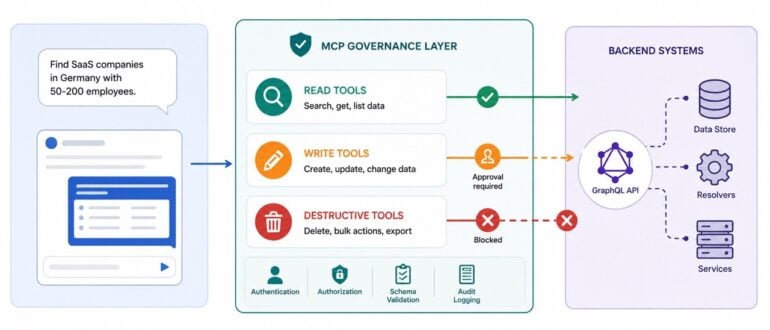
At Fullinfo, more than 1 million company profiles are served through a GraphQL backend on AWS AppSync. Users previously searched a portal and worked with the results using deterministic flows. With MCP, a user can ask, “Find SaaS companies in Germany with 50-200 employees,” and receive structured records in the conversation. The wrapper was straightforward in TypeScript and Go, but defining the model’s authority required more work.
What Changes With MCP Governance?
Existing API controls still apply, but they no longer cover the full decision path. A change to a tool name, description, or schema can affect which operation the model invokes. A generic GraphQL tool may expose too much capability, while a read-only tool may still perform a mutation. Prompt logs may also fail to show which tool was selected or which resources were accessed.
Official MCP guidance covers confused deputy attacks, token passthrough, SSRF, and session hijacking. Backend teams must also manage risks created by their own tool definitions. Retrieved content can influence tool selection, while broad parameters can allow requests the product interface never supported. Governance, therefore, begins with the exposed capability and the permissions that underlie it.
Separate Tools by Permission Level
At Fullinfo, operations were divided by permission level before tools were registered. Read operations followed a standard path, while writes required approval and a feature flag. Destructive or bulk actions were excluded until rollback procedures were in place. This forced the team to justify each tool’s authority before deployment.
A read tool such as search_companies can be enabled when the user already has access to the same data. It still needs user-scoped authorisation, a result cap, schema tests, and audit logs. A controlled write such as create_collection should remain disabled until an approval flow enables it. A destructive operation such as delete_collection should remain outside MCP until the team can explain how it will be confirmed and reversed.
Use Schemas to Enforce Policy
Tool shape determines what the model can request. Generic tools such as run_graphql or query_database reduce implementation work, but they move query construction into a probabilistic system. A purpose-built tool requires more code, yet its limits are visible and enforceable before the request reaches the backend. This is important when the dataset contains more than 1 million records.
The schema limits query length to 200 characters, requires ISO-2 country codes, and permits only supported employee ranges. It sets a default of 10 results and a hard maximum of 50. Calling .strict() rejects unexpected fields rather than ignoring them. These constraints reduce unsupported requests and limit the effect of an incorrect call.
The description should state the same boundaries in plain language. “Read-only company search. Returns at most 50 summaries. Cannot create, update, export, or delete data” gives the model a clearer basis for selection. The server must still validate every request and enforce the user’s permissions. Tool names and stated limits should always match backend authorisation.
Log Tool Calls as Backend Operations
Early MCP services often record prompts without enough information about tool execution. At Fullinfo, a prompt log could not show whether the model chose the wrong tool or received unexpected backend data. Each invocation should record the user, tenant, tool name, schema version, sanitised parameters, backend operation, authorisation result, latency, and final status. Result counts may be stored when safe, while blocked mutations should be logged as security events.
Test Outside the Chat Client
The chat interface is useful for assessing the user experience, but it is a weak harness for backend guarantees, as model behaviour varies across runs. Schema tests should cover bounds and defaults, while mocked-backend tests should verify the exact variables sent downstream. Authorisation tests should prove that unavailable operations remain blocked, and integration tests should run against a non-production backend. MCP Inspector can call tools directly without relying on a conversational model.
This separation found a real issue in the Fullinfo implementation. One mutation passed mocked unit tests but failed against the production-like backend because an AppSync resolver produced a null pointer error. The tool was removed from registration until the integration path had been validated. Unit tests showed that the wrapper behaved as written, but they could not prove that the real backend accepted the operation.
What Backend Teams Should Do
Once a model can select a backend operation, the MCP layer becomes part of the access-control design. Production deployments should begin with typed, read-only tools whose permissions match the user’s existing access. Write access can be added after the actual integration path has been tested and an approval process is in place. Destructive operations should remain unavailable until rollback and incident procedures have been demonstrated.