Did you know that, at GitHub, we host all of our own source code on github.com? We do this because we’re our own biggest customer—testing out changes internally before they go to users. However, there’s one downside: If github.com were ever to go down, we wouldn’t be able to access our own source code.
This is what you’d call a very simple circular dependency: to deploy GitHub, we needed GitHub. If GitHub is down, then we wouldn’t be able to deploy something to fix it. We mitigate this by maintaining a mirror of our code for fixing forward and built assets for rolling back.
So we’re done, right? Problem solved? Nope, there are more circular dependencies to consider. For example, how do you stop a deployment script introducing a circular dependency of its own on an internal service or downloading a binary from GitHub?
When we started to design our new host-based deployment system, we evaluated some new approaches to prevent deployment code from creating circular dependencies. We found that using eBPF, we could selectively monitor and block those calls. In this blog post, we’ll take you through our findings and show how you can get started writing your own eBPF programs.
Types of circular dependencies
Let’s start by looking at the types of circular dependencies through a hypothetical scenario.
Suppose a MySQL outage occurs, which causes GitHub to be unable to serve release data from repositories. To resolve the incident, we need to roll out a configuration change to the stateful MySQL nodes that are impacted. This configuration change is applied by executing a deploy script on each node.
Now, let’s look at the different types of circular dependencies that could impact GitHub during this scenario.
- Direct dependency: The MySQL deploy script attempts to pull the latest release of an open source tool from GitHub. Since GitHub can’t serve the release data (due to the outage), the script can’t complete.

- Hidden dependencies: The MySQL deploy script uses a servicing tool that is already present on the machine’s disk. However, when the tool runs, it checks GitHub to see if an update is available. If it’s unable to contact GitHub (due to the outage), the script may fail or hang, depending on how the tool handles the error when checking for updates.
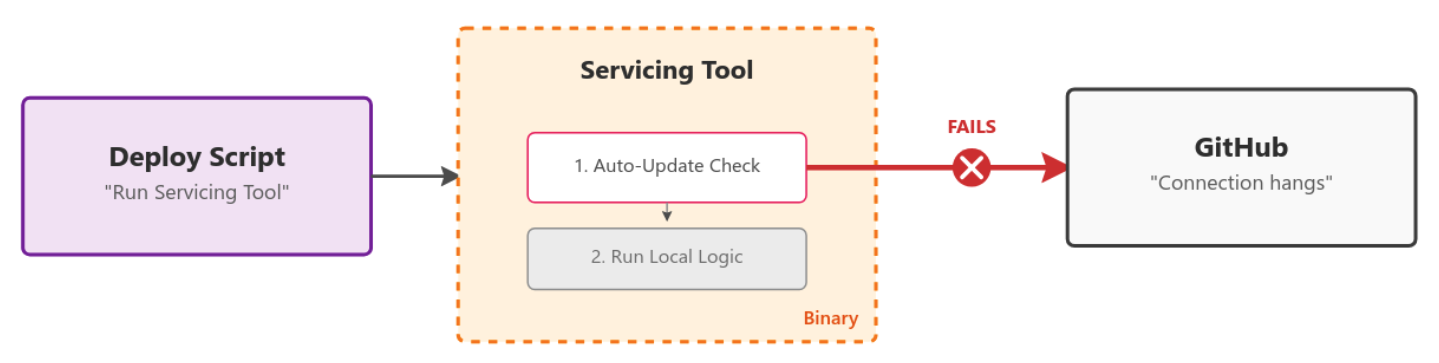
- Transient dependencies: The MySQL deploy script calls, via an API, another internal service (for example, a migrations service), which in turn attempts to fetch the latest release of an open source tool from GitHub to use the new binary. The failure propagates back to the deploy script.

How do you solve these circular dependencies?
Until recently, the onus has been on every team who that owns stateful hosts to review their deployment scripts and identify circular dependencies.
In practice, however, many dependencies aren’t identified until an incident occurs, which can delay recovery.
The obvious route would be to block access to github.com from the machines to validate that the system can deploy without it. But these hosts are stateful and serve customer traffic even during rolling deploys, drains, or restarts. Blocking github.com entirely would impact their ability to handle production requests.
This is where we started to look at eBPF, which lets you load custom programs into the Linux kernel and hook into core system primitives like networking.
We were particularly interested in the BPF_PROG_TYPE_CGROUP_SKB program type because it lets you hook network egress from a particular cGroup.
A cGroup is a Linux primitive (used heavily by Docker but not limited to it) that enforces resource limits and isolation for sets of processes. You can create a cGroup, configure it, and move processes into it—no Docker required.
This started to look very promising. Could we create a cGroup, place only the deployment script inside it, and then limit the outbound network access of only that script? It certainly looked possible, so we started to build a proof of concept.
Building out per-process conditional network filtering with eBPF
We started on a proof of concept in go that used the cilium/ebpf library.
ebpf-go is a pure-Go library to read, modify, and load eBPF programs and attach them to various hooks in the Linux kernel.
It massively simplifies the process of authoring, building, and running programs that use eBPF. For example, to hook the BPF_PROG_TYPE_CGROUP_SKB program type, we can do this as follows: 👇
//go:generate go tool bpf2go -tags linux bpf cgroup_skb.c -- -I../headers


func main() {

   // Load pre-compiled programs and maps into the kernel.

   objs := bpfObjects{}

   if err := loadBpfObjects(&objs, nil); err != nil {

       log.Fatalf("loading objects: %v", err)

   }

   defer objs.Close()


   // Link the count_egress_packets program to the cgroup.

   l, err := link.AttachCgroup(link.CgroupOptions{

       Path:    "/sys/fs/cgroup/system.slice",

       Attach:  ebpf.AttachCGroupInetEgress,

       Program: objs.CountEgressPackets,

   })

   if err != nil {

       log.Fatal(err)

   }

   defer l.Close()


   log.Println("Counting packets...")


   // Read loop reporting the total amount of times the kernel

   // function was entered, once per second.

   ticker := time.NewTicker(1 * time.Second)

   defer ticker.Stop()


   for range ticker.C {

       var value uint64

       if err := objs.PktCount.Lookup(uint32(0), &value); err != nil {

           log.Fatalf("reading map: %v", err)

       }

       log.Printf("number of packets: %dn", value)

   }

}
With the eBPF program:
//go:build ignore


#include "common.h"


char __license[] SEC("license") = "Dual MIT/GPL";


struct {

   __uint(type, BPF_MAP_TYPE_ARRAY);

   __type(key, u32);

   __type(value, u64);

   __uint(max_entries, 1);

} pkt_count SEC(".maps");


SEC("cgroup_skb/egress")

int count_egress_packets(struct __sk_buff *skb) {

   u32 key      = 0;

   u64 init_val = 1;


   u64 *count = bpf_map_lookup_elem(&pkt_count, &key);

   if (!count) {

       bpf_map_update_elem(&pkt_count, &key, &init_val, BPF_ANY);

       return 1;

   }

   __sync_fetch_and_add(count, 1);


   return 1;

}
The //go:generate line handles compiling the eBPF C code and auto-generating the bpfObjects struct, which allows us to attach and interact with the program. This means a simple go build is all you need. 🥳
(cilium/ebpf has a great set of examples to get started. Review the full code from above).
There was still a missing piece though: CGROUP_SKB operates on IP addresses. Given the breadth of GitHub’s systems and rate of change, keeping an up-to-date block IP list would be very hard.
Could we use more eBPF to create a DNS-based blocked list? Yes, it turns out we could.
An eBPF program type of BPF_PROG_TYPE_CGROUP_SOCK_ADDR allows you to hook syscalls to create sockets and change the destination IP.
Here is a simplified example where we rewrite any connect4 syscall targeting DNS (Port 53) to localhost:53.
cgroupLink, err := link.AttachCgroup(link.CgroupOptions{

       Path:    cgroup.Name(),

       Attach:  ebpf.AttachCGroupInet4Connect,

       Program: obj.Connect4,

   })

   if err != nil {

       return nil, fmt.Errorf("attaching eBPF program Connect4 to cgroup: %w", err)

   }
/* This is the hexadecimal representation of 127.0.0.1 address */
const __u32 ADDRESS_LOCALHOST_NETBYTEORDER = bpf_htonl(0x7f000001);
SEC("cgroup/connect4")
int connect4(struct bpf_sock_addr *ctx) {
__be32 original_ip = ctx->user_ip4;
__u16 original_port = bpf_ntohs(ctx->user_port);
if (ctx->user_port == bpf_htons(53)) {
/* For DNS Query (*:53) rewire service to backend
* 127.0.0.1:const_dns_proxy_port */
ctx->user_ip4 = const_mitm_proxy_address;
ctx->user_port = bpf_htons(const_dns_proxy_port);
}
return 1;
} We used this to intercept DNS queries from the cGroup and forward them to a userspace DNS proxy we run.
Now, any DNS queries initiated by the deployment script are routed through our DNS proxy. Our proxy evaluates each requested domain against our block list and uses eBPF Maps to communicate with the CGROUP_SKB program, allowing or denying the request accordingly.
If you’d like to dig into the code, here’s an early proof of concept we put together. Our current implementation has progressed since then, but this should serve as a good intro.
Like any fun project, the deeper we got, the more we realized we could do.
For example, could we correlate blocked DNS requests back to the specific command or process that triggered them, so teams could more easily debug and fix issues? Yes, we can!
Inside the BPF_PROG_TYPE_CGROUP_SKB program type, we have the skb_buff from which we can pull the DNS transaction ID and also capture the Process ID (PID) that initiated the request. We place this information into another eBPF Map tracking DNS Transaction ID -> Process ID.
Here is a simplified version of the eBPF code (see this PoC code for full example):
  __u32 pid = bpf_get_current_pid_tgid() >> 32;

     __u16 skb_read_offset = sizeof(struct iphdr) + sizeof(struct udphdr);

     __u16 dns_transaction_id =

         get_transaction_id_from_dns_header(skb, skb_read_offset);


     if (pid && dns_transaction_id != 0) {

       bpf_map_update_elem(&dns_transaction_id_to_pid, &dns_transaction_id,

                           pid, BPF_ANY);

     }
As we’re redirecting all DNS calls to our userspace DNS proxy, we can look at the transaction ID of each request, find the domain being resolved, and lookup in the eBPF Map to see which process made the request. By reading /proc/{PID}/cmdline, we can even extract the full command line that triggered the request.
Then we can output a log line with all the information:
> WARN DNS BLOCKED reason=FromDNSRequest blocked=true blockedAt=dns domain=github.com. pid=266767 cmd="curl github.com " firewallMethod=blocklistWith that, we’re done.
We can now:
- Conditionally block domains that would cause circular dependencies from deployment scripts.
- Inform the owning team which command triggered the blocked request.
- Provide an audit list of all domains contacted during a deployment.
- Use the cGroups to enforce CPU and memory limits on deploy scripts, preventing runaway resource usage from impacting workloads.
What’s next?
Our new circular dependency detection process is live after a six-month rollout.
Now, if a team accidentally adds a problematic dependency, or if an existing binary tool we use takes a new dependency, the tooling will detect that problem and flag it to the team.
The net result is a more stable GitHub and faster mean time to recovery during incidents (due to the removal of these circular dependencies).
Are there ways for circular dependencies to still trip things up? You bet—and we’ll look to improve the tool as we discover them.
Want to dive in?
Has this piqued your interest in what you might be able to do with eBPF?
Get started by having a look through the examples in cilium/ebpf and the great documentation on the docs.ebpf.io site.
If you’re not quite ready to start writing your own eBPF tools, try open source tools powered by eBPF, like bpftrace for deep tracing or ptcpdump to get TCP dumps with container-level metadata.
The post How GitHub uses eBPF to improve deployment safety appeared first on The GitHub Blog.