We’re shipping two major capabilities that change how security teams enable and act on application security in Azure DevOps: CodeQL default setup makes it possible to enable code scanning across your organization without configuring a single pipeline, and a new combined alerts experience in Security Overview gives security administrators a single place to search, filter, and coordinate remediation across every repository.
In tandem with dependency scanning default setup and automatic secret scanning, scanning is now the default, and delegating work is built-in to the product with security campaigns powered by the combined alerts experience.
CodeQL default setup (public preview)
Until now, enabling CodeQL code scanning on Azure DevOps required manually configuring a pipeline for each repository, installing the CodeQL task, setting up the build steps, and maintaining the pipeline over time. For organizations with hundreds of repositories, this could be a significant barrier to adoption.
CodeQL default setup eliminates that friction. With one click, you can enable code scanning for a repository, or across your entire project or organization. Advanced Security automatically runs CodeQL scans using Azure Pipelines by default on your behalf, with no additional configuration required.
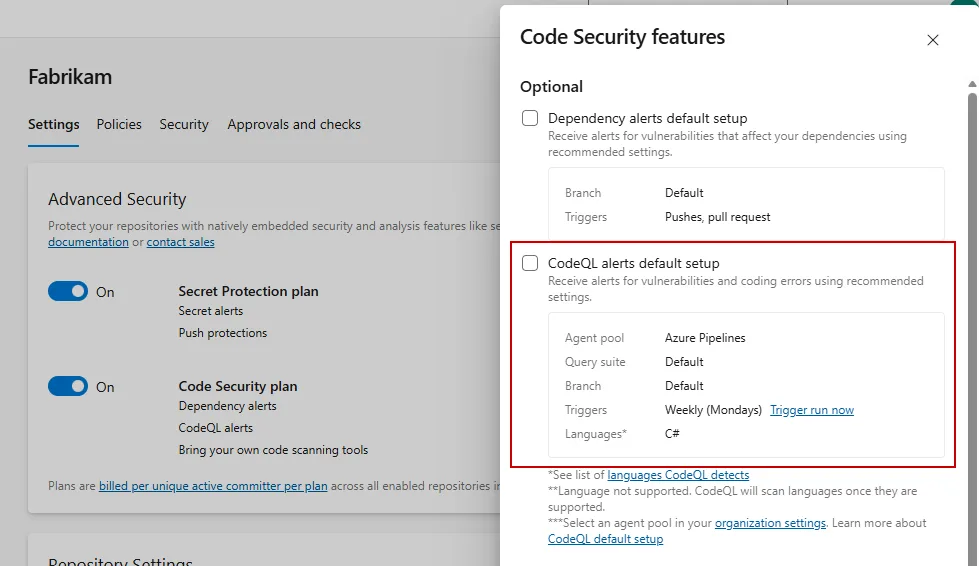
Key capabilities
- One-click enablement at the repository, project, or organization level
- Automatic scanning — no YAML editing, no task installation
- Runs on Azure Pipelines for a seamless out-of-the-box experience
- Configurable agent pool via organization-level repository settings, so you control where scans run
Getting started
- Navigate to your repository, project, or organization settings
- Enable the Code Security plan for your repository
- Enable CodeQL default setup
- Scans run on specified schedule, which can be changed at the organization level
For more information on default setup, see https://aka.ms/ghazdo/codeql-default-setup.
Combined alerts view and security campaigns
Security administrators have told us consistently: “I need to see what’s happening across my entire organization, not repo by repo.” The new combined alerts experience in Security Overview delivers exactly that.
See everything in one place
The Security Overview alerts tab surfaces individual alerts from the default branch of all repositories in your organization in a single, unified view. Instead of clicking into each repository to understand your security posture, you can now search, sort, and filter across your entire estate from one screen.
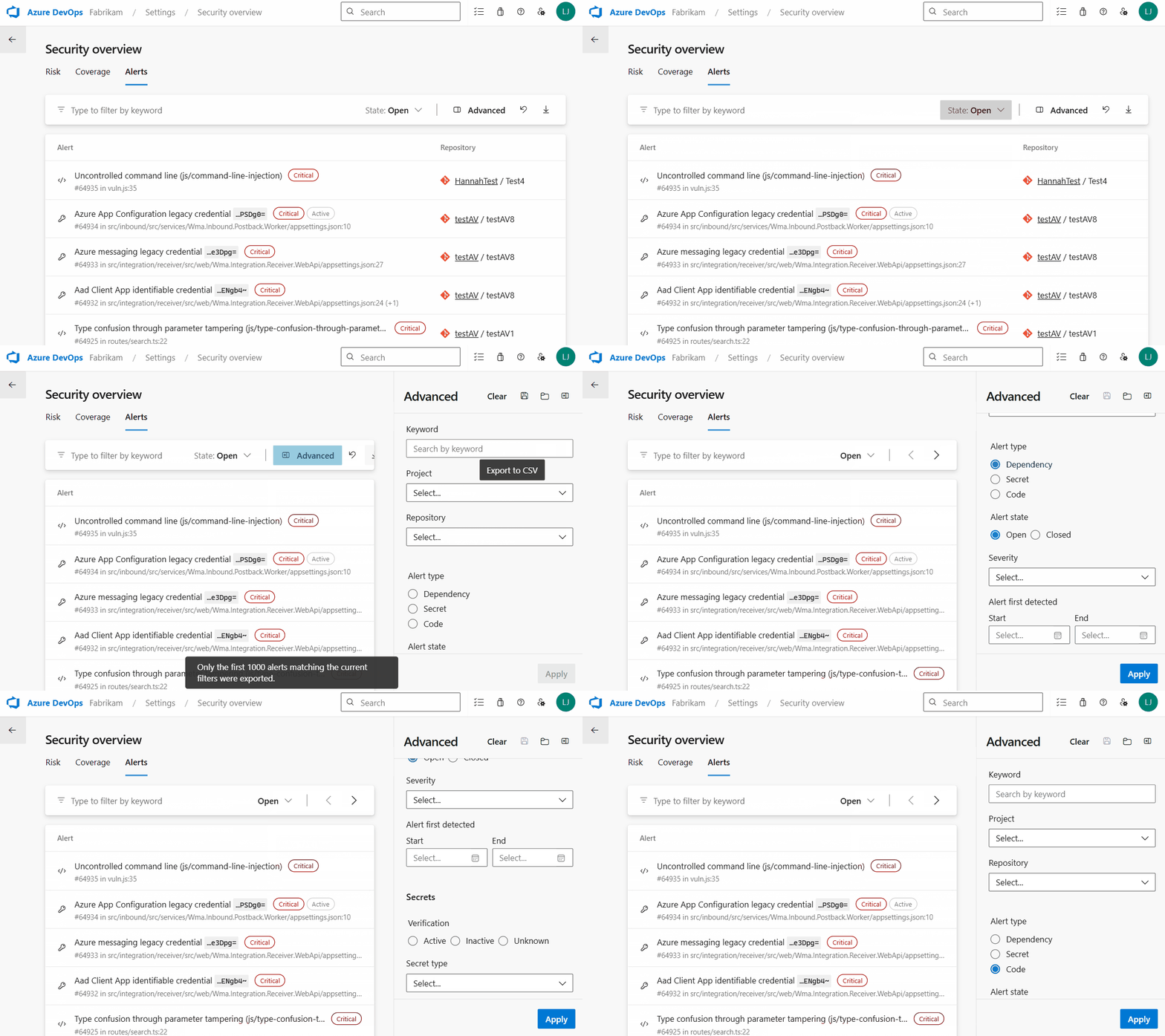
Security campaigns: coordinate remediation at scale
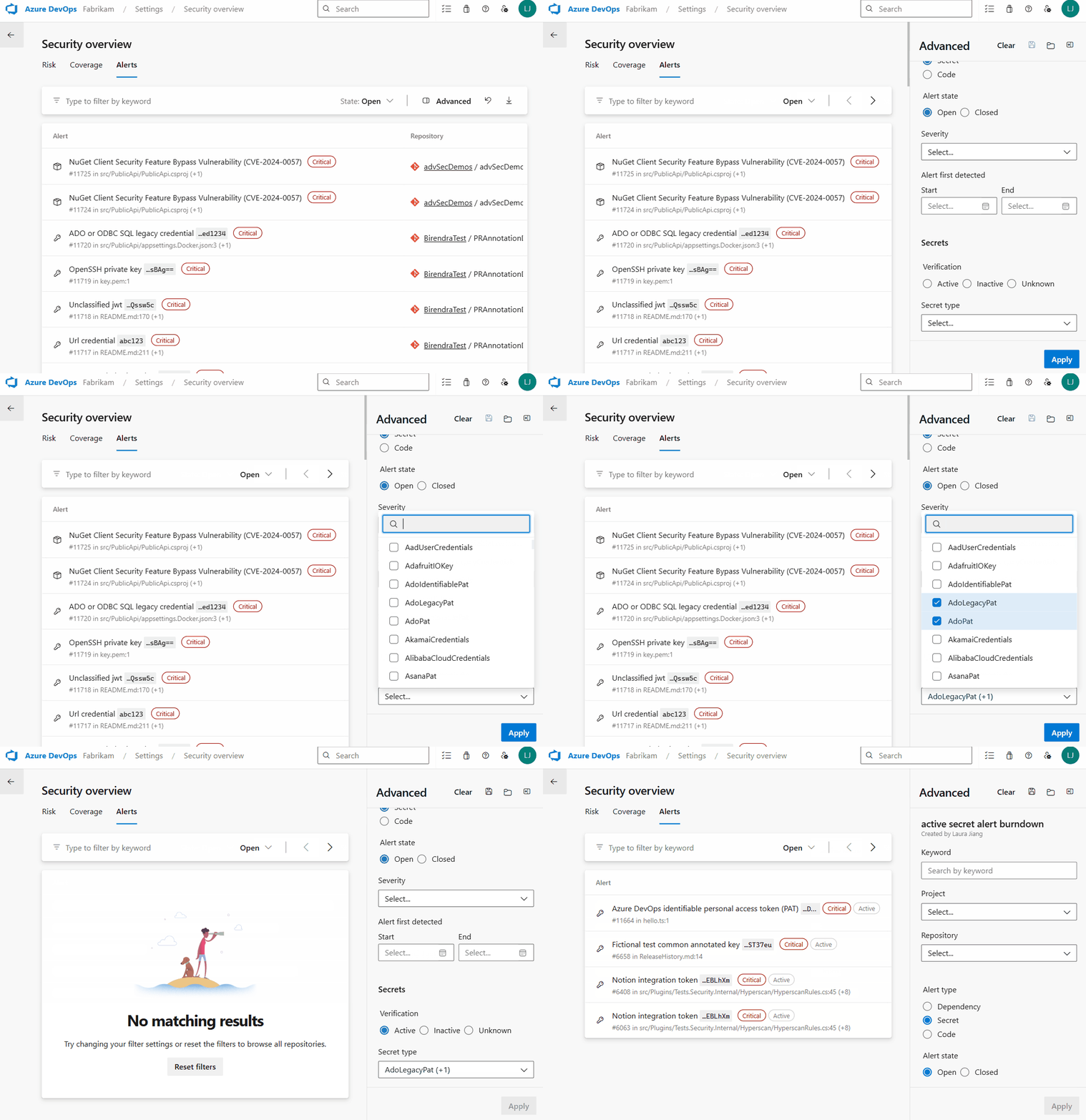
Security campaigns let you create filtered views of alerts and share them with your team. Focus on a specific vulnerability type, severity level, or set of repositories, then share the campaign as a coordination tool for remediation. Filters are live, so if any new vulnerabilities appear that match your criteria, you’ll see them appear in your campaigns.
Use campaigns to:
- Track remediation of a specific CVE across all affected repositories
- Create a “critical secrets” campaign for your security team’s weekly triage
- Share a filtered view with a development team so they see only what’s relevant to them
What’s next
We’re continuing to invest in making Advanced Security the most seamless way to secure your Azure DevOps workflows. Both CodeQL default setup and the combined alerts dashboard will roll out to organizations over the next two to three weeks.
If you’re interested in trying CodeQL default setup, enable it from your repository or organization settings and start scanning.
For the combined alerts dashboard, navigate to your Organization Settings > Security overview to view.
Have feedback? We’d love to hear from you. Reach out via the Azure DevOps Developer Community or contact your Microsoft account team.
The post One-click security scanning and org-wide alert triage come to Advanced Security appeared first on Azure DevOps Blog.